
Join us at FabCon Atlanta from March 16 - 20, 2026, for the ultimate Fabric, Power BI, AI and SQL community-led event. Save $200 with code FABCOMM.
Register now!The Power BI Data Visualization World Championships is back! Get ahead of the game and start preparing now! Learn more
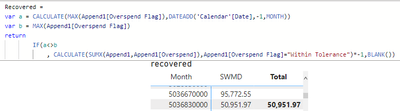
I've got a simple formula but it's not giving the correct result in the row level.
If the Overspend Flag is not the same from last month then Overspend value will be taken otherwise, none.
It generally works but for some reason there are rows that takes the value per row that doesn't meet the parameter.
The first line doesn't meet the parameter but the formula picks it up yet excluded in the Total.
Could someone please have a look and advise?
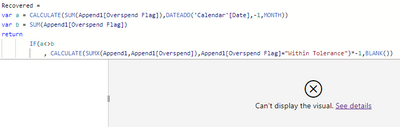
Hello @digitalPlay , Can you please try using SUM instead of MAX if you have months in the row context. Let me know if it works.
If this post helps, then please consider accepting it as the solution to help other members find it more quickly. Thank You!!
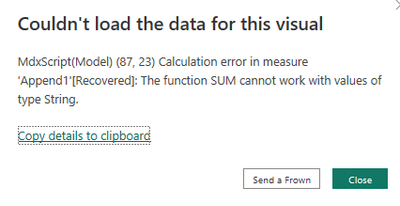
Hello @digitalPlay , please change the column data type for Overspend Flag. Values in it are in text select that column and in column tools select data type as whole number or decimal number depends on the data. Then this formula will work.
If this post helps, then please consider accepting it as the solution to help other members find it more quickly. Thank You!!
thanks for that! however, if I put their groupings in the columns, it will show the overall total (which is correct) but the value and count will not be shown per group. If the ID has the same group month on month, it will show the values, however if it changes the next month, no value is picked up per group on that month but the total will still be correct. I guess groupby will help but my attempt to add it in the formula has failed.
The Power BI Data Visualization World Championships is back! Get ahead of the game and start preparing now!
| User | Count |
|---|---|
| 150 | |
| 126 | |
| 109 | |
| 79 | |
| 54 |