FabCon is coming to Atlanta
Join us at FabCon Atlanta from March 16 - 20, 2026, for the ultimate Fabric, Power BI, AI and SQL community-led event. Save $200 with code FABCOMM.
Register now!- Power BI forums
- Get Help with Power BI
- Desktop
- Service
- Report Server
- Power Query
- Mobile Apps
- Developer
- DAX Commands and Tips
- Custom Visuals Development Discussion
- Health and Life Sciences
- Power BI Spanish forums
- Translated Spanish Desktop
- Training and Consulting
- Instructor Led Training
- Dashboard in a Day for Women, by Women
- Galleries
- Data Stories Gallery
- Themes Gallery
- Contests Gallery
- QuickViz Gallery
- Quick Measures Gallery
- Visual Calculations Gallery
- Notebook Gallery
- Translytical Task Flow Gallery
- TMDL Gallery
- R Script Showcase
- Webinars and Video Gallery
- Ideas
- Custom Visuals Ideas (read-only)
- Issues
- Issues
- Events
- Upcoming Events
The Power BI Data Visualization World Championships is back! Get ahead of the game and start preparing now! Learn more
- Power BI forums
- Forums
- Get Help with Power BI
- Desktop
- Re: SUMIF and VLOOKUP within BI
- Subscribe to RSS Feed
- Mark Topic as New
- Mark Topic as Read
- Float this Topic for Current User
- Bookmark
- Subscribe
- Printer Friendly Page

- Mark as New
- Bookmark
- Subscribe
- Mute
- Subscribe to RSS Feed
- Permalink
- Report Inappropriate Content
SUMIF and VLOOKUP within BI
Hi,
I'm new to power Bi and trying to manipulate some data from my SQL database.
This is a screenshot of the data tables im trying to work on:
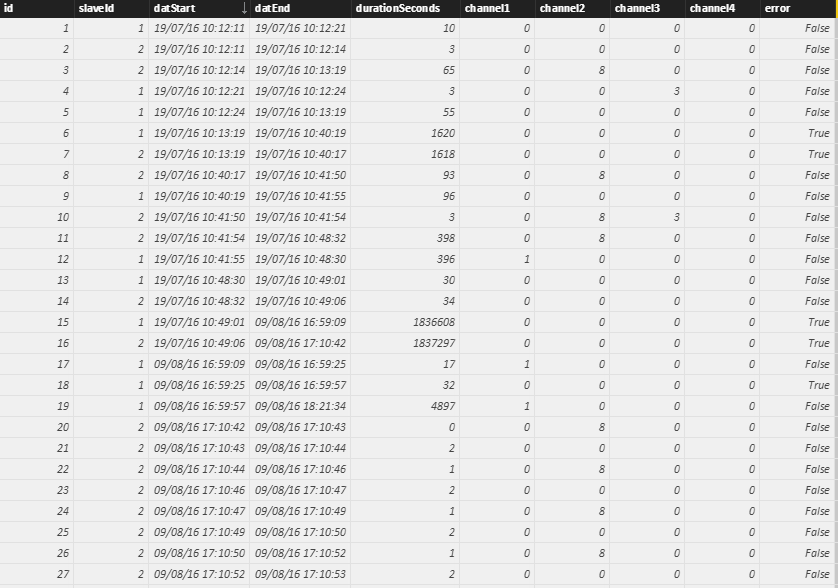
What i am looking to do is do a SUM of Column 5 (DurationinSeconds) IF Column 5 (channel) = "1" IF Column 10 (error) = "False" IF Column 2 (slaveId) = "1" and if the (datEnd) = Today
I can then manipulate this to give information on the other Channels.
I'm not sure the best way to approcah this, do i need to create columns or is it a measure function?
Hoping someone can help me,
Thanks


- Mark as New
- Bookmark
- Subscribe
- Mute
- Subscribe to RSS Feed
- Permalink
- Report Inappropriate Content
You can try this as well.
Measure =
CALCULATE (
    SUM ( YourTable[DurationSeconds] ),
    FILTER (
        YourTable,
        YourTable[slaveId] = 1
            && INT(YourTable[dateEnd]) = INT(TODAY ())
            && YourTable[channel1] = 1
            && YourTable[error] = FALSE ()
    )
)
- Mark as New
- Bookmark
- Subscribe
- Mute
- Subscribe to RSS Feed
- Permalink
- Report Inappropriate Content
This is spot on, give the figure i need, Thanks.
Can I create another measure to perfom a calculation on this mease?
- Mark as New
- Bookmark
- Subscribe
- Mute
- Subscribe to RSS Feed
- Permalink
- Report Inappropriate Content
@chrisread9907 wrote:
This is spot on, give the figure i need, Thanks.
Can I create another measure to perfom a calculation on this mease?
Surely you can. What is the problem when use it in anothere measure?


- Mark as New
- Bookmark
- Subscribe
- Mute
- Subscribe to RSS Feed
- Permalink
- Report Inappropriate Content
Create a measure like:
SumDurationInSeconds = SUM([DurationInSeconds])
Then, create another measure like this:
ConditionalSumDiS = CALCULATE(SumDurationInSeconds, [channel] = "1" & [error] = "False" & [slaveid] = "1" & [dateEnd] = TODAY())
Something like that.
Follow on LinkedIn
@ me in replies or I'll lose your thread!!!
Instead of a Kudo, please vote for this idea
Become an expert!: Enterprise DNA
External Tools: MSHGQM
YouTube Channel!: Microsoft Hates Greg
Latest book!: DAX For Humans
DAX is easy, CALCULATE makes DAX hard...
- Mark as New
- Bookmark
- Subscribe
- Mute
- Subscribe to RSS Feed
- Permalink
- Report Inappropriate Content
Thanks very much,
I have tried to add both measures but get this messgae:

Have i done something wrong?
How do i use a measure with graphical reports? can i just drag it out to create a graph etc?
Thanks,
- Mark as New
- Bookmark
- Subscribe
- Mute
- Subscribe to RSS Feed
- Permalink
- Report Inappropriate Content
Sorry, my bad, you need to add a aggregation function when referencing columns in a measure (SUM, AVERAGE, etc.) Let me review once again what you are trying to accomplish and see if you can achieve that via this method or if we need to go another route. That's what I get for trying to multitask.
Follow on LinkedIn
@ me in replies or I'll lose your thread!!!
Instead of a Kudo, please vote for this idea
Become an expert!: Enterprise DNA
External Tools: MSHGQM
YouTube Channel!: Microsoft Hates Greg
Latest book!: DAX For Humans
DAX is easy, CALCULATE makes DAX hard...
- Mark as New
- Bookmark
- Subscribe
- Mute
- Subscribe to RSS Feed
- Permalink
- Report Inappropriate Content
Let's go a different route, it's a little ugly but should accomplish what you want.
Create a new calculated column:
MyDurationInSeconds = IF([channel] = "1",IF([error] = "False",IF([slaveid] = "1" ,IF([dateEnd] = TODAY(),[DurationInSeconds],0),0),0),0)
Then, you can create a measure to just sum "MyDurationInSeconds".
Follow on LinkedIn
@ me in replies or I'll lose your thread!!!
Instead of a Kudo, please vote for this idea
Become an expert!: Enterprise DNA
External Tools: MSHGQM
YouTube Channel!: Microsoft Hates Greg
Latest book!: DAX For Humans
DAX is easy, CALCULATE makes DAX hard...
- Mark as New
- Bookmark
- Subscribe
- Mute
- Subscribe to RSS Feed
- Permalink
- Report Inappropriate Content
Also, remember that you could just sum "DurationInSeconds", put it in a card visualization and then add the other IF conditions as filter values or as slicers and do your filtering that way. That's a lot better if you have multiple different kinds of scenarios that you want to get that value for.
Follow on LinkedIn
@ me in replies or I'll lose your thread!!!
Instead of a Kudo, please vote for this idea
Become an expert!: Enterprise DNA
External Tools: MSHGQM
YouTube Channel!: Microsoft Hates Greg
Latest book!: DAX For Humans
DAX is easy, CALCULATE makes DAX hard...

Helpful resources

Power BI Dataviz World Championships
The Power BI Data Visualization World Championships is back! Get ahead of the game and start preparing now!

Power BI Monthly Update - December 2025
Check out the December 2025 Power BI Holiday Recap!

FabCon Atlanta 2026
Join us at FabCon Atlanta, March 16-20, for the ultimate Fabric, Power BI, AI and SQL community-led event. Save $200 with code FABCOMM.

| User | Count |
|---|---|
| 39 | |
| 38 | |
| 38 | |
| 28 | |
| 27 |


| User | Count |
|---|---|
| 124 | |
| 88 | |
| 73 | |
| 66 | |
| 65 |


