FabCon is coming to Atlanta
Join us at FabCon Atlanta from March 16 - 20, 2026, for the ultimate Fabric, Power BI, AI and SQL community-led event. Save $200 with code FABCOMM.
Register now!- Power BI forums
- Get Help with Power BI
- Desktop
- Service
- Report Server
- Power Query
- Mobile Apps
- Developer
- DAX Commands and Tips
- Custom Visuals Development Discussion
- Health and Life Sciences
- Power BI Spanish forums
- Translated Spanish Desktop
- Training and Consulting
- Instructor Led Training
- Dashboard in a Day for Women, by Women
- Galleries
- Data Stories Gallery
- Themes Gallery
- Contests Gallery
- QuickViz Gallery
- Quick Measures Gallery
- Visual Calculations Gallery
- Notebook Gallery
- Translytical Task Flow Gallery
- TMDL Gallery
- R Script Showcase
- Webinars and Video Gallery
- Ideas
- Custom Visuals Ideas (read-only)
- Issues
- Issues
- Events
- Upcoming Events
The Power BI Data Visualization World Championships is back! Get ahead of the game and start preparing now! Learn more
- Power BI forums
- Forums
- Get Help with Power BI
- Desktop
- Re: SUMIF Equivalent in DAX
- Subscribe to RSS Feed
- Mark Topic as New
- Mark Topic as Read
- Float this Topic for Current User
- Bookmark
- Subscribe
- Printer Friendly Page


- Mark as New
- Bookmark
- Subscribe
- Mute
- Subscribe to RSS Feed
- Permalink
- Report Inappropriate Content
SUMIF Equivalent in DAX
Hi,
I am inthe process of moving reports from excel onto power Bi and i am having some problems finding the DAX alternative so some common formulas i use.
For example i am usiing this sum ifs =SUMIFS(Allocated,Month,F$8,Workflow,"Reactive on DRS")
Solved! Go to Solution.


- Mark as New
- Bookmark
- Subscribe
- Mute
- Subscribe to RSS Feed
- Permalink
- Report Inappropriate Content
Hi @Jayfemi,
For example i am usiing this sum ifs =SUMIFS(Allocated,Month,F$8,Workflow,"Reactive on DRS")
Based on my test, the formula below should work in your scenario.
Sum Of Allocated = CALCULATE(SUM(Data[Allocated]),Data[Workflow]="Reactive on DRS")
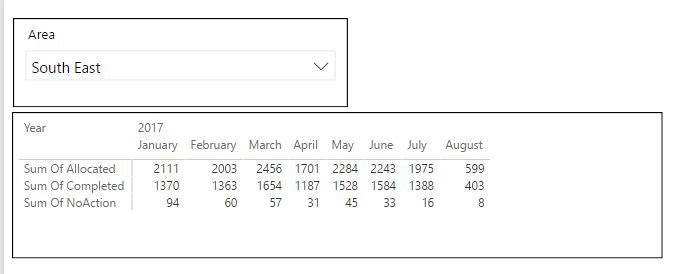
Here is the sample pbix file for your reference. 
Regards
- Mark as New
- Bookmark
- Subscribe
- Mute
- Subscribe to RSS Feed
- Permalink
- Report Inappropriate Content
Hi @Jayfemi,
For example i am usiing this sum ifs =SUMIFS(Allocated,Month,F$8,Workflow,"Reactive on DRS")
Based on my test, the formula below should work in your scenario.
Sum Of Allocated = CALCULATE(SUM(Data[Allocated]),Data[Workflow]="Reactive on DRS")
Here is the sample pbix file for your reference.
Regards
- Mark as New
- Bookmark
- Subscribe
- Mute
- Subscribe to RSS Feed
- Permalink
- Report Inappropriate Content


- Mark as New
- Bookmark
- Subscribe
- Mute
- Subscribe to RSS Feed
- Permalink
- Report Inappropriate Content
Just use the CALCULATE function something like this
CALCULATE( SUM(Table[Allocated]), Table[Month]= Calendar[Month], Table[Workflow]="Reactive on DRS")
Don't know you're exact model but it will be sonething like the above where the first argument is the summarization you want the rest are the filter you want to make.
Regards,
MFelix
Regards
Miguel Félix
Did I answer your question? Mark my post as a solution!
Proud to be a Super User!
Check out my blog: Power BI em Português
- Mark as New
- Bookmark
- Subscribe
- Mute
- Subscribe to RSS Feed
- Permalink
- Report Inappropriate Content
Hey,
basically you can use this pattern
SUMX('your table'
,if('yourtable'[columnyousearchin] = "yoursearchvalue"
,calculate(SUM('yourtable'[column you want to sum]))
,BLANK()
)
Hope this gets you started
Did I answer your question? Mark my post as a solution, this will help others!
Proud to be a Super User!
I accept Kudos 😉
Hamburg, Germany

- Mark as New
- Bookmark
- Subscribe
- Mute
- Subscribe to RSS Feed
- Permalink
- Report Inappropriate Content
Hi @Jayfemi,
It would be great if you have shared some sample data or the result you are trying to achieve. I still believe "calculate wrapped in if " would do what you want.
Regards,
Hemant
- Mark as New
- Bookmark
- Subscribe
- Mute
- Subscribe to RSS Feed
- Permalink
- Report Inappropriate Content
Hi @Anonymous
please see sample data ideally i am trying to recreate the charts on the tab Vital statistics in Bi
- Mark as New
- Bookmark
- Subscribe
- Mute
- Subscribe to RSS Feed
- Permalink
- Report Inappropriate Content
Hi @Jayfemi,
please see sample data ideally i am trying to recreate the charts on the tab Vital statistics in Bi
Where is your sample data? I can't find it anywhere.
Regards
- Mark as New
- Bookmark
- Subscribe
- Mute
- Subscribe to RSS Feed
- Permalink
- Report Inappropriate Content
Helpful resources

Power BI Dataviz World Championships
The Power BI Data Visualization World Championships is back! Get ahead of the game and start preparing now!

Power BI Monthly Update - November 2025
Check out the November 2025 Power BI update to learn about new features.

FabCon Atlanta 2026
Join us at FabCon Atlanta, March 16-20, for the ultimate Fabric, Power BI, AI and SQL community-led event. Save $200 with code FABCOMM.

| User | Count |
|---|---|
| 59 | |
| 46 | |
| 42 | |
| 23 | |
| 17 |


| User | Count |
|---|---|
| 190 | |
| 122 | |
| 96 | |
| 66 | |
| 47 |


