FabCon is coming to Atlanta
Join us at FabCon Atlanta from March 16 - 20, 2026, for the ultimate Fabric, Power BI, AI and SQL community-led event. Save $200 with code FABCOMM.
Register now!- Power BI forums
- Get Help with Power BI
- Desktop
- Service
- Report Server
- Power Query
- Mobile Apps
- Developer
- DAX Commands and Tips
- Custom Visuals Development Discussion
- Health and Life Sciences
- Power BI Spanish forums
- Translated Spanish Desktop
- Training and Consulting
- Instructor Led Training
- Dashboard in a Day for Women, by Women
- Galleries
- Data Stories Gallery
- Themes Gallery
- Contests Gallery
- QuickViz Gallery
- Quick Measures Gallery
- Visual Calculations Gallery
- Notebook Gallery
- Translytical Task Flow Gallery
- TMDL Gallery
- R Script Showcase
- Webinars and Video Gallery
- Ideas
- Custom Visuals Ideas (read-only)
- Issues
- Issues
- Events
- Upcoming Events
The Power BI Data Visualization World Championships is back! Get ahead of the game and start preparing now! Learn more
- Power BI forums
- Forums
- Get Help with Power BI
- Desktop
- SUM() vs SUMX(): What is the difference between th...
- Subscribe to RSS Feed
- Mark Topic as New
- Mark Topic as Read
- Float this Topic for Current User
- Bookmark
- Subscribe
- Printer Friendly Page

- Mark as New
- Bookmark
- Subscribe
- Mute
- Subscribe to RSS Feed
- Permalink
- Report Inappropriate Content
SUM() vs SUMX(): What is the difference between the two DAX functions?
SUM() vs SUMX(): What is the difference between the two DAX functions?
Solved! Go to Solution.


- Mark as New
- Bookmark
- Subscribe
- Mute
- Subscribe to RSS Feed
- Permalink
- Report Inappropriate Content

- Mark as New
- Bookmark
- Subscribe
- Mute
- Subscribe to RSS Feed
- Permalink
- Report Inappropriate Content
Power BI comprises 2 basic Calculation Engines: Aggregator Engine and Iterator Engine.
DAX SUM function belongs to the Aggregator Engine and it adds all the values in a single column to return the result. SUM considers a single column as a whole and returns a result. SUM and other aggregator functions are not capable of performing row-wise evaluations.
A typical SUM function looks like this:
SUM(<Column Name>)
SUM should be used whenever it is just a simple calculation across a single column and row-wise execution is not required. Hence, if your data is structured in a way that it contains only a single column of values, then you can use SUM to add up the values. The DAX SUM function operates over a single column and hence there is no need for an iterator in a case where you are simply trying to calculate the sum of a column of data.
Lets consider this example: Total Units = SUM(Sales_Table[Units])
The DAX SUM function considers a single column of data to add all the data in that column. So, the SUM function will add every single value in the “Units” column of Sales_Table to return the total number of units.
- SUMX is an iterator function and takes a different approach.
- Unlike SUM, SUMX is capable of performing row-by-row calculations and iterates through every row of a specified table to complete the calculation.
- SUMX then adds all the row-wise results of the iterations of the given expression.
A typical SUMX function looks like this:
SUMX (<Table>, <Expression>)
You can use the SUMX function whenever there is a need for the row-by-row calculation. Hence, if your data is structured in a way that you will necessarily need to multiply values from 2 columns one row at a time in order to get the desired result, you simply must use the SUMX Power BI function.
Did I answer your question? Mark my post as a solution, this will help others!
If my response(s) assisted you in any way, don't forget to drop me a "Kudos" 🙂
Kind Regards,
Sahir Maharaj
Data Scientist | Data Engineer | Data Analyst | AI Engineer
P.S. Want me to build your Power BI solution? (Yes, its FREE!)
➤ Lets connect on LinkedIn: Join my network of 15K+ professionals
➤ Join my free newsletter: Data Driven: From 0 to 100
➤ Website: https://sahirmaharaj.com
➤ About: https://sahirmaharaj.com/about.html
➤ Email: sahir@sahirmaharaj.com
➤ Want me to build your Power BI solution? Lets chat about how I can assist!
➤ Join my Medium community of 30K readers! Sharing my knowledge about data science and artificial intelligence
➤ Explore my latest project (350K+ views): Wordlit.net
➤ 100+ FREE Power BI Themes: Download Now
LinkedIn Top Voice in Artificial Intelligence, Data Science and Machine Learning
- Mark as New
- Bookmark
- Subscribe
- Mute
- Subscribe to RSS Feed
- Permalink
- Report Inappropriate Content
The Difference Between SUM vs SUMX In Power BI: https://blog.enterprisedna.co/difference-between-sum-vs-sumx-in-power-bi/
Did I answer your question? Mark my post as a solution, this will help others!
If my response(s) assisted you in any way, don't forget to drop me a "Kudos" 🙂
Kind Regards,
Sahir Maharaj
Data Scientist | Data Engineer | Data Analyst | AI Engineer
P.S. Want me to build your Power BI solution? (Yes, its FREE!)
➤ Lets connect on LinkedIn: Join my network of 15K+ professionals
➤ Join my free newsletter: Data Driven: From 0 to 100
➤ Website: https://sahirmaharaj.com
➤ About: https://sahirmaharaj.com/about.html
➤ Email: sahir@sahirmaharaj.com
➤ Want me to build your Power BI solution? Lets chat about how I can assist!
➤ Join my Medium community of 30K readers! Sharing my knowledge about data science and artificial intelligence
➤ Explore my latest project (350K+ views): Wordlit.net
➤ 100+ FREE Power BI Themes: Download Now
LinkedIn Top Voice in Artificial Intelligence, Data Science and Machine Learning
- Mark as New
- Bookmark
- Subscribe
- Mute
- Subscribe to RSS Feed
- Permalink
- Report Inappropriate Content
SUM Vs SUMX: What's The Difference Between These Two: https://www.youtube.com/watch?v=2Pu0z4GSs7g
Did I answer your question? Mark my post as a solution, this will help others!
If my response(s) assisted you in any way, don't forget to drop me a "Kudos" 🙂
Kind Regards,
Sahir Maharaj
Data Scientist | Data Engineer | Data Analyst | AI Engineer
P.S. Want me to build your Power BI solution? (Yes, its FREE!)
➤ Lets connect on LinkedIn: Join my network of 15K+ professionals
➤ Join my free newsletter: Data Driven: From 0 to 100
➤ Website: https://sahirmaharaj.com
➤ About: https://sahirmaharaj.com/about.html
➤ Email: sahir@sahirmaharaj.com
➤ Want me to build your Power BI solution? Lets chat about how I can assist!
➤ Join my Medium community of 30K readers! Sharing my knowledge about data science and artificial intelligence
➤ Explore my latest project (350K+ views): Wordlit.net
➤ 100+ FREE Power BI Themes: Download Now
LinkedIn Top Voice in Artificial Intelligence, Data Science and Machine Learning
- Mark as New
- Bookmark
- Subscribe
- Mute
- Subscribe to RSS Feed
- Permalink
- Report Inappropriate Content
DAX Beginners - SUM Vs SUMX in Power BI: https://www.youtube.com/watch?v=bQWwj9w06K4
Did I answer your question? Mark my post as a solution, this will help others!
If my response(s) assisted you in any way, don't forget to drop me a "Kudos" 🙂
Kind Regards,
Sahir Maharaj
Data Scientist | Data Engineer | Data Analyst | AI Engineer
P.S. Want me to build your Power BI solution? (Yes, its FREE!)
➤ Lets connect on LinkedIn: Join my network of 15K+ professionals
➤ Join my free newsletter: Data Driven: From 0 to 100
➤ Website: https://sahirmaharaj.com
➤ About: https://sahirmaharaj.com/about.html
➤ Email: sahir@sahirmaharaj.com
➤ Want me to build your Power BI solution? Lets chat about how I can assist!
➤ Join my Medium community of 30K readers! Sharing my knowledge about data science and artificial intelligence
➤ Explore my latest project (350K+ views): Wordlit.net
➤ 100+ FREE Power BI Themes: Download Now
LinkedIn Top Voice in Artificial Intelligence, Data Science and Machine Learning
- Mark as New
- Bookmark
- Subscribe
- Mute
- Subscribe to RSS Feed
- Permalink
- Report Inappropriate Content
Hope this helps you 🙂
Did I answer your question? Mark my post as a solution, this will help others!
If my response(s) assisted you in any way, don't forget to drop me a "Kudos" 🙂
Kind Regards,
Sahir Maharaj
Data Scientist | Data Engineer | Data Analyst | AI Engineer
P.S. Want me to build your Power BI solution? (Yes, its FREE!)
➤ Lets connect on LinkedIn: Join my network of 15K+ professionals
➤ Join my free newsletter: Data Driven: From 0 to 100
➤ Website: https://sahirmaharaj.com
➤ About: https://sahirmaharaj.com/about.html
➤ Email: sahir@sahirmaharaj.com
➤ Want me to build your Power BI solution? Lets chat about how I can assist!
➤ Join my Medium community of 30K readers! Sharing my knowledge about data science and artificial intelligence
➤ Explore my latest project (350K+ views): Wordlit.net
➤ 100+ FREE Power BI Themes: Download Now
LinkedIn Top Voice in Artificial Intelligence, Data Science and Machine Learning


- Mark as New
- Bookmark
- Subscribe
- Mute
- Subscribe to RSS Feed
- Permalink
- Report Inappropriate Content
Everythinhg that has an X and a nonX version is just syntax sugar. It is all X iterators.
- Mark as New
- Bookmark
- Subscribe
- Mute
- Subscribe to RSS Feed
- Permalink
- Report Inappropriate Content
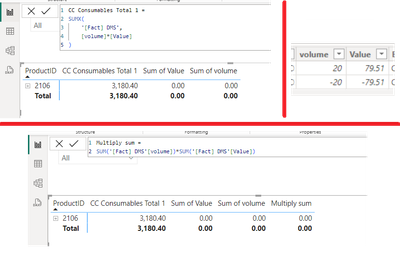
The difference between sumx and sum in an example
"CC Consumables Total 1" it's a sumx measure where it firstly multiplies per row and then sums -- (20*79.51) + (-20*-79.51) = 1590.2 + 1590.2 = 3180.4
whereas "Multiply sum" it firstly sums the column and then it multiplies -- (20+(-20))*(79.51+(-79.51)) = 0+0=0
- Mark as New
- Bookmark
- Subscribe
- Mute
- Subscribe to RSS Feed
- Permalink
- Report Inappropriate Content
Hope this helps you 🙂
Did I answer your question? Mark my post as a solution, this will help others!
If my response(s) assisted you in any way, don't forget to drop me a "Kudos" 🙂
Kind Regards,
Sahir Maharaj
Data Scientist | Data Engineer | Data Analyst | AI Engineer
P.S. Want me to build your Power BI solution? (Yes, its FREE!)
➤ Lets connect on LinkedIn: Join my network of 15K+ professionals
➤ Join my free newsletter: Data Driven: From 0 to 100
➤ Website: https://sahirmaharaj.com
➤ About: https://sahirmaharaj.com/about.html
➤ Email: sahir@sahirmaharaj.com
➤ Want me to build your Power BI solution? Lets chat about how I can assist!
➤ Join my Medium community of 30K readers! Sharing my knowledge about data science and artificial intelligence
➤ Explore my latest project (350K+ views): Wordlit.net
➤ 100+ FREE Power BI Themes: Download Now
LinkedIn Top Voice in Artificial Intelligence, Data Science and Machine Learning
- Mark as New
- Bookmark
- Subscribe
- Mute
- Subscribe to RSS Feed
- Permalink
- Report Inappropriate Content
DAX Beginners - SUM Vs SUMX in Power BI: https://www.youtube.com/watch?v=bQWwj9w06K4
Did I answer your question? Mark my post as a solution, this will help others!
If my response(s) assisted you in any way, don't forget to drop me a "Kudos" 🙂
Kind Regards,
Sahir Maharaj
Data Scientist | Data Engineer | Data Analyst | AI Engineer
P.S. Want me to build your Power BI solution? (Yes, its FREE!)
➤ Lets connect on LinkedIn: Join my network of 15K+ professionals
➤ Join my free newsletter: Data Driven: From 0 to 100
➤ Website: https://sahirmaharaj.com
➤ About: https://sahirmaharaj.com/about.html
➤ Email: sahir@sahirmaharaj.com
➤ Want me to build your Power BI solution? Lets chat about how I can assist!
➤ Join my Medium community of 30K readers! Sharing my knowledge about data science and artificial intelligence
➤ Explore my latest project (350K+ views): Wordlit.net
➤ 100+ FREE Power BI Themes: Download Now
LinkedIn Top Voice in Artificial Intelligence, Data Science and Machine Learning
- Mark as New
- Bookmark
- Subscribe
- Mute
- Subscribe to RSS Feed
- Permalink
- Report Inappropriate Content
SUM Vs SUMX: What's The Difference Between These Two: https://www.youtube.com/watch?v=2Pu0z4GSs7g
Did I answer your question? Mark my post as a solution, this will help others!
If my response(s) assisted you in any way, don't forget to drop me a "Kudos" 🙂
Kind Regards,
Sahir Maharaj
Data Scientist | Data Engineer | Data Analyst | AI Engineer
P.S. Want me to build your Power BI solution? (Yes, its FREE!)
➤ Lets connect on LinkedIn: Join my network of 15K+ professionals
➤ Join my free newsletter: Data Driven: From 0 to 100
➤ Website: https://sahirmaharaj.com
➤ About: https://sahirmaharaj.com/about.html
➤ Email: sahir@sahirmaharaj.com
➤ Want me to build your Power BI solution? Lets chat about how I can assist!
➤ Join my Medium community of 30K readers! Sharing my knowledge about data science and artificial intelligence
➤ Explore my latest project (350K+ views): Wordlit.net
➤ 100+ FREE Power BI Themes: Download Now
LinkedIn Top Voice in Artificial Intelligence, Data Science and Machine Learning
- Mark as New
- Bookmark
- Subscribe
- Mute
- Subscribe to RSS Feed
- Permalink
- Report Inappropriate Content
The Difference Between SUM vs SUMX In Power BI: https://blog.enterprisedna.co/difference-between-sum-vs-sumx-in-power-bi/
Did I answer your question? Mark my post as a solution, this will help others!
If my response(s) assisted you in any way, don't forget to drop me a "Kudos" 🙂
Kind Regards,
Sahir Maharaj
Data Scientist | Data Engineer | Data Analyst | AI Engineer
P.S. Want me to build your Power BI solution? (Yes, its FREE!)
➤ Lets connect on LinkedIn: Join my network of 15K+ professionals
➤ Join my free newsletter: Data Driven: From 0 to 100
➤ Website: https://sahirmaharaj.com
➤ About: https://sahirmaharaj.com/about.html
➤ Email: sahir@sahirmaharaj.com
➤ Want me to build your Power BI solution? Lets chat about how I can assist!
➤ Join my Medium community of 30K readers! Sharing my knowledge about data science and artificial intelligence
➤ Explore my latest project (350K+ views): Wordlit.net
➤ 100+ FREE Power BI Themes: Download Now
LinkedIn Top Voice in Artificial Intelligence, Data Science and Machine Learning
- Mark as New
- Bookmark
- Subscribe
- Mute
- Subscribe to RSS Feed
- Permalink
- Report Inappropriate Content
Power BI comprises 2 basic Calculation Engines: Aggregator Engine and Iterator Engine.
DAX SUM function belongs to the Aggregator Engine and it adds all the values in a single column to return the result. SUM considers a single column as a whole and returns a result. SUM and other aggregator functions are not capable of performing row-wise evaluations.
A typical SUM function looks like this:
SUM(<Column Name>)
SUM should be used whenever it is just a simple calculation across a single column and row-wise execution is not required. Hence, if your data is structured in a way that it contains only a single column of values, then you can use SUM to add up the values. The DAX SUM function operates over a single column and hence there is no need for an iterator in a case where you are simply trying to calculate the sum of a column of data.
Lets consider this example: Total Units = SUM(Sales_Table[Units])
The DAX SUM function considers a single column of data to add all the data in that column. So, the SUM function will add every single value in the “Units” column of Sales_Table to return the total number of units.
- SUMX is an iterator function and takes a different approach.
- Unlike SUM, SUMX is capable of performing row-by-row calculations and iterates through every row of a specified table to complete the calculation.
- SUMX then adds all the row-wise results of the iterations of the given expression.
A typical SUMX function looks like this:
SUMX (<Table>, <Expression>)
You can use the SUMX function whenever there is a need for the row-by-row calculation. Hence, if your data is structured in a way that you will necessarily need to multiply values from 2 columns one row at a time in order to get the desired result, you simply must use the SUMX Power BI function.
Did I answer your question? Mark my post as a solution, this will help others!
If my response(s) assisted you in any way, don't forget to drop me a "Kudos" 🙂
Kind Regards,
Sahir Maharaj
Data Scientist | Data Engineer | Data Analyst | AI Engineer
P.S. Want me to build your Power BI solution? (Yes, its FREE!)
➤ Lets connect on LinkedIn: Join my network of 15K+ professionals
➤ Join my free newsletter: Data Driven: From 0 to 100
➤ Website: https://sahirmaharaj.com
➤ About: https://sahirmaharaj.com/about.html
➤ Email: sahir@sahirmaharaj.com
➤ Want me to build your Power BI solution? Lets chat about how I can assist!
➤ Join my Medium community of 30K readers! Sharing my knowledge about data science and artificial intelligence
➤ Explore my latest project (350K+ views): Wordlit.net
➤ 100+ FREE Power BI Themes: Download Now
LinkedIn Top Voice in Artificial Intelligence, Data Science and Machine Learning
- Mark as New
- Bookmark
- Subscribe
- Mute
- Subscribe to RSS Feed
- Permalink
- Report Inappropriate Content
hi @Anonymous
SUM is syntax sugar, runned as SUMX in the background.
- Mark as New
- Bookmark
- Subscribe
- Mute
- Subscribe to RSS Feed
- Permalink
- Report Inappropriate Content
- Mark as New
- Bookmark
- Subscribe
- Mute
- Subscribe to RSS Feed
- Permalink
- Report Inappropriate Content
Everythinhg that has an X and a nonX version is just syntax sugar. It is all X iterators.
Helpful resources

Power BI Monthly Update - November 2025
Check out the November 2025 Power BI update to learn about new features.

Fabric Data Days
Advance your Data & AI career with 50 days of live learning, contests, hands-on challenges, study groups & certifications and more!

FabCon Atlanta 2026
Join us at FabCon Atlanta, March 16-20, for the ultimate Fabric, Power BI, AI and SQL community-led event. Save $200 with code FABCOMM.


