Join us at FabCon Atlanta from March 16 - 20, 2026, for the ultimate Fabric, Power BI, AI and SQL community-led event. Save $200 with code FABCOMM.
Register now!The Power BI Data Visualization World Championships is back! Get ahead of the game and start preparing now! Learn more
Hi,
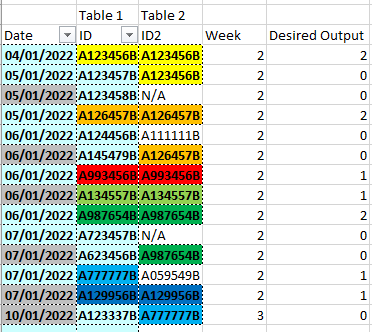
In Excel i have made the below table.
I currently have two excel sheets which i have pasted together.
Sheet 1 has the Date and ID Column in. (First 2 Columns)
Sheet 2 has ID2 Column in.
I have created the formula below.
=SUM(COUNTIF(C1:C20,B1))
=SUM(COUNTIF((ID2 All Rows,ID Row 1)
I have highlighted the cells to show the matches.
So basically i want to look at each row in Column ID and check how many times it occurs in Column ID2 and produce the value in the Desired Output Column.
How would i produce this as DAX in powerbi.
Any help is much appreciated!
Solved! Go to Solution.
Hi @Anonymous
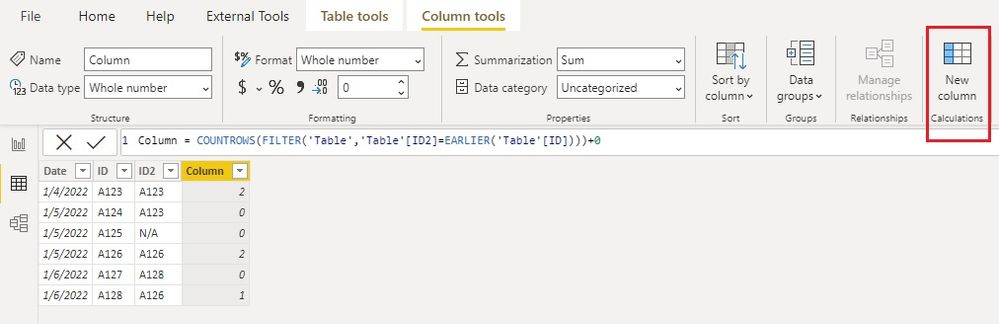
Here is one way to create a new column to get the result.
Column = COUNTROWS(FILTER('Table','Table'[ID2]=EARLIER('Table'[ID])))+0
If you load data from two sheets into two tables in Power BI, you can bring data from table2 to table1 by merging queries before adding the new column. See How To Merge Queries In Power BI | Enterprise DNA
Best Regards,
Community Support Team _ Jing
If this post helps, please Accept it as Solution to help other members find it.
Hi @Anonymous
Here is one way to create a new column to get the result.
Column = COUNTROWS(FILTER('Table','Table'[ID2]=EARLIER('Table'[ID])))+0
If you load data from two sheets into two tables in Power BI, you can bring data from table2 to table1 by merging queries before adding the new column. See How To Merge Queries In Power BI | Enterprise DNA
Best Regards,
Community Support Team _ Jing
If this post helps, please Accept it as Solution to help other members find it.
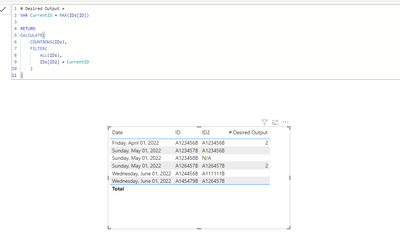
Try this:
# Desired Output =
VAR CurrentID = MAX(IDs[ID])
RETURN
CALCULATE(
COUNTROWS(IDs),
FILTER(
ALL(IDs),
IDs[ID2] = CurrentID
)
)
The Power BI Data Visualization World Championships is back! Get ahead of the game and start preparing now!
Check out the November 2025 Power BI update to learn about new features.
| User | Count |
|---|---|
| 59 | |
| 43 | |
| 42 | |
| 23 | |
| 17 |
| User | Count |
|---|---|
| 190 | |
| 122 | |
| 96 | |
| 66 | |
| 47 |