Join us at FabCon Atlanta from March 16 - 20, 2026, for the ultimate Fabric, Power BI, AI and SQL community-led event. Save $200 with code FABCOMM.
Register now!Get Fabric certified for FREE! Don't miss your chance! Learn more
Good day good people.
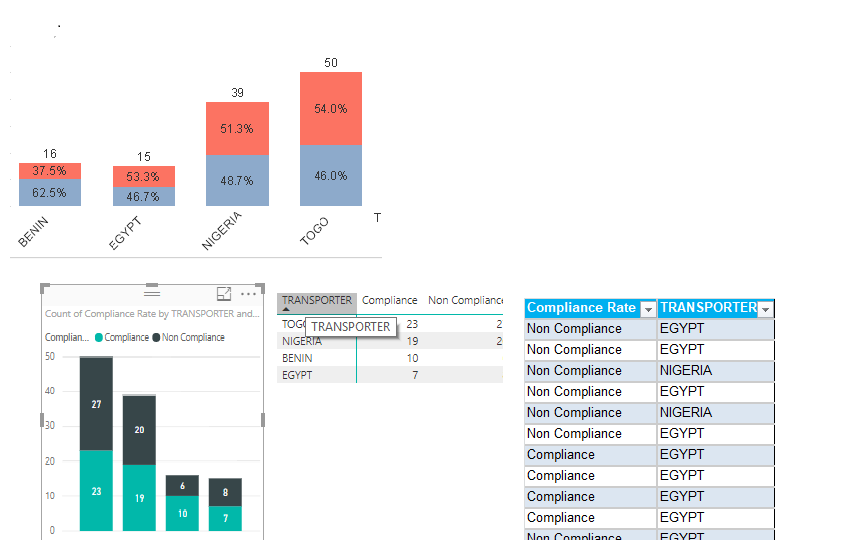
I am new to Power BI. I have a set of data that I want to display like this: To display Percentage of column total.
The excel is the way the data loaded into Power Bi looks like.
Thank you all in advance.
Hi @BobPierre,
Based on my test, you can refer to below steps:
1.I have entered some sample data like the picture below:
2.Create a measure.
MeasureA = (CALCULATE(SUM(Table1[Value]),FILTER('Table1','Table1'[Compliance Rate]=MAX('Table1'[Compliance Rate])&&'Table1'[Transpoter]=MAX('Table1'[Transpoter]))))/CALCULATE(SUM(Table1[Value]),FILTER(ALL('Table1'),'Table1'[Transpoter]=MAX('Table1'[Transpoter])))
3.Create a Stacked column chart and add the related field. Now you can see the correct result.
You can also download the PBIX file to have a view.
https://www.dropbox.com/s/ew4wb604joyxzeb/STACKED%20CHART.pbix?dl=0
Regards,
Daniel He
Thanks for your response.
But my data does not have value, so, I am a bit confused.
Hi @BobPierre,
To find the cause as soon as possible, I would suggest you share pbix file if possible. If the report does contain sensitive data, please upload your report to your OneDrive and send the link to me via private message.
Regards,
Daniel He
Thank you, Daniel.
The Data is as below:
Compliance Rate TRANSPORTER
| Non Compliance | EGYPT |
| Non Compliance | EGYPT |
| Non Compliance | NIGERIA |
| Non Compliance | EGYPT |
| Non Compliance | NIGERIA |
| Non Compliance | EGYPT |
| Compliance | EGYPT |
| Compliance | EGYPT |
| Compliance | EGYPT |
| Compliance | EGYPT |
| Non Compliance | EGYPT |
| Non Compliance | EGYPT |
| Compliance | EGYPT |
| Compliance | EGYPT |
| Non Compliance | EGYPT |
| Compliance | BENIN |
| Compliance | TOGO |
| Compliance | EGYPT |
| Compliance | TOGO |
| Non Compliance | EGYPT |
| Non Compliance | TOGO |
| Compliance | NIGERIA |
| Compliance | BENIN |
| Compliance | TOGO |
| Compliance | TOGO |
| Compliance | NIGERIA |
| Non Compliance | NIGERIA |
| Compliance | BENIN |
| Compliance | BENIN |
| Compliance | NIGERIA |
| Compliance | TOGO |
| Compliance | NIGERIA |
| Non Compliance | BENIN |
| Compliance | BENIN |
| Compliance | BENIN |
| Non Compliance | BENIN |
| Non Compliance | BENIN |
| Compliance | BENIN |
| Compliance | BENIN |
| Compliance | BENIN |
| Compliance | BENIN |
| Non Compliance | BENIN |
| Non Compliance | BENIN |
| Non Compliance | BENIN |
| Compliance | NIGERIA |
| Non Compliance | NIGERIA |
| Non Compliance | TOGO |
| Compliance | NIGERIA |
| Compliance | TOGO |
| Non Compliance | TOGO |
| Non Compliance | NIGERIA |
| Non Compliance | NIGERIA |
| Non Compliance | NIGERIA |
| Compliance | NIGERIA |
| Non Compliance | TOGO |
| Non Compliance | TOGO |
| Non Compliance | NIGERIA |
| Non Compliance | NIGERIA |
| Compliance | TOGO |
| Compliance | TOGO |
| Non Compliance | NIGERIA |
| Non Compliance | TOGO |
| Non Compliance | TOGO |
| Non Compliance | TOGO |
| Non Compliance | TOGO |
Looking forward to hearing from you soon.
Share feedback directly with Fabric product managers, participate in targeted research studies and influence the Fabric roadmap.
Check out the February 2026 Power BI update to learn about new features.
| User | Count |
|---|---|
| 68 | |
| 59 | |
| 48 | |
| 20 | |
| 16 |
| User | Count |
|---|---|
| 107 | |
| 104 | |
| 39 | |
| 27 | |
| 27 |