Join us at FabCon Atlanta from March 16 - 20, 2026, for the ultimate Fabric, Power BI, AI and SQL community-led event. Save $200 with code FABCOMM.
Register now!The Power BI Data Visualization World Championships is back! Get ahead of the game and start preparing now! Learn more
Hi team,
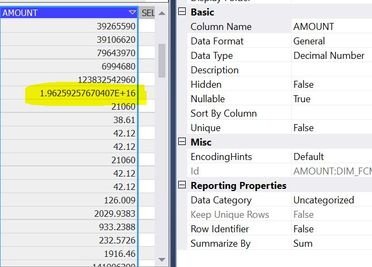
I am facing data mismatch in SSAS tabular model cube beacuse of exponential data in column. refer screenshot for sample data.
DAX: Calculate(sum(Table[Amount]))
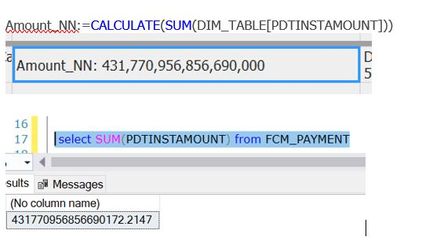
when i compare data with SQL and SSAS cube data not matching. i have to fix this exponential in cube to match data with SQL DB and SSAS Cube.
would someone can please help me in this regards
regards
SNKM
I have a similar issue. The keys I use are defined as 18,0 and they are unique. They are the PK in the SQL Server DB I use, so I know they are unique. But when I bring the table into SSAS Tabular it is displayed in scientific notation. Even if I change the data type to whole number I am not allowed to set the value to unique because SSAS see the numbers as duplicates but they are not.
This needs to be fixed.
even i change data from General to Decimal number no luck, below are the details
row data contains more than 18 digits, when we add table in SSAS cube from SQL DB, column data contains scientific notation which cause in data mismatch.
| 1.96E+16 |
we have to bring data as is from SQL into cube with out scientific notation to get accurate sum.
SQL column data type is Amount Decimal(38,2)
would you please help 🙂
below is the screenshot.
The Power BI Data Visualization World Championships is back! Get ahead of the game and start preparing now!
| User | Count |
|---|---|
| 39 | |
| 37 | |
| 33 | |
| 33 | |
| 29 |
| User | Count |
|---|---|
| 132 | |
| 90 | |
| 78 | |
| 66 | |
| 65 |