Don't miss your chance to take exam DP-600 or DP-700 on us!
Request nowLearn from the best! Meet the four finalists headed to the FINALS of the Power BI Dataviz World Championships! Register now
Hi All,
I have a SSAS Tabular model on which my PBI reporting is based.
I have not found a way to join the tables using a range. Where the join is a "between"
Other reporting solutions are able to do this easily. Is there a DAX formula for this?
EG Join between Sales and Date table where Sales is between Min Date and Max Date of the Date table.
Thanks!!
Basia
Hi Basia
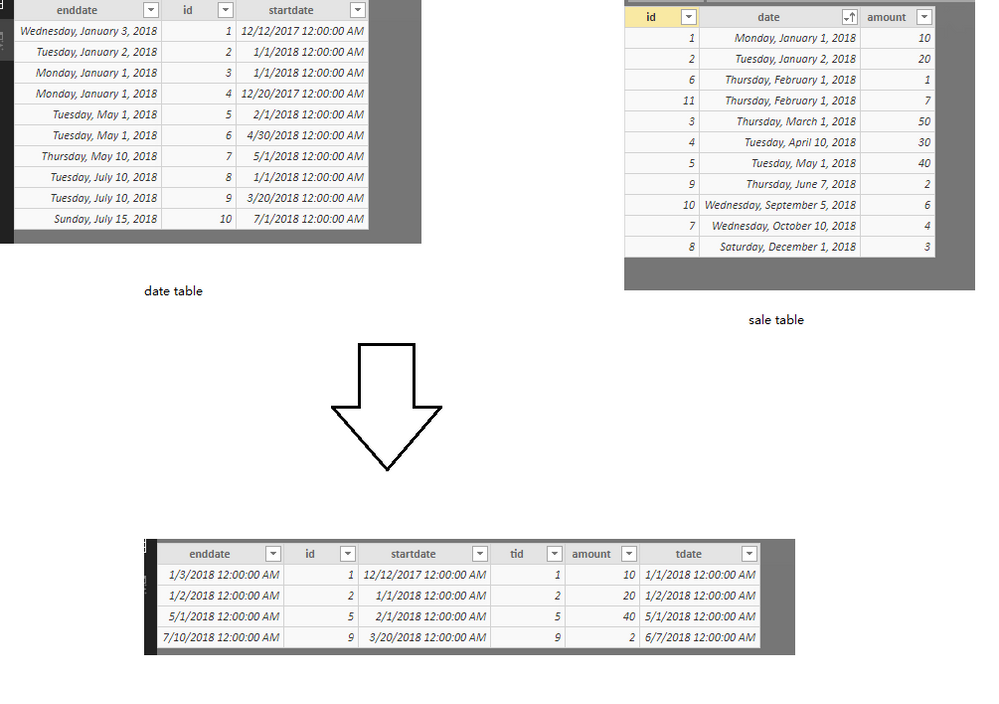
According to your description, did you mean you want to generate a table like sql with join syntax: “select a.xx,b.ss from a left join b on a.id=b.id where b.date between ..and …”? If so, you could try to create a table in powerbi like below
join2 =
FILTER (
CROSSJOIN (
date1,
SELECTCOLUMNS (
salet,
"saleid", salet[id],
"saleamount", salet[amount],
"saledate", salet[date]
)
),
date1[id] = [saleid]
&& date1[startdate] <= [saledate]
&& date1[enddate] >= [saledate]
)Best Regards,
Zoe Zhi
Thanks Zoe,
This looks really cool! Where do I apply the filter?
Is it applied in each sales measure? or can I globally apply it so that all measures that use the date table can be reported over a date range?
Thanks again
Basia
Hi Basia
According to your description, it seems that you want to join two tables into a new table, so my expression is to create a new table, you could use the new table to create visual and apply filter on it
Best Regards,
Zoe Zhi
Hi Zoe,
Thanks for your explanation.
I guess I'm after a run-time table that would be used for the purpose of graphing all sorts of measures against a time line that is governed by a single drop down Month Filter/Slicer.
I have not been able to achieve this yet.
With your solution, I would need to create a separate measures table for each measure and I have 100+ measures, so that is just not feasible.
I'll keep searching/asking....
Thanks for your help.
Basia
Share feedback directly with Fabric product managers, participate in targeted research studies and influence the Fabric roadmap.
Check out the February 2026 Power BI update to learn about new features.
| User | Count |
|---|---|
| 54 | |
| 47 | |
| 39 | |
| 16 | |
| 15 |
| User | Count |
|---|---|
| 83 | |
| 71 | |
| 39 | |
| 29 | |
| 27 |