Don't miss your chance to take the Fabric Data Engineer (DP-600) exam for FREE! Find out how by attending the DP-600 session on April 23rd (pacific time), live or on-demand.
Learn moreNext up in the FabCon + SQLCon recap series: The roadmap for Microsoft SQL and Maximizing Developer experiences in Fabric. All sessions are available on-demand after the live show. Register now
HI there,
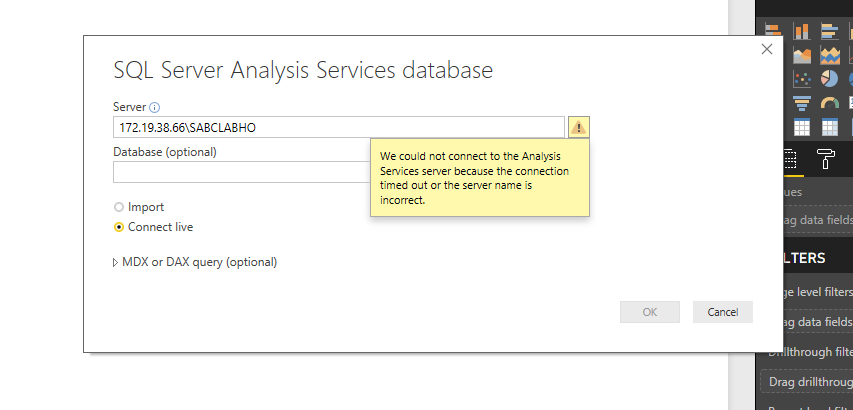
When I Type in the IP address using the SQL server analysis services database method, selecting Import i get a error pop-up message in the first screen shot.
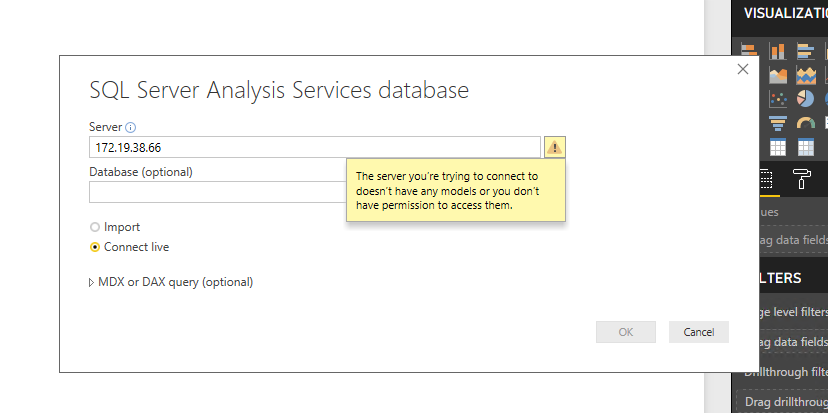
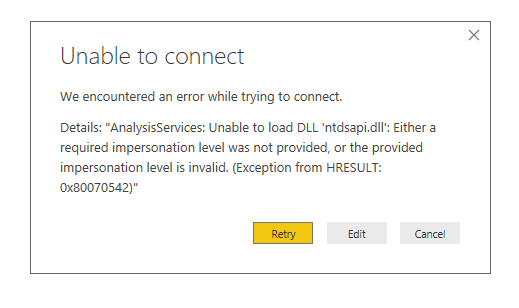
The second screenshot i selected.
I troubled shooted this by logging into excel and doing the same type of connection, with the same IP address and it worked.
Please could someone assist with this.
Hi @JohnB,
IP is not enough. You need to enter IP\SSAS_Server_Name. Because in each IP can be more than 1 SSAS server.
HI,
I tried it with the server name but still not letting me in.
Not sure why it is not working.
Could it be that the IT department/ firewall is blocking it. However in excel it connects.
Hello again.
Is there another method to connect to this server?
HI @JohnB,
I'd like to suggest you install ssms on device which install power bi desktop to test connection states.
Regards,
Xiaoxin Sheng
hi,
1.There are 5 databases in this server. this server is an off site.
2. Yes, i did mentioned the database that I want to connect to.
3. In a command prompt i ran TELNET of the IP and it connected.
Tried connect via Sql but not connecting.
The IT department downloaded Power BI to that server Machine, in order to do a remote desktop connection. I want to test the connection as this will be a connection on site.
Regards,
John
If you have recently started exploring Fabric, we'd love to hear how it's going. Your feedback can help with product improvements.
A new Power BI DataViz World Championship is coming this June! Don't miss out on submitting your entry.
Share feedback directly with Fabric product managers, participate in targeted research studies and influence the Fabric roadmap.
| User | Count |
|---|---|
| 48 | |
| 43 | |
| 39 | |
| 19 | |
| 17 |
| User | Count |
|---|---|
| 69 | |
| 63 | |
| 32 | |
| 30 | |
| 23 |