Get Fabric or SQL Certified for Free.
Get certified for free when you join Fabric Data Days 2026 and dive into Fabric, Power BI, SQL, AI, and other essential data skills.
Join now- Power BI forums
- Get Help with Power BI
- Desktop
- Service
- Report Server
- Power Query
- Mobile Apps
- Developer
- DAX Commands and Tips
- Custom Visuals Development Discussion
- Health and Life Sciences
- Power BI Spanish forums
- Translated Spanish Desktop
- Training and Consulting
- Instructor Led Training
- Dashboard in a Day for Women, by Women
- Galleries
- Data Stories Gallery
- Themes Gallery
- Contests Gallery
- QuickViz Gallery
- Quick Measures Gallery
- Visual Calculations Gallery
- Notebook Gallery
- Translytical Task Flow Gallery
- TMDL Gallery
- R Script Showcase
- Webinars and Video Gallery
- Ideas
- Custom Visuals Ideas (read-only)
- Issues
- Issues
- Events
- Upcoming Events
Try your skills in the Power BI Dataviz World Championship! Round one ends June 26. Join now
- Power BI forums
- Forums
- Get Help with Power BI
- Desktop
- Re: Power BI direct query mode
- Subscribe to RSS Feed
- Mark Topic as New
- Mark Topic as Read
- Float this Topic for Current User
- Bookmark
- Subscribe
- Printer Friendly Page


- Mark as New
- Bookmark
- Subscribe
- Mute
- Subscribe to RSS Feed
- Permalink
- Report Inappropriate Content
SQL query in direct query mode
Hi,
I am running a sql query in power bi to get data in direct query mode. The query throws correct result on sql server without any syntax error. However, when I run the same query in direct query mode, connecting to Azure SQL Database, in power bi's advanced options box under get data it throws correct result when I click the OK button but when I click the Load button on the same resultset it throws a syntax error message. The part where it is throwing the error is below:
DECLARE @LatestPackageVersion int;
SELECT
@LatestPackageVersion = MAX(PackageId)
FROM [Packages];
DECLARE @CurrentTime AS datetime;
SELECT
@CurrentTime = GETUTCDATE()
;
with cte_.....-- code continues.
The error message is:
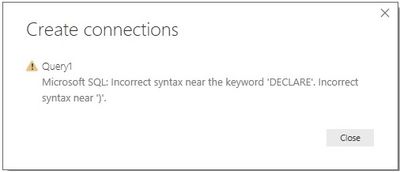
Anyone getting any clue why is this happening?
Thanks,
Amitabh
Solved! Go to Solution.


- Mark as New
- Bookmark
- Subscribe
- Mute
- Subscribe to RSS Feed
- Permalink
- Report Inappropriate Content
@amitabhk1971 wrote:
Well I am using only the select part of the stored procedue. I am not using exec procname.
In my test on SQL Server, in DQ mode, Power BI sends a query wrapped as below.
SELECT XXXX, XXXX, XXX, XX FROM (

your query in you input in the pbi desktop

) t
So in your case, the actually query is
SELECT XXXX, XXXX, XXX, XX FROM (

declare ....
...
select..

) t
That's why the you got the SQL syntax error. This is on SQL Server, and I think Power BI does the same thing to Azure SQL. As a workaround, instead of DECLARE statement, replace those variables in the SQL with a scalar value sub query.The CTEs can't work in this case as well, Try to recompose the SQL like.
From
FROM

DECLARE @LatestPackageVersion int;
SELECT
@LatestPackageVersion = MAX(PackageId)
FROM [Packages];
DECLARE @CurrentTime AS datetime;
SELECT
@CurrentTime = GETUTCDATE()

;with cte as(
....
where datetime = @CurrentTime
and version = @LatestPackageVersion
)
select * from cte

TO

SELECT * FROM (
..
where datetime = GETUTCDATE()
and version = (select MAX(PackageId) FROM [Packages])

) cte
- Mark as New
- Bookmark
- Subscribe
- Mute
- Subscribe to RSS Feed
- Permalink
- Report Inappropriate Content
Thanks Eric. That is what I did. I replaced the parameters with their select queries and now it works.
- Mark as New
- Bookmark
- Subscribe
- Mute
- Subscribe to RSS Feed
- Permalink
- Report Inappropriate Content
Hi,
I am trying to use MAX function in PowerBI using DAX/SQL in direct query mode but it says MAX is not supported in direct query mode. I checked the microsoft site for supported commands in DQ mode and MAX is included, but it is throwing this error on power bi. I went to options and checked "Allow unrestricted measures in direct query mode" under DirectQuery. Did not work. Does anyone know the solution. I need DQL mode because in DQ mode the report is real time while in import mode it needs to be refreshed as per a schedule. Any clue anyone? Thanks
- Mark as New
- Bookmark
- Subscribe
- Mute
- Subscribe to RSS Feed
- Permalink
- Report Inappropriate Content
@amitabhk1971 wrote:
Hi,
I am trying to use MAX function in PowerBI using DAX/SQL in direct query mode but it says MAX is not supported in direct query mode. I checked the microsoft site for supported commands in DQ mode and MAX is included, but it is throwing this error on power bi. I went to options and checked "Allow unrestricted measures in direct query mode" under DirectQuery. Did not work. Does anyone know the solution. I need DQL mode because in DQ mode the report is real time while in import mode it needs to be refreshed as per a schedule. Any clue anyone? Thanks
The MAX function is allowed in DQ mode, based on my test on SQL Server. What database are you using and could you upload a snapshot of the "MAX is not supported in DQ mode"?
By the way, for real time purpose, you could also reference Real-time streaming in Power BI
- Mark as New
- Bookmark
- Subscribe
- Mute
- Subscribe to RSS Feed
- Permalink
- Report Inappropriate Content
Hi Eric I am again stuck at the same point. In Direct query mode the following code is not running. Please see the error screenshot.
DECLARE @LatestPackageVersion int;
SELECT
@LatestPackageVersion = MAX(PackageId)
FROM [Packages]
The error:

Any solution or workaround?
Amitabh
- Mark as New
- Bookmark
- Subscribe
- Mute
- Subscribe to RSS Feed
- Permalink
- Report Inappropriate Content
@amitabhk1971 wrote:
Hi Eric I am again stuck at the same point. In Direct query mode the following code is not running. Please see the error screenshot.
@DECLARE @LatestPackageVersion int;
SELECT
@LatestPackageVersion = MAX(PackageId)
FROM [Packages]
The error:
Any solution or workaround?
Amitabh
Those are SQL to do variable value assignment and it doesn't return any rows, that's why I think Power BI doesn't accept it. What's your goal when trying to run such SQL statements in Power BI desktop?
- Mark as New
- Bookmark
- Subscribe
- Mute
- Subscribe to RSS Feed
- Permalink
- Report Inappropriate Content
It is part of a stored procedure. When I run the stored procedure in PowerBI it says syntax arror at the Declare statement. This is the only place where there is a DECLARE statement. While the same stored procedure runs ok in sql server.
Amitabh
- Mark as New
- Bookmark
- Subscribe
- Mute
- Subscribe to RSS Feed
- Permalink
- Report Inappropriate Content
In fact the same stored procedure throws the correct result set in Power BI also when I click OK on the get data box. But it throws the error when I click LOAD button on the result box.
Amitabh
- Mark as New
- Bookmark
- Subscribe
- Mute
- Subscribe to RSS Feed
- Permalink
- Report Inappropriate Content
@amitabhk1971 wrote:
In fact the same stored procedure throws the correct result set in Power BI also when I click OK on the get data box. But it throws the error when I click LOAD button on the result box.
Amitabh
I'm afraid that in DQ mode, executing a stored procedure is not supported. See this similar thread.
- Mark as New
- Bookmark
- Subscribe
- Mute
- Subscribe to RSS Feed
- Permalink
- Report Inappropriate Content
Well I am using only the select part of the stored procedue. I am not using exec procname.
- Mark as New
- Bookmark
- Subscribe
- Mute
- Subscribe to RSS Feed
- Permalink
- Report Inappropriate Content
@amitabhk1971 wrote:
Well I am using only the select part of the stored procedue. I am not using exec procname.
In my test on SQL Server, in DQ mode, Power BI sends a query wrapped as below.
SELECT XXXX, XXXX, XXX, XX FROM (

your query in you input in the pbi desktop

) t
So in your case, the actually query is
SELECT XXXX, XXXX, XXX, XX FROM (

declare ....
...
select..

) t
That's why the you got the SQL syntax error. This is on SQL Server, and I think Power BI does the same thing to Azure SQL. As a workaround, instead of DECLARE statement, replace those variables in the SQL with a scalar value sub query.The CTEs can't work in this case as well, Try to recompose the SQL like.
From
FROM

DECLARE @LatestPackageVersion int;
SELECT
@LatestPackageVersion = MAX(PackageId)
FROM [Packages];
DECLARE @CurrentTime AS datetime;
SELECT
@CurrentTime = GETUTCDATE()

;with cte as(
....
where datetime = @CurrentTime
and version = @LatestPackageVersion
)
select * from cte

TO

SELECT * FROM (
..
where datetime = GETUTCDATE()
and version = (select MAX(PackageId) FROM [Packages])

) cte
- Mark as New
- Bookmark
- Subscribe
- Mute
- Subscribe to RSS Feed
- Permalink
- Report Inappropriate Content
Thanks Eric. That is what I did. I replaced the parameters with their select queries and now it works.
- Mark as New
- Bookmark
- Subscribe
- Mute
- Subscribe to RSS Feed
- Permalink
- Report Inappropriate Content
@amitabhk1971 wrote:
Thanks Eric. That is what I did. I replaced the parameters with their select queries and now it works.
Glad to hear you've figured it out. If no further question, could you please mark the replies making sense as solution to close this thread?
- Mark as New
- Bookmark
- Subscribe
- Mute
- Subscribe to RSS Feed
- Permalink
- Report Inappropriate Content
Hi Eric,
I am actually using a long stored procedure in sql querying Azure SQL database. But anyways my purpose is to make my report real time. Thanks for referring to the Microsoft page regarding making a repport real time.

Helpful resources

Data Days 2026
Don't miss out on Data Days, June 15 through August 7. Learn Fabric, Power BI, SQL, AI and more.

Power BI DataViz World Championships - June 2026
A new Power BI DataViz World Championship is coming this June! Don't miss out on submitting your entry.

| User | Count |
|---|---|
| 23 | |
| 22 | |
| 21 | |
| 20 | |
| 12 |


| User | Count |
|---|---|
| 66 | |
| 56 | |
| 45 | |
| 43 | |
| 30 |


