Join us at FabCon Atlanta from March 16 - 20, 2026, for the ultimate Fabric, Power BI, AI and SQL community-led event. Save $200 with code FABCOMM.
Register now!The Power BI Data Visualization World Championships is back! Get ahead of the game and start preparing now! Learn more
Hi All,
I need a requirement of implement below sql query in DAX.
declare @startdate as date
declare @enddate as date
set @startdate = '2021-10-18'
set @enddate = '2021-11-15'
select distinct count (Item_Number) from [dbo].[TblItem] as i
inner join [dbo].[Customs] as c on i.Item_Number = c.Item_Number
Where ActiveDate <= @startdate and (EndDate > @enddate or EndDate is null)However, the ActiveDate and EndDate are in 7 days interval. For example '2021-10-18' on Monday and the next date is '2021-10-25' the next Monday and soon.(7 days intervals). The startdate act as a minimum date and the EndDate is the maximum date from their respective columns and falls within 3 months
Solved! Go to Solution.
Hi @Anonymous ,
I could not successfullt execute the SQL code on my side since it has error:
Ambiguous column name 'Item_Number'.
In Power BI, you may try:
Measure =
var _start=DATE(2021,10,18)
var _end=DATE(2021,11,15)
return
CALCULATE(DISTINCTCOUNT(TblItem[Item_Number]), FILTER('Customs',[ActiveDate ]<=_start && [EndDate]>= _end || [EndDate]=BLANK()))
Best Regards,
Eyelyn Qin
If this post helps, then please consider Accept it as the solution to help the other members find it more quickly.
Hi @Anonymous ,
I could not successfullt execute the SQL code on my side since it has error:
Ambiguous column name 'Item_Number'.
In Power BI, you may try:
Measure =
var _start=DATE(2021,10,18)
var _end=DATE(2021,11,15)
return
CALCULATE(DISTINCTCOUNT(TblItem[Item_Number]), FILTER('Customs',[ActiveDate ]<=_start && [EndDate]>= _end || [EndDate]=BLANK()))
Best Regards,
Eyelyn Qin
If this post helps, then please consider Accept it as the solution to help the other members find it more quickly.
@Anonymous
declare @startdate as date
declare @enddate as date
set
@startdate = '2021-10-18'
set
@enddate = '2021-11-15'
select distinct
count (Item_Number)
from
[dbo].[TblItem] as i
inner join
[dbo].[Customs] as c
on i.Item_Number = c.Item_Number
Where
ActiveDate <= @startdate
and
(
EndDate > @enddate
or EndDate is null
)
this SQL looks ambiguous to me because it is not clear whether the filtering applies in
[dbo].[TblItem]
or
[dbo].[Customs]
You can achieve a basic inner join like this
basicMeasure = calculate(distinctcount(item[Item_Number]),Customs)
//if filtering item
m1 = calculate(DISTINCTCOUNT(Item[Item_Number]),Filter(Item, Item[ActiveDate]<=DAY(2021,10,18)||(Item[EndDate]>=DAY(2021,11,15)||Item[EndDate]=BLANK()),(Customs))
@Anonymous are
[Customs]
and
[TblItem]
related?
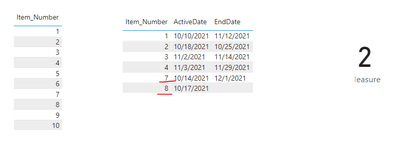
@smpa01 Yes. they are related or joined with item_Number from both tables.
The ActiveDate and EndDate are both from TblItem
The Power BI Data Visualization World Championships is back! Get ahead of the game and start preparing now!
| User | Count |
|---|---|
| 41 | |
| 40 | |
| 33 | |
| 29 | |
| 27 |
| User | Count |
|---|---|
| 131 | |
| 105 | |
| 60 | |
| 56 | |
| 55 |