Get certified for free when you join Fabric Data Days 2026 and dive into Fabric, Power BI, SQL, AI, and other essential data skills.
Join nowJuly 7 - July 17 | Round 2 of the Power BI Dataviz World Championships. Don't miss your chance! Learn more
Hi All,
I need a requirement of implement below sql query in DAX.
declare @startdate as date
declare @enddate as date
set @startdate = '2021-10-18'
set @enddate = '2021-11-15'
select distinct count (Item_Number) from [dbo].[TblItem] as i
inner join [dbo].[Customs] as c on i.Item_Number = c.Item_Number
Where ActiveDate <= @startdate and (EndDate > @enddate or EndDate is null)However, the ActiveDate and EndDate are in 7 days interval. For example '2021-10-18' on Monday and the next date is '2021-10-25' the next Monday and soon.(7 days intervals). The startdate act as a minimum date and the EndDate is the maximum date from their respective columns and falls within 3 months
Solved! Go to Solution.
Hi @Anonymous ,
I could not successfullt execute the SQL code on my side since it has error:
Ambiguous column name 'Item_Number'.
In Power BI, you may try:
Measure =
var _start=DATE(2021,10,18)
var _end=DATE(2021,11,15)
return
CALCULATE(DISTINCTCOUNT(TblItem[Item_Number]), FILTER('Customs',[ActiveDate ]<=_start && [EndDate]>= _end || [EndDate]=BLANK()))
Best Regards,
Eyelyn Qin
If this post helps, then please consider Accept it as the solution to help the other members find it more quickly.
Hi @Anonymous ,
I could not successfullt execute the SQL code on my side since it has error:
Ambiguous column name 'Item_Number'.
In Power BI, you may try:
Measure =
var _start=DATE(2021,10,18)
var _end=DATE(2021,11,15)
return
CALCULATE(DISTINCTCOUNT(TblItem[Item_Number]), FILTER('Customs',[ActiveDate ]<=_start && [EndDate]>= _end || [EndDate]=BLANK()))
Best Regards,
Eyelyn Qin
If this post helps, then please consider Accept it as the solution to help the other members find it more quickly.
@Anonymous
declare @startdate as date
declare @enddate as date
set
@startdate = '2021-10-18'
set
@enddate = '2021-11-15'
select distinct
count (Item_Number)
from
[dbo].[TblItem] as i
inner join
[dbo].[Customs] as c
on i.Item_Number = c.Item_Number
Where
ActiveDate <= @startdate
and
(
EndDate > @enddate
or EndDate is null
)
this SQL looks ambiguous to me because it is not clear whether the filtering applies in
[dbo].[TblItem]
or
[dbo].[Customs]
You can achieve a basic inner join like this
basicMeasure = calculate(distinctcount(item[Item_Number]),Customs)
//if filtering item
m1 = calculate(DISTINCTCOUNT(Item[Item_Number]),Filter(Item, Item[ActiveDate]<=DAY(2021,10,18)||(Item[EndDate]>=DAY(2021,11,15)||Item[EndDate]=BLANK()),(Customs))
@Anonymous are
[Customs]
and
[TblItem]
related?
@smpa01 Yes. they are related or joined with item_Number from both tables.
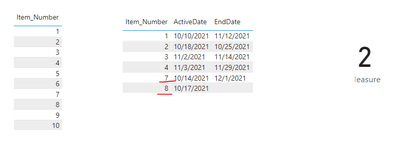
The ActiveDate and EndDate are both from TblItem
Join us in Barcelona for FabCon and SQLCon, the Fabric, Power BI, SQL, and AI community event. Save €200 with code FABCMTY200.
Join Data Days 2026: 60 days of free live/on-demand sessions, challenges, study groups, and certification opportunities.
| User | Count |
|---|---|
| 29 | |
| 23 | |
| 18 | |
| 18 | |
| 15 |
| User | Count |
|---|---|
| 51 | |
| 44 | |
| 43 | |
| 39 | |
| 32 |