cancel
Showing results for 
Search instead for 
Did you mean: 

The Power BI Data Visualization World Championships is back! Get ahead of the game and start preparing now! Learn more

Reply
Anonymous
Not applicable

SQL aggregation for Direct Query

Hi,


I need to import the Historical Inventory table, which consists of sales data through item, Item variant code, location and day and for the measures, I need the most detailed information that is in this table.

Table returns about 50-60 mln rows, and I what to use a Direct Query, but as I understand from previous tickets, there is a limit for returning 1 million rows:

"There is a 1 million row limit for returning data using DirectQuery. This does not affect aggregations or calculations used to create the dataset returned using DirectQuery, only the rows returned. For example, you can aggregate 10 million rows with your query that runs on the data source, and accurately return the results of that aggregation to Power BI using DirectQuery as long as the data returned to Power BI is less than 1 million rows. If more than 1 million rows would be returned from DirectQuery, Power BI returns an error." 


I'm not very advanced in SQL  so please, correct me if I'm wrong, but as I understand that there is no difference what aggregation I will use an SQL statement to bring data to Power BI, the measure will use all data that is in SQL?

For example

If I have sum up sales for the item, for a month, the measure still be able to calculate sales average by day for particular item variant?


If not, than how can I solve this problem?


3 REPLIES 3
Anonymous
Not applicable

Hi @Anonymous ,

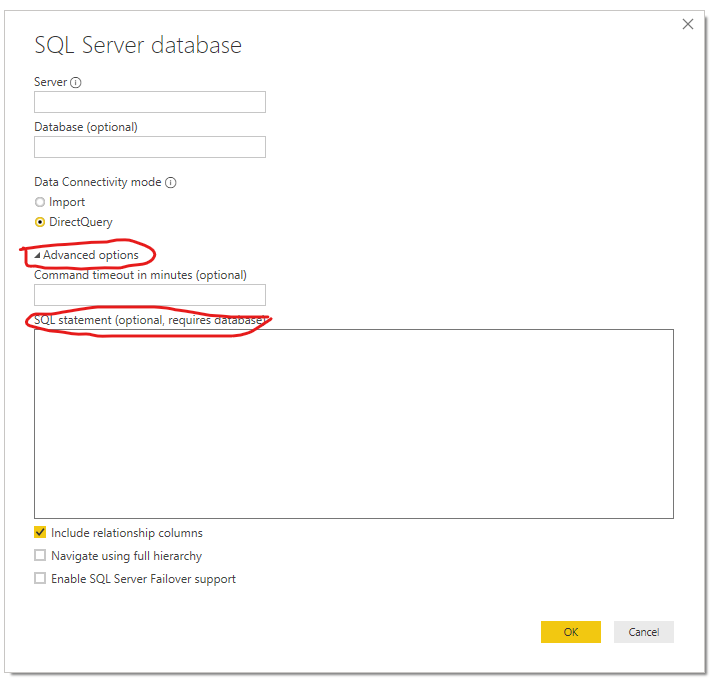
You can coding your t-sql script in 'advanced options -> sql statement' to return an aggregate sql table.

3.png

Regards,

Xiaoxin Sheng

Anonymous
Not applicable

Thanks, @Anonymous 

I know about this feature, but with basic information that I need with SQL statement still, I get 40 mln rows.


I know I can aggregate separate tables by item, by location, by date, but then I won't be able to calculate let say, sums by item for a particular period (days) for a particular location. If I divided information by month there will be extra steps every month that must be done, in order for the report work correctly and I'm preparing the report for the client it's not very suitable for them.


I'm in big doubt if Power BI able to work efficiently with large data quantity?


Anonymous
Not applicable

Hi @Anonymous ,

Maybe you can try to add query parameter as filter condition on your query table to reduce records.

Deep Dive into Query Parameters and Power BI Templates

Regards,

Xiaoxin Sheng

Helpful resources

Announcements
Power BI DataViz World Championships

Power BI Dataviz World Championships

The Power BI Data Visualization World Championships is back! Get ahead of the game and start preparing now!

December 2025 Power BI Update Carousel

Power BI Monthly Update - December 2025

Check out the December 2025 Power BI Holiday Recap!

FabCon Atlanta 2026 carousel

FabCon Atlanta 2026

Join us at FabCon Atlanta, March 16-20, for the ultimate Fabric, Power BI, AI and SQL community-led event. Save $200 with code FABCOMM.

Top Solution Authors