cancel
Showing results for 
Search instead for 
Did you mean: 

Learn from the best! Meet the four finalists headed to the FINALS of the Power BI Dataviz World Championships! Register now

Reply
r1cokoro
Regular Visitor

SQL Statement to Dax

Hi All,

I need help converting a SQL query to DAX cause at this point my DAX code looks weird and it doesn't work,


There are data in USD and DOP currencys, so I would like to have a result like this
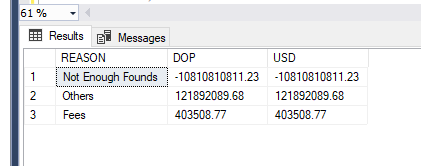
Capture.PNG


there is a parameter in the pbix VAR CURRENCY = SELECTEDVALUE(DIM_CURRENCY[key]) which will replace the variable in the next SQL Server code


/*
DECLARE @CURRENCY INT;

SET @CURRENCY = 1

SELECT
	A.REASON,
	--calculation for dop currency
	CASE @CURRENCY
		WHEN 1 THEN
			CASE A.CURRENCY
				WHEN 1 THEN SUM(ADJUDICADO) + SUM(MONTO_COTIZADO)
				WHEN 2 THEN (SUM(ADJUDICADO) + SUM(MONTO_COTIZADO)) / 57
				ELSE 0
			END
		WHEN 2 THEN
			CASE A.CURRENCY
				WHEN 1 THEN (SUM(ADJUDICADO) + SUM(MONTO_COTIZADO)) * 57
				WHEN 2 THEN SUM(ADJUDICADO) + SUM(MONTO_COTIZADO)
				ELSE 0
			END
		ELSE 0
	END AS DOP,
	--calculation for usd currency
	CASE @CURRENCY
		WHEN 1 THEN
			CASE A.CURRENCY
				WHEN 1 THEN SUM(ADJUDICADO) + SUM(MONTO_COTIZADO)
				WHEN 2 THEN (SUM(ADJUDICADO) + SUM(MONTO_COTIZADO)) / 57
				ELSE 0
			END
		WHEN 2 THEN
			CASE A.CURRENCY
				WHEN 1 THEN (SUM(ADJUDICADO) + SUM(MONTO_COTIZADO)) * 57
				WHEN 2 THEN SUM(ADJUDICADO) + SUM(MONTO_COTIZADO)
				ELSE 0
			END
		ELSE 0
	END AS USD
FROM ( --TMP TABLE
	SELECT
		'Not Enough Founds' AS REASON,
		23423423423.321 AS ADJUDICADO,
		-34234234234.55 AS MONTO_COTIZADO,
		1 AS CURRENCY
	UNION
	SELECT
		'Fees' AS REASON,
		23423423.2 AS ADJUDICADO,
		-423423.09 AS MONTO_COTIZADO,
		2 AS CURRENCY
	UNION
	SELECT
		'Others' AS REASON,
		123123321.21 AS ADJUDICADO,
		-1231231.53 AS MONTO_COTIZADO,
		1 AS CURRENCY
	) A
GROUP BY
	A.REASON,
	A.CURRENCY
*/


Basically the parameter 1 will convert the currency from USD to DOP and vice versa if we select 2, for the data in USD and DOP respectively.


At the end I don't know If it's possible to have a calculation table with those case and grouping calculations,


Hope this makes sense!


Thanks for your help!

1 ACCEPTED SOLUTION
r1cokoro
Regular Visitor

Well doing some research on Microsoft DOCS, I found the way I can translate the query,

Monto = 
VAR CURRENCY = SELECTEDVALUE(DIM_MONEDA[key])
RETURN (
    SWITCH(
        TRUE(),
        CURRENCY = 1, SUMX(FILTER(FACT_DEALS, FACT_DEALS[MONEDA]="DOP"), FACT_DEALS[MONTO_COTIZADO])
            + (SUMX(FILTER(FACT_DEALS, FACT_DEALS[MONEDA]="USD"), FACT_DEALS[MONTO_COTIZADO]) * 57),
        CURRENCY = 2, SUMX(FILTER(FACT_DEALS, FACT_DEALS[MONEDA]="USD"), FACT_DEALS[MONTO_COTIZADO])
            + (SUMX(FILTER(FACT_DEALS, FACT_DEALS[MONEDA]="DOP"), FACT_DEALS[MONTO_COTIZADO]) / 57),
        CURRENCY = 3, SUM(FACT_DEALS[MONTO_COTIZADO]) + SUM(FACT_DEALS[ADJUDICADO])
    )
)

Basically with SWITCH and SUMX I found the way to calculate the amount...

View solution in original post

1 REPLY 1
r1cokoro
Regular Visitor

Well doing some research on Microsoft DOCS, I found the way I can translate the query,

Monto = 
VAR CURRENCY = SELECTEDVALUE(DIM_MONEDA[key])
RETURN (
    SWITCH(
        TRUE(),
        CURRENCY = 1, SUMX(FILTER(FACT_DEALS, FACT_DEALS[MONEDA]="DOP"), FACT_DEALS[MONTO_COTIZADO])
            + (SUMX(FILTER(FACT_DEALS, FACT_DEALS[MONEDA]="USD"), FACT_DEALS[MONTO_COTIZADO]) * 57),
        CURRENCY = 2, SUMX(FILTER(FACT_DEALS, FACT_DEALS[MONEDA]="USD"), FACT_DEALS[MONTO_COTIZADO])
            + (SUMX(FILTER(FACT_DEALS, FACT_DEALS[MONEDA]="DOP"), FACT_DEALS[MONTO_COTIZADO]) / 57),
        CURRENCY = 3, SUM(FACT_DEALS[MONTO_COTIZADO]) + SUM(FACT_DEALS[ADJUDICADO])
    )
)

Basically with SWITCH and SUMX I found the way to calculate the amount...

Helpful resources

Announcements
Join our Fabric User Panel

Join our Fabric User Panel

Share feedback directly with Fabric product managers, participate in targeted research studies and influence the Fabric roadmap.

February Power BI Update Carousel

Power BI Monthly Update - February 2026

Check out the February 2026 Power BI update to learn about new features.

FabCon Atlanta 2026 carousel

FabCon Atlanta 2026

Join us at FabCon Atlanta, March 16-20, for the ultimate Fabric, Power BI, AI and SQL community-led event. Save $200 with code FABCOMM.