cancel
Showing results for 
Search instead for 
Did you mean: 

The Power BI Data Visualization World Championships is back! Get ahead of the game and start preparing now! Learn more

Reply
SanthuWilly4
Frequent Visitor

SQL Query in Direct Query Mode in Power BI

Hi , 


I'm trying to build a dynamic report using Direct Query connection connecting to SQL Server , I can able to connect to direct tables and from there I'm able to create visuals where the data is updating dynamically for every 30 seconds.


Here's my road block , most of the tables has to be transformed in data wise

For Example :

1. Few tables has delimited values in a single column and I need to split them into separate columns

2. Few tables has XML Column with XML content and I need to convert that XML content into individual columns 


But When I'm inserting SQL Query (by transforming all the columns and content) in Advance Section selecting Direct Query , it is throwing Syntax error ")" 


Please help , if I overcome this mostly I will be get going in creating the visuals.


Thank you 

Santosh Reddy

4 REPLIES 4
Greg_Deckler
Community Champion
Community Champion

@SanthuWilly4 - Going to be difficult with Direct Query doing that in Power Query. Probably have to do it in DAX and create columns pushing you into composite mode. Can you be specific with a use case? Alternatively use import mode. As a last resort maybe you can do certain things completely within measures. 


Follow on LinkedIn
@ me in replies or I'll lose your thread!!!
Instead of a Kudo, please vote for this idea
Become an expert!: Enterprise DNA
External Tools: MSHGQM
YouTube Channel!: Microsoft Hates Greg
Latest book!:
DAX For Humans

DAX is easy, CALCULATE makes DAX hard...

Hi Greg , Thanks for your reply.


Here's my sittuation I want to split SSRS report path /Folder1/Folder2/Folder3/Folder4/ReportName into it's individual columns.

I able to do this in Import Mode by Column Split By Delimeter but this is feature is not supported in Direct Query mode.

Also I have tried DAX function PATHITEM (which does almost same) then I came to know that most of the DAX functions are not available in Direct Query mode 😞


Regards,

Santosh Reddy

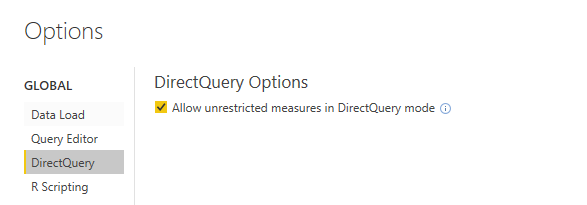
@SanthuWilly4  Have you checked the box to allow unrestricted measures via DirectQuery and that I believe should allow to use most of the functions.

directquery.PNG


Follow on LinkedIn
@ me in replies or I'll lose your thread!!!
Instead of a Kudo, please vote for this idea
Become an expert!: Enterprise DNA
External Tools: MSHGQM
YouTube Channel!: Microsoft Hates Greg
Latest book!:
DAX For Humans

DAX is easy, CALCULATE makes DAX hard...
amitchandak
Super User
Super User

@SanthuWilly4 , Transformation in direct query mode is limited to a certain set of operations. So need to check what is possible what is not. I do not think complex transformation on XML is there.


There are a few basics operations I tested out that work. But I doubt what you need is.

What I tested on direct query -https://www.youtube.com/watch?v=My0bLn9voo4&list=PLPaNVDMhUXGbKatyDdOhGbTL3xW2Xy6pA

Share with Power BI Enthusiasts: Full Power BI Video (20 Hours) YouTube
Microsoft Fabric Series 60+ Videos YouTube
Microsoft Fabric Hindi End to End YouTube

Helpful resources

Announcements
Power BI DataViz World Championships

Power BI Dataviz World Championships

The Power BI Data Visualization World Championships is back! Get ahead of the game and start preparing now!

December 2025 Power BI Update Carousel

Power BI Monthly Update - December 2025

Check out the December 2025 Power BI Holiday Recap!

FabCon Atlanta 2026 carousel

FabCon Atlanta 2026

Join us at FabCon Atlanta, March 16-20, for the ultimate Fabric, Power BI, AI and SQL community-led event. Save $200 with code FABCOMM.