cancel
Showing results for 
Search instead for 
Did you mean: 

The Power BI Data Visualization World Championships is back! Get ahead of the game and start preparing now! Learn more

Reply
DavidJLitttle
Frequent Visitor

SQL Express Local Connection Issue

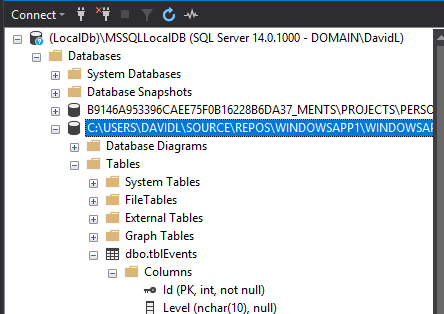
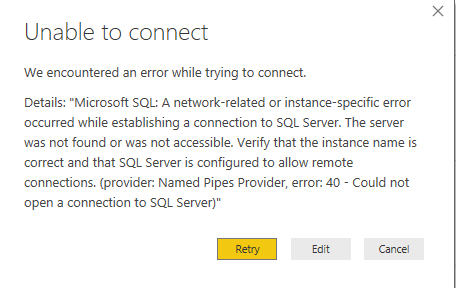
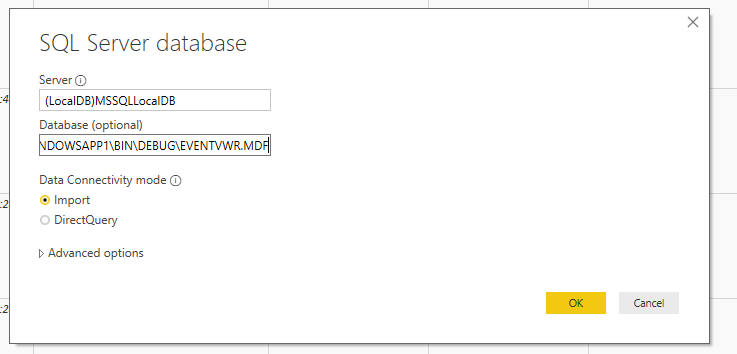
Hi, i have SQL Express running and a DB created on it. I know the DB is accessible as both SMSS and my application that is populating the DB can both connect to it fine. But PowerBI for some reason cannot connect. The SQL Express Server is running locally so in Power BI i am entering the Database name as (LocalDB)\MSSQLLocalDB and im entering the database name as per what is lsited in SSMS but it fails to connect claiming the Server cannot be found or does not accept remote connections. Both of which i know are not true as i am succesfully connecting on other apps.

DelMe.pngDelMe.pngDelMe.png

1 ACCEPTED SOLUTION
v-piga-msft
Resident Rockstar
Resident Rockstar

Hi @DavidJLitttle ,

Firstly, please check if you could use SQL Server Management Studio to connect to the remote SQL Server instance successfully? If it also fails, please follow the steps in this blog to troubleshoot this issue.

Please ensure that SSMS is installed on the same machine with Power BI Desktop.

If it success, you could try that don't type the database name as it is optional and connect it directly to check if it could connect successfully.

In addition, you could use “IP address, port” or “tcp:computername” as server name to connect to SQL Server in Power BI Desktop.

Best Regards,

Cherry


Community Support Team _ Cherry Gao
If this post helps, then please consider Accept it as the solution to help the other members find it more quickly.

View solution in original post

2 REPLIES 2
v-piga-msft
Resident Rockstar
Resident Rockstar

Hi @DavidJLitttle ,

Have you solved your problem?

If you have solved, please always accept the replies making sense as solution to your question so that people who may have the same question can get the solution directly.

If you still need help, please feel free to ask.

Best Regards,

Cherry


Community Support Team _ Cherry Gao
If this post helps, then please consider Accept it as the solution to help the other members find it more quickly.
v-piga-msft
Resident Rockstar
Resident Rockstar

Hi @DavidJLitttle ,

Firstly, please check if you could use SQL Server Management Studio to connect to the remote SQL Server instance successfully? If it also fails, please follow the steps in this blog to troubleshoot this issue.

Please ensure that SSMS is installed on the same machine with Power BI Desktop.

If it success, you could try that don't type the database name as it is optional and connect it directly to check if it could connect successfully.

In addition, you could use “IP address, port” or “tcp:computername” as server name to connect to SQL Server in Power BI Desktop.

Best Regards,

Cherry


Community Support Team _ Cherry Gao
If this post helps, then please consider Accept it as the solution to help the other members find it more quickly.

Helpful resources

Announcements
Power BI DataViz World Championships

Power BI Dataviz World Championships

The Power BI Data Visualization World Championships is back! Get ahead of the game and start preparing now!

December 2025 Power BI Update Carousel

Power BI Monthly Update - December 2025

Check out the December 2025 Power BI Holiday Recap!

FabCon Atlanta 2026 carousel

FabCon Atlanta 2026

Join us at FabCon Atlanta, March 16-20, for the ultimate Fabric, Power BI, AI and SQL community-led event. Save $200 with code FABCOMM.