Join us at FabCon Atlanta from March 16 - 20, 2026, for the ultimate Fabric, Power BI, AI and SQL community-led event. Save $200 with code FABCOMM.
Register now!Get Fabric certified for FREE! Don't miss your chance! Learn more
Hi all
I've got a SLA column with "Breached", "Within" and "No Target".
I need to work out the % "Within" based on the SLA column ("Within" and "Breached") . Anyone know how I can achieve this?
Example: If i have 110 rows in SLA Column, where 80 are Within, 20 are Breached and 10 No Target. So the % FulFillment (Within) SLA is 80% above 100 rows measured (Within and Breached items). Thankfull.
Solved! Go to Solution.
Hi @Anonymous,
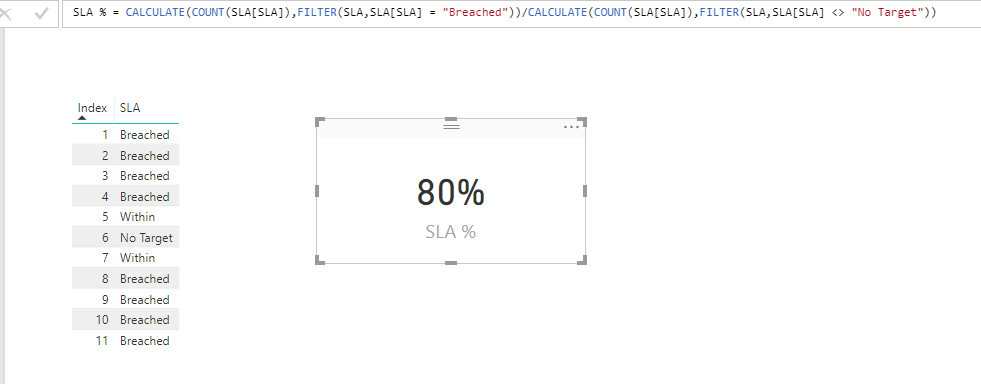
To achieve your requirement, you can try a measure with following expression:
SLA % =
CALCULATE ( COUNT ( SLA[SLA] ), FILTER ( SLA, SLA[SLA] = "Breached" ) )
/ CALCULATE ( COUNT ( SLA[SLA] ), FILTER ( SLA, SLA[SLA] <> "No Target" ) )
Thanks,
Xi Jin.
Hi @Anonymous,
To achieve your requirement, you can try a measure with following expression:
SLA % =
CALCULATE ( COUNT ( SLA[SLA] ), FILTER ( SLA, SLA[SLA] = "Breached" ) )
/ CALCULATE ( COUNT ( SLA[SLA] ), FILTER ( SLA, SLA[SLA] <> "No Target" ) )
Thanks,
Xi Jin.
My friend, is working. Thankfull.
Best Regards.
Share feedback directly with Fabric product managers, participate in targeted research studies and influence the Fabric roadmap.
Check out the January 2026 Power BI update to learn about new features.
| User | Count |
|---|---|
| 68 | |
| 59 | |
| 44 | |
| 20 | |
| 15 |
| User | Count |
|---|---|
| 104 | |
| 102 | |
| 37 | |
| 26 | |
| 26 |