Join us at FabCon Atlanta from March 16 - 20, 2026, for the ultimate Fabric, Power BI, AI and SQL community-led event. Save $200 with code FABCOMM.
Register now!The Power BI Data Visualization World Championships is back! Get ahead of the game and start preparing now! Learn more
Hi Guys,
Here i am again, now i finished almost everything
I have a query to enter all the data from last week (so not the last 7 days, but all the data from last week):
WHERE CreatedDateTime >= DATEADD(day, -(DATEPART(dw, GETDATE()) + 6), CONVERT(DATE, GETDATE()))
AND CreatedDateTime < DATEADD(day, 1 - DATEPART(dw, GETDATE()), CONVERT(DATE, GETDATE()))
But when i put my full query in DirectQuery, the SET DATEFIRST 1 function doesn't work,
is there a workaround? Because i want monday as my first day and not sunday
Thanks
Solved! Go to Solution.
Hi All,
I was trying to use SET DATEFIRST 1 in Power Query of Power BI Report and was getting error and seems like we can use SET DATEFIRST 1 in Power Query.
Refer link : https://docs.microsoft.com/en-us/sql/t-sql/statements/set-datefirst-transact-sql?view=sql-server-ver... for more details.
My SQL Server is set to use English (USA) and in USA Weeks starts on Sunday. So If I run below query It will return WeekDayNumberForSunday = 1
SELECT DATEADD(wk, DATEDIFF(wk, 0, GETDATE()), 6) AS CurrentWeekSunday_Date,
DATENAME(WEEKDAY, DATEADD(wk, DATEDIFF(wk, 0, GETDATE()), 6)) AS Sunday,
DATEPART(WEEKDAY, DATEADD(wk, DATEDIFF(wk, 0, GETDATE()), 6)) AS WeekDayNumberForSunday
I tried using SET DATEFIRST 1 in SQL View and even this is not allowed in VIEW. Then I used this expression in my VIEW:
((DATEPART(WEEKDAY, T1.RunDate) + @@DATEFIRST -1 -1) % 7) + 1
After doing bit more research I found this which is very usefull.
https://www.buttigieg.org/blog/set-datefirst-in-a-view-transact-sql
In Transact-SQL, the SET DATEFIRST command is used to set the first day of the week, so when you use the DATEPART(weekday, <Date>) function, you have control on which day of the week is first. So a common requirment is to set Monday as the first day of the week, so you'll call (Where 1 = Monday):
SET DATEFIRST 1;
GO
1 = Monday, 2 = Tuesday, 3 = Wednesday, and so forth.
Very useful, but you cannot use SET commands within a View definition, so what do you do when you want to have a certain DATEFIRST value within a view's results? Use this calculation:
SELECT ((DATEPART(weekday, <Your Date>) + @@DATEFIRST -1 -<Your DATEFIRST>) % 7) + 1
Replcaing:
<Your Date> with the date value
<Your DATEFIRST> with your diesired DATEFIRST number
And you can wrap this in your own Scalar-valued function to simplify reuse:
CREATE FUNCTION dbo.f_WEEKDAY(@dateValue datetime, @datefirst int)
RETURNS int
AS
BEGIN
RETURN ((DATEPART(weekday, @dateValue) + @@DATEFIRST -1 -@datefirst) % 7) + 1;
END
GO
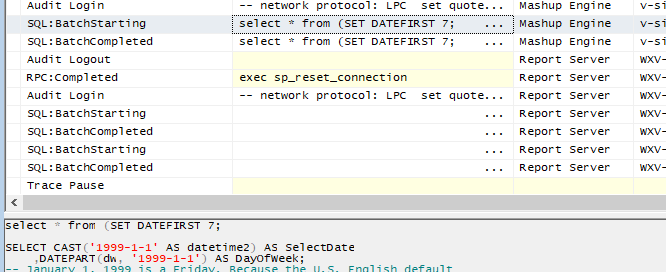
When using Direct Query mode in Power BI Desktop, it will always pass the SQL statement like:
select * from ( -your SQL query- )
That's the reason why it throws syntax error.
See a similar thread:
https://community.powerbi.com/t5/Desktop/SQL-parameters-in-direct-query/td-p/248180
I'm afraid you have to adjust the logic in your where clause.
Regards,
Thanks @v-sihou-msft for yuor answer,
I'm trying to get it in my WHERE clause, but what i can find on the internet won't help.
I tried this:
declare @MyDate datetime = getdate()
select
SELECT
CASE WHEN DATEPART(DW,CreatedDateTime) = 1
THEN 7
WHEN DATEPART(DW,CreatedDateTime) <= 7
THEN DATEPART(DW,CreatedDateTime) - 1
END
FROM myDB
WHERE CreatedDateTime >= DATEADD(day, -(DATEPART(dw, GETDATE()) + 6), CONVERT(DATE, GETDATE()))
AND CreatedDateTime < DATEADD(day, 1 - DATEPART(dw, GETDATE()), CONVERT(DATE, GETDATE()))
AND Minutes is not null
AND Minutes > 0
AND TicketNumber like 'CH%'
AND User like 'itsn%'
AND TicketNumber is not null
This won't work, guys got any idea to help me further?
- 1 select ofcourse, typo
Thanks guys, i found out the right solution!!
Do you remember the solution to this problem?
The Power BI Data Visualization World Championships is back! Get ahead of the game and start preparing now!
| User | Count |
|---|---|
| 46 | |
| 42 | |
| 34 | |
| 31 | |
| 21 |
| User | Count |
|---|---|
| 134 | |
| 124 | |
| 98 | |
| 80 | |
| 65 |