Join us at FabCon Atlanta from March 16 - 20, 2026, for the ultimate Fabric, Power BI, AI and SQL community-led event. Save $200 with code FABCOMM.
Register now!The Power BI Data Visualization World Championships is back! Get ahead of the game and start preparing now! Learn more
Hi Everyone,
I want to understand can we create a Power BI report where our data connectivity mode is both direct query and import?
1. My main data is coming from SAP BW and I want to connect it through Direct query mode.
2. I have few dimension tables which are Excel files in a Sharepoint folder and I want to connect it through import mode.
Is this possible?? If yes, can you please share some links or sources that would be really helpful.
Regards,
Nikhil Chenna
Solved! Go to Solution.
Hi @aj1973 ,
Yes, I have connected to SAP BW Application server through Direct Query and that's why I think we are not able to connect to other sources.
Thank your for help..
Regards,
Nikhil Chenna
Yes it possible, please refer to this
https://learn.microsoft.com/en-us/power-bi/transform-model/desktop-composite-models
Regards
Amine Jerbi
If I answered your question, please mark this thread as accepted
and you can follow me on
My Website, LinkedIn and Facebook
Hi @aj1973 ,
Thank you for replying..
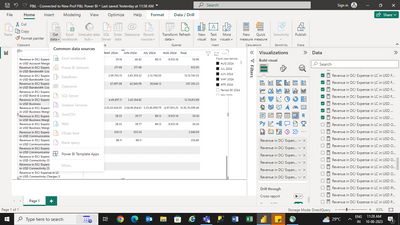
I'm connected to SAP BW it is a OLAP source, check the attached image I have already connected to a SAP BW through direct query and then if i go to Get data option all the options are greyed out.
Regards,
Nikhil Chenna
Looks like you are in Live connection mode, therefore your model falls into this limitations
Regards
Amine Jerbi
If I answered your question, please mark this thread as accepted
and you can follow me on
My Website, LinkedIn and Facebook
Hi @aj1973 ,
Yes, I have connected to SAP BW Application server through Direct Query and that's why I think we are not able to connect to other sources.
Thank your for help..
Regards,
Nikhil Chenna
Welcome
Regards
Amine Jerbi
If I answered your question, please mark this thread as accepted
and you can follow me on
My Website, LinkedIn and Facebook
The Power BI Data Visualization World Championships is back! Get ahead of the game and start preparing now!
| User | Count |
|---|---|
| 63 | |
| 55 | |
| 42 | |
| 41 | |
| 23 |
| User | Count |
|---|---|
| 171 | |
| 136 | |
| 119 | |
| 79 | |
| 54 |