FabCon is coming to Atlanta
Join us at FabCon Atlanta from March 16 - 20, 2026, for the ultimate Fabric, Power BI, AI and SQL community-led event. Save $200 with code FABCOMM.
Register now!- Power BI forums
- Get Help with Power BI
- Desktop
- Service
- Report Server
- Power Query
- Mobile Apps
- Developer
- DAX Commands and Tips
- Custom Visuals Development Discussion
- Health and Life Sciences
- Power BI Spanish forums
- Translated Spanish Desktop
- Training and Consulting
- Instructor Led Training
- Dashboard in a Day for Women, by Women
- Galleries
- Data Stories Gallery
- Themes Gallery
- Contests Gallery
- QuickViz Gallery
- Quick Measures Gallery
- Visual Calculations Gallery
- Notebook Gallery
- Translytical Task Flow Gallery
- TMDL Gallery
- R Script Showcase
- Webinars and Video Gallery
- Ideas
- Custom Visuals Ideas (read-only)
- Issues
- Issues
- Events
- Upcoming Events
The Power BI Data Visualization World Championships is back! Get ahead of the game and start preparing now! Learn more
- Power BI forums
- Forums
- Get Help with Power BI
- Desktop
- Re: SAMEPERIODLASTYEAR()
- Subscribe to RSS Feed
- Mark Topic as New
- Mark Topic as Read
- Float this Topic for Current User
- Bookmark
- Subscribe
- Printer Friendly Page

- Mark as New
- Bookmark
- Subscribe
- Mute
- Subscribe to RSS Feed
- Permalink
- Report Inappropriate Content
SAMEPERIODLASTYEAR()
Hello!!!
I´m building a sales report and have a problem with time intelligence mesures.
on the report i have two data tables, the first one is a sales table with the following columns: client/date/units (for 4 years) and a date dimension table. The only relationship between them is a many to one single relationship of the date.
I want to compare this years sales with those of the previous year by using the following measures:
The problem is that the LYTD measure adds up the sales for the whole year and I want it to add up only the months that elapsed in the current year (for ex. if YTD sums only the sales of january 2021, i want LYTD to sum only the sales od january 2020)
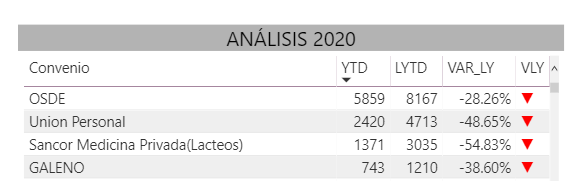
I´m showing both values in a Table.
Hope you can help me
Thank you!!
Solved! Go to Solution.


- Mark as New
- Bookmark
- Subscribe
- Mute
- Subscribe to RSS Feed
- Permalink
- Report Inappropriate Content
Hi @auxilio99357 ,
The previous code I supplied for DAX and Power Query M were both intended to be new columns in your calendar table, not measures.
For your specific scenario i.e. sales only go up to two months ago, I would recommend adding a relative month column into your calendar table, something like this:
DAX
_relativeMonth =
(YEAR(DimDates[Date]) * 12 + MONTH(DimDates[Date])) - (YEAR(TODAY()) * 12 + MONTH(TODAY()))
PQ M
(Date.Year([Date]) * 12 + Date.Month([Date])) - (Date.Year(DateTime.LocalNow()) * 12 + Date.Month(DateTime.LocalNow()))
The usage of this in a measure would look something like this:
LYTD =
CALCULATE(
  SUM(Sales[U_Liq]),
  SAMEPERIODLASTYEAR(DimDates[Date]),
  DimDates[relativeMonth] <= -2
)
Pete
Now accepting Kudos! If my post helped you, why not give it a thumbs-up?
Proud to be a Datanaut!


- Mark as New
- Bookmark
- Subscribe
- Mute
- Subscribe to RSS Feed
- Permalink
- Report Inappropriate Content
Hi @auxilio99357 ,
Just try this:
LYTD =
CALCULATE ( [YTD], SAMEPERIODLASTYEAR ( DimDates[Date] ) )
Best regards
Icey
If this post helps, then consider Accepting it as the solution to help other members find it faster.
- Mark as New
- Bookmark
- Subscribe
- Mute
- Subscribe to RSS Feed
- Permalink
- Report Inappropriate Content
Hii Icey!
I tried using the measure:
LYTD =
CALCULATE ( [YTD], SAMEPERIODLASTYEAR ( DimDates[Date] ) )
but it didn´t work! it sums up the sales of the whole previous year instead of only the months of the current year.
Can you imagine why is this happening?
Thank you!
- Mark as New
- Bookmark
- Subscribe
- Mute
- Subscribe to RSS Feed
- Permalink
- Report Inappropriate Content
Hi @auxilio99357 ,
I'll refer you back to my original answer i.e. create a 'currentDay' field in your calendar table with which you can filter pages, visuals or measures using [currentDay] = "History".
It will solve this issue for you and, if you write the [currentDay] field into your usual calendar code, it will quickly solve any similar issues for you in the future.
Pete
Now accepting Kudos! If my post helped you, why not give it a thumbs-up?
Proud to be a Datanaut!
- Mark as New
- Bookmark
- Subscribe
- Mute
- Subscribe to RSS Feed
- Permalink
- Report Inappropriate Content
Hi, @BA_Pete !!
When trying to add the field I think I understood why all the time intelligent measures don´t work as I expect. My Sales table will always contain the value of sales up to two months before the current day.
So now I want to create a 'CurrentDay' with the condition that the current day is two months from the actual current day.
To do that I'm trying to adapt the 'CurrentDay' field you specified.
First I wanted to create the field exactly as you wrote it by adding a new measure to the DimDates table and by adding a new table. In both times, when when I wrote the code, I couldn´t write "DimDates[Date]" after the IF funtion.
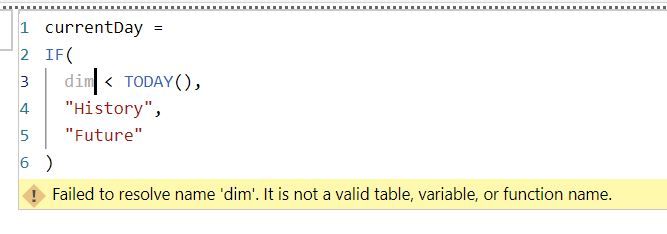
Is this correct or did I misunderstand?
Thank you
😊
- Mark as New
- Bookmark
- Subscribe
- Mute
- Subscribe to RSS Feed
- Permalink
- Report Inappropriate Content
Hi @auxilio99357 ,
The previous code I supplied for DAX and Power Query M were both intended to be new columns in your calendar table, not measures.
For your specific scenario i.e. sales only go up to two months ago, I would recommend adding a relative month column into your calendar table, something like this:
DAX
_relativeMonth =
(YEAR(DimDates[Date]) * 12 + MONTH(DimDates[Date])) - (YEAR(TODAY()) * 12 + MONTH(TODAY()))
PQ M
(Date.Year([Date]) * 12 + Date.Month([Date])) - (Date.Year(DateTime.LocalNow()) * 12 + Date.Month(DateTime.LocalNow()))
The usage of this in a measure would look something like this:
LYTD =
CALCULATE(
  SUM(Sales[U_Liq]),
  SAMEPERIODLASTYEAR(DimDates[Date]),
  DimDates[relativeMonth] <= -2
)
Pete
Now accepting Kudos! If my post helped you, why not give it a thumbs-up?
Proud to be a Datanaut!
- Mark as New
- Bookmark
- Subscribe
- Mute
- Subscribe to RSS Feed
- Permalink
- Report Inappropriate Content
Thank you @BA_Pete !!
I manage to solve most of the issues by adding that column
Regards 🙂
Auxilio99357


- Mark as New
- Bookmark
- Subscribe
- Mute
- Subscribe to RSS Feed
- Permalink
- Report Inappropriate Content
Here is one way to do it without time intelligence.
LYTD =
VAR vMaxDate =
MAX ( DimDate[Date] )
RETURN
CALCULATE (
SUM ( Sales[U_Liq] ),
FILTER (
ALL ( DimDate[Date] ),
DimDate[Date]
<= EOMONTH (
vMaxDate,
-12
)
&& DimDate[Date]
>= DATE ( YEAR ( vMaxDate ) - 1, 1, 1 )
)
)
Pat
Did I answer your question? Mark my post as a solution! Kudos are also appreciated!
To learn more about Power BI, follow me on Twitter or subscribe on YouTube.
@mahoneypa HoosierBI on YouTube

- Mark as New
- Bookmark
- Subscribe
- Mute
- Subscribe to RSS Feed
- Permalink
- Report Inappropriate Content
how are you displaying your data? have you got it at the correct grain, can you share a screenshot?
If I took the time to answer your question and I came up with a solution, please mark my post as a solution and /or give kudos freely for the effort 🙂 Thank you!
Proud to be a Super User!
- Mark as New
- Bookmark
- Subscribe
- Mute
- Subscribe to RSS Feed
- Permalink
- Report Inappropriate Content
- Mark as New
- Bookmark
- Subscribe
- Mute
- Subscribe to RSS Feed
- Permalink
- Report Inappropriate Content
Hi @auxilio99357 ,
If you don't ever want to see last year's sales ahead of where you are in the current year, then the easiest way to do this is by adding a [currentDay] field to your date dimension.
In DAX, it would be something like this:
currentDay =
IF(
  calendar[date] < TODAY(),
  "History",
  "Future"
)
In Power Query M, it would be something like this:
currentDay =
if [date] < Date.From(DateTime.LocalNow()) then "History" else "Future"
You can then really easily filter pages, visuals, or even measures using this field to prevent 'future' dates from figuring into your report.
Pete
Now accepting Kudos! If my post helped you, why not give it a thumbs-up?
Proud to be a Datanaut!

Helpful resources

Power BI Dataviz World Championships
The Power BI Data Visualization World Championships is back! Get ahead of the game and start preparing now!

Power BI Monthly Update - December 2025
Check out the December 2025 Power BI Holiday Recap!

FabCon Atlanta 2026
Join us at FabCon Atlanta, March 16-20, for the ultimate Fabric, Power BI, AI and SQL community-led event. Save $200 with code FABCOMM.

| User | Count |
|---|---|
| 39 | |
| 37 | |
| 33 | |
| 32 | |
| 29 |


| User | Count |
|---|---|
| 133 | |
| 88 | |
| 85 | |
| 68 | |
| 64 |


