Join us at FabCon Atlanta from March 16 - 20, 2026, for the ultimate Fabric, Power BI, AI and SQL community-led event. Save $200 with code FABCOMM.
Register now!The Power BI Data Visualization World Championships is back! It's time to submit your entry. Live now!
I have something very odd happening when I'm working with SAMEPERIODLASTYEAR
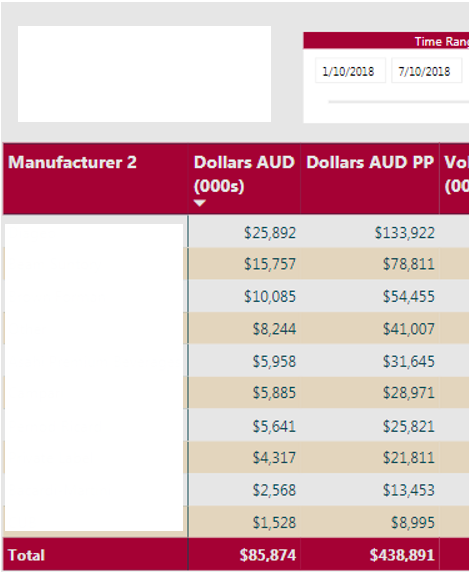
I have, in Power Query, removed any future dates from my calendar table. My fact table only has facts up to 07/10/2018 (dd-mm-yyyy) so I've limited the calendar to only go up to that date. When I select that very last date in my date range slicer it inflates my LY figures dramatically.
I have a work-around, which is to make my last date in my calendar 08/10/2018 but ideally I'd just want to have it as the very last date that has a fact attributed to it - any ideas as to why this might be happening?
e.g. below shows the issue. If I do my workaround 01/10/2018 - 07/10/2018 gives me 97,435
Hi @Anonymous,
Please illustrate your scenario with sample data. And what is the formula of those used measures?
Regards,
Yuliana Gu
| User | Count |
|---|---|
| 51 | |
| 37 | |
| 31 | |
| 21 | |
| 19 |
| User | Count |
|---|---|
| 136 | |
| 101 | |
| 58 | |
| 36 | |
| 35 |