cancel
Showing results for 
Search instead for 
Did you mean: 

View all the Fabric Data Days sessions on demand. View schedule

Reply
unclejemima
Post Patron
Post Patron

SAMEPERIODLASTYEAR error without any filters or slicers

I'm using this formula...


TotalIncomeLastYear = CALCULATE([Income4000'sCalc],SAMEPERIODLASTYEAR('Trandata'[DataDate]))

When I put it onto my report I get the error 


MdxScrip(Model)(50,69) Calculation Error in this measure.  'Trandata'[TotalIncomeLastYear]: Function "SAMEPERIODLASTYEAR" expects a contiguous selection when the date column is not unique, has gaps or it contains time portion.


I did a search and this appears typically when there is slicers on the page...I have no slicers or page level filters so I'm not sure where to go from here...


1 ACCEPTED SOLUTION
v-frfei-msft
Community Support
Community Support

Hi @unclejemima,


Based on my test, here we need to create a separate date table.


Table = CALENDAR(DATE(2016,01,01),DATE(2019,12,31))


Then create relationship between the Trandata table and the date table, and create the two measures.


Income4000'sCalc = SUM(Trandata[Income])
TotalIncomeLastYear = CALCULATE([Income4000'sCalc],SAMEPERIODLASTYEAR('Table'[Date]))


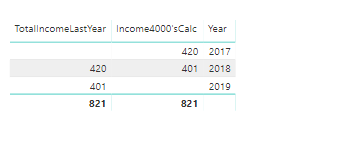
Finally, we can get the result as below.


1.png

For more details, please check the pbix as attached.


https://www.dropbox.com/s/pbrqa4d5423ev80/SAMEPERIODLASTYEAR%20error%20without%20any%20filters%20or%...


Regards,

Frank


Community Support Team _ Frank
If this post helps, then please consider Accept it as the solution to help the others find it more quickly.

View solution in original post

2 REPLIES 2
v-frfei-msft
Community Support
Community Support

Hi @unclejemima,


Based on my test, here we need to create a separate date table.


Table = CALENDAR(DATE(2016,01,01),DATE(2019,12,31))


Then create relationship between the Trandata table and the date table, and create the two measures.


Income4000'sCalc = SUM(Trandata[Income])
TotalIncomeLastYear = CALCULATE([Income4000'sCalc],SAMEPERIODLASTYEAR('Table'[Date]))


Finally, we can get the result as below.


1.png

For more details, please check the pbix as attached.


https://www.dropbox.com/s/pbrqa4d5423ev80/SAMEPERIODLASTYEAR%20error%20without%20any%20filters%20or%...


Regards,

Frank


Community Support Team _ Frank
If this post helps, then please consider Accept it as the solution to help the others find it more quickly.

Hi @unclejemima,


Does that make sense? If so , kindly mark the answer as a solution to close the case, thanks in advance.


Regards,

Frank

Community Support Team _ Frank
If this post helps, then please consider Accept it as the solution to help the others find it more quickly.

Helpful resources

Announcements
November Power BI Update Carousel

Power BI Monthly Update - November 2025

Check out the November 2025 Power BI update to learn about new features.

Fabric Data Days Carousel

Fabric Data Days

Advance your Data & AI career with 50 days of live learning, contests, hands-on challenges, study groups & certifications and more!

FabCon Atlanta 2026 carousel

FabCon Atlanta 2026

Join us at FabCon Atlanta, March 16-20, for the ultimate Fabric, Power BI, AI and SQL community-led event. Save $200 with code FABCOMM.

Top Solution Authors
Top Kudoed Authors