cancel
Showing results for 
Search instead for 
Did you mean: 

The Power BI Data Visualization World Championships is back! Get ahead of the game and start preparing now! Learn more

Reply
michellerosen
Frequent Visitor

Running total?

So I have a dates, hour, and goals query. 


A monthly goal is August "3000" hours, so my daily one is 96.77. I am trying to get my goals column to increase by 96.77 every day of August until it's 3000.

For example my goals table I have:
Month       | Goal |  Daily Goal
7/1/2017   | 4532 |  146.19
8/1/2017   | 4000 | 96.77

How could I get it to associate my daily goal with a date in Dates and add "96.77" to itself each day of the month?

5 REPLIES 5
Anonymous
Not applicable

Hi @michellerosen,


Did you means use target table to create the rolling total calendar?

If this is a case, you can refer to below sample.


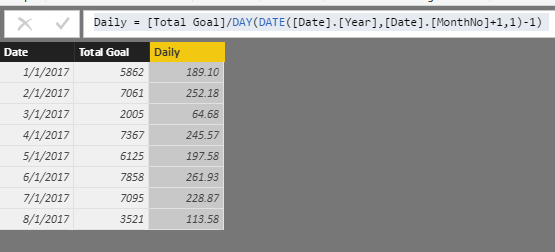
1. Calculate column daily target:

Daily = [Total Goal]/DAY(DATE([Date].[Year],[Date].[MonthNo]+1,1)-1) 

9.PNG


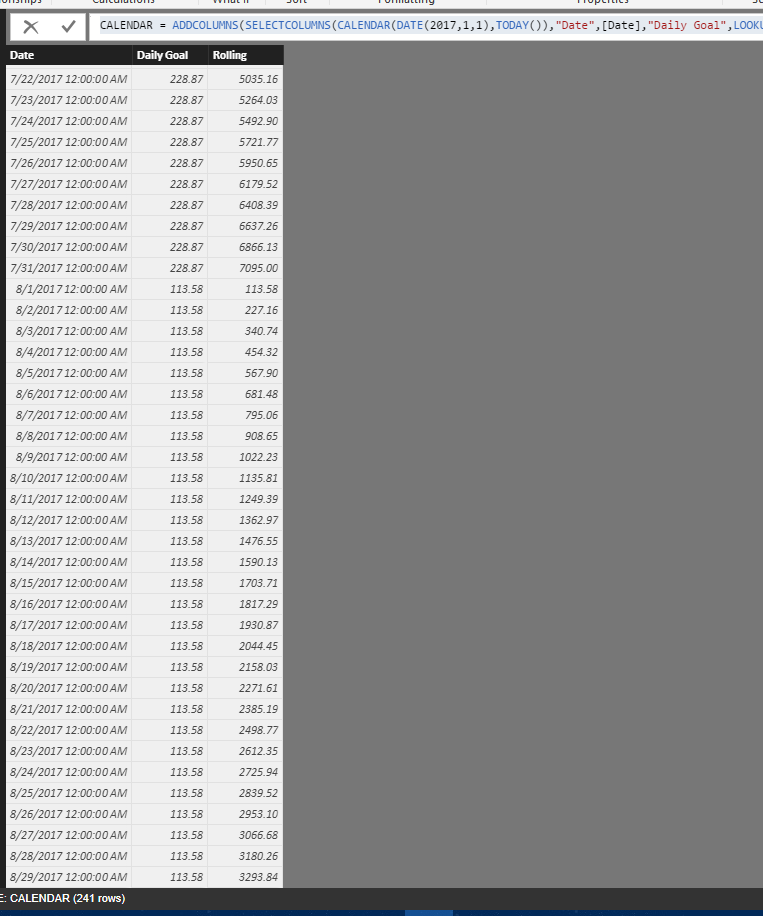
2. Rolling target calendar based on target table.

CALENDAR = ADDCOLUMNS(SELECTCOLUMNS(CALENDAR(DATE(2017,1,1),TODAY()),"Date",[Date],"Daily Goal",LOOKUPVALUE(Records[Daily],Records[Date],DATE(YEAR([Date]),MONTH([Date]),1))),"Rolling",DAY([Date])*[Daily Goal])

10.PNG


If above not help, please share some sample data to analysis.


Regards,

Xiaoxin Sheng

fhill
Resident Rockstar
Resident Rockstar


Michellerosen,


I thought we had this sovled before....  What's new / different, or what are we missing that I can help with again?


https://community.powerbi.com/t5/Desktop/Make-monthly-goal-into-daily-goal/m-p/233447


Thank You,

Forrest


Did I answer your question, or help you along the way?
Please give Kudos or Mark as a Solution!


https://www.linkedin.com/in/forrest-hill-04480730/

Proud to give back to the community!
Thank You!


The solution worked but only if I used the dates I made in the Daily Table. It wouldn't work with the dates in my Dates table, and for some reason when I added my dates in the Daily Table they would all be for the same day regardless of filter. 

Any chance you can share a copy of your PBIX file so we can review?  As you are looking for Day level detail, you'll have to have a Date table, but any Date table (as long as it has 1 entry for every date) should have worked just fine...?


FOrrest


Did I answer your question, or help you along the way?
Please give Kudos or Mark as a Solution!


https://www.linkedin.com/in/forrest-hill-04480730/

Proud to give back to the community!
Thank You!


Anonymous
Not applicable

If you are going to have a table\matrix that is by day, and you have your daily goal, you could just multiply the daily goal by the month day:


Get day of month: DAY('Calendar'[Date])


Get goal value rolleed up:

=DAY('Calendar'[Date]) * DailyGoal

Helpful resources

Announcements
Power BI DataViz World Championships

Power BI Dataviz World Championships

The Power BI Data Visualization World Championships is back! Get ahead of the game and start preparing now!

December 2025 Power BI Update Carousel

Power BI Monthly Update - December 2025

Check out the December 2025 Power BI Holiday Recap!

FabCon Atlanta 2026 carousel

FabCon Atlanta 2026

Join us at FabCon Atlanta, March 16-20, for the ultimate Fabric, Power BI, AI and SQL community-led event. Save $200 with code FABCOMM.