Join us in Barcelona for FabCon and SQLCon, September 28 - October 1, 2026.
This is best Fabric, Power BI, SQL and AI community event. How do we know? The last event sold out! Save €200 with code FABCMTY200.
Register now- Power BI forums
- Get Help with Power BI
- Desktop
- Service
- Report Server
- Power Query
- Mobile Apps
- Developer
- DAX Commands and Tips
- Custom Visuals Development Discussion
- Health and Life Sciences
- Power BI Spanish forums
- Translated Spanish Desktop
- Training and Consulting
- Instructor Led Training
- Dashboard in a Day for Women, by Women
- Galleries
- Data Stories Gallery
- Themes Gallery
- Contests Gallery
- QuickViz Gallery
- Quick Measures Gallery
- Visual Calculations Gallery
- Fabric Apps Gallery
- Notebook Gallery
- Translytical Task Flow Gallery
- TMDL Gallery
- R Script Showcase
- Webinars and Video Gallery
- Ideas
- Custom Visuals Ideas (read-only)
- Issues
- Issues
- Events
- Upcoming Events
The Fabric community is upgrading! Read all of the details including the timeline and what you can expect. Learn more
- Power BI forums
- Forums
- Get Help with Power BI
- Desktop
- Re: Running total
- Subscribe to RSS Feed
- Mark Topic as New
- Mark Topic as Read
- Float this Topic for Current User
- Bookmark
- Subscribe
- Printer Friendly Page

- Mark as New
- Bookmark
- Subscribe
- Mute
- Subscribe to RSS Feed
- Permalink
- Report Inappropriate Content
Running total
Hi All,
I want to create a running total (Not YTD) based on previous 12 months. eg; in May 2017 result should be the count of data points from April 2016 and April 2017 count of data points from March 2016.
I used following formula, which doesn't sum up the 12 months data.
RN = CALCULATE(COUNT(DATA[Risk Number]),DATESINPERIOD(DATA[Date Occurred],Lastdate(DATA[Date Occurred]),-12,MONTH))
Appreciate if anyone has a solution for it.
Solved! Go to Solution.


- Mark as New
- Bookmark
- Subscribe
- Mute
- Subscribe to RSS Feed
- Permalink
- Report Inappropriate Content
@Anonymous
Please create a relationship between the Calendar and LTI table. Then use YearMonth in the X-Axis of the Line chart as below.
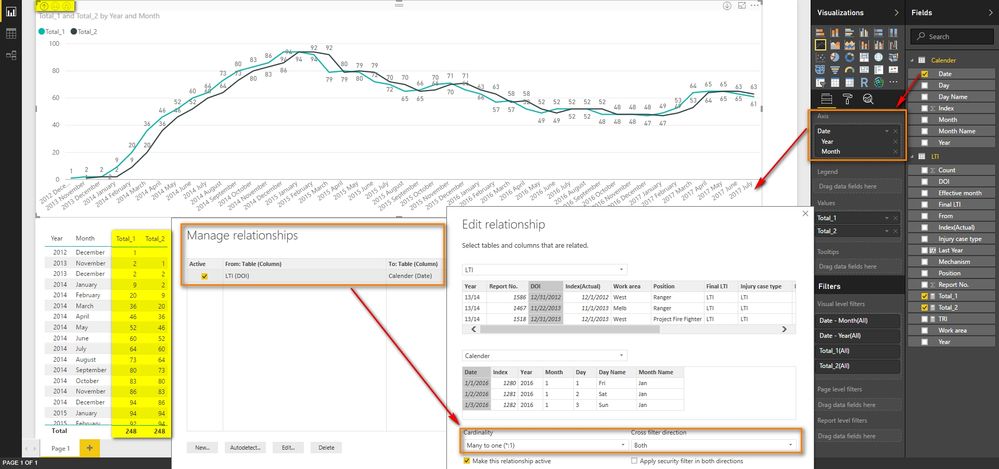
Best Regards,
Herbert
- Mark as New
- Bookmark
- Subscribe
- Mute
- Subscribe to RSS Feed
- Permalink
- Report Inappropriate Content
@Anonymous
Does above solution work on you side?
Best Regards,
Herbert
- Mark as New
- Bookmark
- Subscribe
- Mute
- Subscribe to RSS Feed
- Permalink
- Report Inappropriate Content
Hi Herbert @v-haibl-msft,
Unfortunately, it doesn't work. It only returns the total of the month not the aggregate value of last 12 months.
- Mark as New
- Bookmark
- Subscribe
- Mute
- Subscribe to RSS Feed
- Permalink
- Report Inappropriate Content
@Anonymous
That's strange. It works in my attached .pbix file. Could you please share your .pbix file through online file service like OneDrive? So that I can look into it.
Best Regards,
Herbert
- Mark as New
- Bookmark
- Subscribe
- Mute
- Subscribe to RSS Feed
- Permalink
- Report Inappropriate Content
Hi Herbert @v-haibl-msft
Check the link below ;
https://drive.google.com/open?id=0B-NaZUyqRQMoNTlBQ3BQOUU4dzQ
Regards,
Thilan
- Mark as New
- Bookmark
- Subscribe
- Mute
- Subscribe to RSS Feed
- Permalink
- Report Inappropriate Content
- Mark as New
- Bookmark
- Subscribe
- Mute
- Subscribe to RSS Feed
- Permalink
- Report Inappropriate Content
@Anonymous
Please try with following two measures.
Total_1 =
IF (
    ISBLANK ( SUM ( Table1[Sales] ) ),
    BLANK (),
    CALCULATE (
        SUM( Table1[Sales] ),
        DATESBETWEEN (
            'Calendar'[Date],
            FIRSTDATE ( DATEADD ( 'Calendar'[Date], -11, MONTH ) ),
            LASTDATE ( 'Calendar'[Date] )
        )
    )
)
Total_2 =
IF (
    ISBLANK ( SUM ( Table1[Sales] ) ),
    BLANK (),
    CALCULATE (
        SUM( Table1[Sales] ),
        DATESBETWEEN (
            'Calendar'[Date],
            FIRSTDATE ( DATEADD ( 'Calendar'[Date], -12, MONTH ) ),
            ENDOFMONTH ( DATEADD ( 'Calendar'[Date], -1, MONTH ) )
        )
    )
)
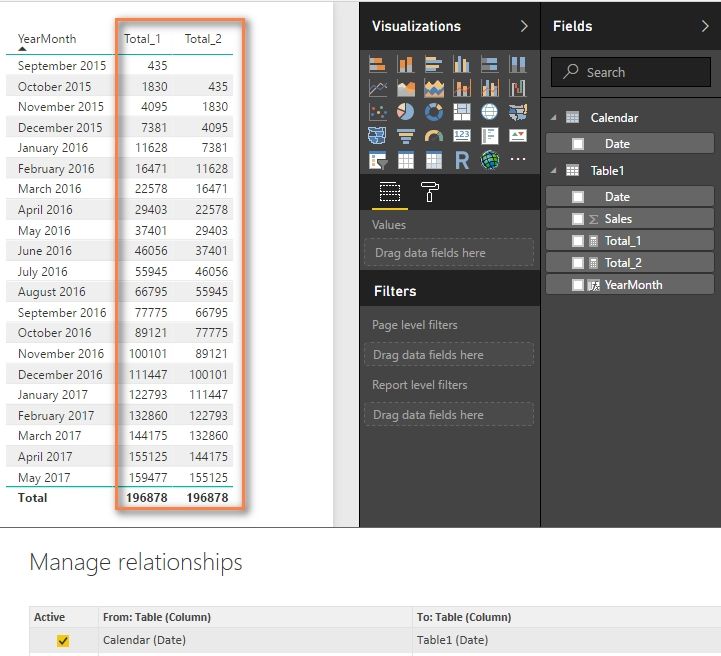
Best Regards,
Herbert
Helpful resources

FabCon & SQLCon – Barcelona 2026
Join us in Barcelona for FabCon and SQLCon, the Fabric, Power BI, SQL, and AI community event. Save €200 with code FABCMTY200.

Power BI DataViz World Championships - June 2026
A new Power BI DataViz World Championship is coming this June! Don't miss out on submitting your entry.

| User | Count |
|---|---|
| 24 | |
| 22 | |
| 20 | |
| 18 | |
| 14 |


| User | Count |
|---|---|
| 44 | |
| 36 | |
| 23 | |
| 20 | |
| 20 |


