FabCon is coming to Atlanta
Join us at FabCon Atlanta from March 16 - 20, 2026, for the ultimate Fabric, Power BI, AI and SQL community-led event. Save $200 with code FABCOMM.
Register now!- Power BI forums
- Get Help with Power BI
- Desktop
- Service
- Report Server
- Power Query
- Mobile Apps
- Developer
- DAX Commands and Tips
- Custom Visuals Development Discussion
- Health and Life Sciences
- Power BI Spanish forums
- Translated Spanish Desktop
- Training and Consulting
- Instructor Led Training
- Dashboard in a Day for Women, by Women
- Galleries
- Data Stories Gallery
- Themes Gallery
- Contests Gallery
- QuickViz Gallery
- Quick Measures Gallery
- Visual Calculations Gallery
- Notebook Gallery
- Translytical Task Flow Gallery
- TMDL Gallery
- R Script Showcase
- Webinars and Video Gallery
- Ideas
- Custom Visuals Ideas (read-only)
- Issues
- Issues
- Events
- Upcoming Events
The Power BI Data Visualization World Championships is back! Get ahead of the game and start preparing now! Learn more
- Power BI forums
- Forums
- Get Help with Power BI
- Desktop
- Re: Running total with ranking
- Subscribe to RSS Feed
- Mark Topic as New
- Mark Topic as Read
- Float this Topic for Current User
- Bookmark
- Subscribe
- Printer Friendly Page

- Mark as New
- Bookmark
- Subscribe
- Mute
- Subscribe to RSS Feed
- Permalink
- Report Inappropriate Content
Running total with ranking
Hi,
I'm trying to do a Running Total based on a rank of a measure.
After a little of research i've found the way to do the running total but i'm having a trouble with that.
I create a rank measure:
Ranking City =
RANKX(ALL(Sales[City]),[QTR Quantity],,DESC,Skip)
And a measure for the running total:
Running Total =
CALCULATE (
[QTR Quantity],
( TOPN ( [Ranking City], ALL ( Sales[City] ), [QTR Quantity] ) ))
The problem is when a pair of cities have the same rank (a tie situation) the running total sum the value of both cities in the same row / point (when it's a chart).
Example:

I think the solution is try to change the ranking so when there's a tie it should put different ranking for each member.
Thanks!
Solved! Go to Solution.
- Mark as New
- Bookmark
- Subscribe
- Mute
- Subscribe to RSS Feed
- Permalink
- Report Inappropriate Content
Finnally i´ve got the solution.
I´ve changed the approach of the formula.
Used this guide (it´s in spanish)


- Mark as New
- Bookmark
- Subscribe
- Mute
- Subscribe to RSS Feed
- Permalink
- Report Inappropriate Content
Hi @chsardas
Could you try this?
Running Total =
CALCULATE (
    [QTR Quantity],
    (
        TOPN (
            [Ranking City],
            ALL ( Sales[City] ),
            [QTR Quantity]
                + RANDBETWEEN ( 1, 100 ) / 1000
        )
    )
)
Regards
Zubair
Please try my custom visuals
- Mark as New
- Bookmark
- Subscribe
- Mute
- Subscribe to RSS Feed
- Permalink
- Report Inappropriate Content
Thanks for your reply!.
Now it only sum one of the members which are tied.

But the behavior i expect is cardenas shoud be 11.511 + 515 and COMALCALCO should be 12.026 + 515.
- Mark as New
- Bookmark
- Subscribe
- Mute
- Subscribe to RSS Feed
- Permalink
- Report Inappropriate Content
HI @chsardas
Instead of Running_Total try doing this for Ranking City
The idea is to differentiate between 2 similar Ranks by decimal points. You can hide the decimals for RANKING
Ranking City =
RANKX ( ALL ( Sales[City] ), [QTR Quantity],, DESC, SKIP )
    + RANDBETWEEN ( 1, 100 ) / 1000
Regards
Zubair
Please try my custom visuals
- Mark as New
- Bookmark
- Subscribe
- Mute
- Subscribe to RSS Feed
- Permalink
- Report Inappropriate Content
Nice idea, now the ranking shows different values:

But the running total keeps returning the same, it looks like the top n doesn't take care of the decimal. 😞
- Mark as New
- Bookmark
- Subscribe
- Mute
- Subscribe to RSS Feed
- Permalink
- Report Inappropriate Content
HI @chsardas
Sorry I went to sleep.
Could you try this please?
I hope it will work
Ranking City =
RANKX (
    ALL ( Sales[City] ),
    [QTR Quantity]
        + RANDBETWEEN ( 1, 100 ) / 1000,
    ,
    DESC,
    SKIP
)
Regards
Zubair
Please try my custom visuals
- Mark as New
- Bookmark
- Subscribe
- Mute
- Subscribe to RSS Feed
- Permalink
- Report Inappropriate Content
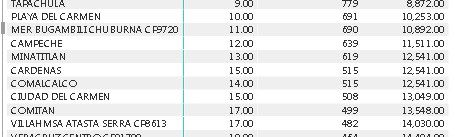
Hi!! Now the ranking works better but the running total is really weird:
- Mark as New
- Bookmark
- Subscribe
- Mute
- Subscribe to RSS Feed
- Permalink
- Report Inappropriate Content
Regards
Zubair
Please try my custom visuals
- Mark as New
- Bookmark
- Subscribe
- Mute
- Subscribe to RSS Feed
- Permalink
- Report Inappropriate Content
I've sent you a PM. 
- Mark as New
- Bookmark
- Subscribe
- Mute
- Subscribe to RSS Feed
- Permalink
- Report Inappropriate Content
Finnally i´ve got the solution.
I´ve changed the approach of the formula.
Used this guide (it´s in spanish)

Helpful resources

Power BI Dataviz World Championships
The Power BI Data Visualization World Championships is back! Get ahead of the game and start preparing now!

Power BI Monthly Update - December 2025
Check out the December 2025 Power BI Holiday Recap!

FabCon Atlanta 2026
Join us at FabCon Atlanta, March 16-20, for the ultimate Fabric, Power BI, AI and SQL community-led event. Save $200 with code FABCOMM.

| User | Count |
|---|---|
| 39 | |
| 37 | |
| 33 | |
| 32 | |
| 29 |


| User | Count |
|---|---|
| 133 | |
| 88 | |
| 85 | |
| 68 | |
| 64 |


