cancel
Showing results for 
Search instead for 
Did you mean: 

Get Fabric Certified for FREE during Fabric Data Days. Don't miss your chance! Request now

Reply
vinserra
Frequent Visitor

Running total that resets when equal to or greater than a set value

Is there a way using either Power Query M or DAX, to add a column to your data set that calculates a running total which will reset at reach valued and begin again as a running total on the line below the reached value? 


For example (illustration provided below):  I have a list of customers, their products and service dates.  I want to calculate the difference between their first service date to each of their subsequent service dates based on their product.  However, should the amount of days between their first service date and the current service date exceed or equal 60, then that current line now becomes the "first" service date and it's total is 0 and the running total now starts there.  


customer numberproductdateofservicerunning total"resetting running total"
c1p112/30/201700
c1p11/28/20182929
c1p12/27/20185959
c1p13/17/2018770
c1p14/12/201810326
c1p14/25/201811639


Hopefully that is a clear explanation.  I'm able to do running totals in a variety of ways in Power BI, but unable to do a reset.  I can make this work in Excel but haven't been able to translate the logic into M or DAX.  


Thanks in advance for the help. 

1 ACCEPTED SOLUTION

HI @vinserra


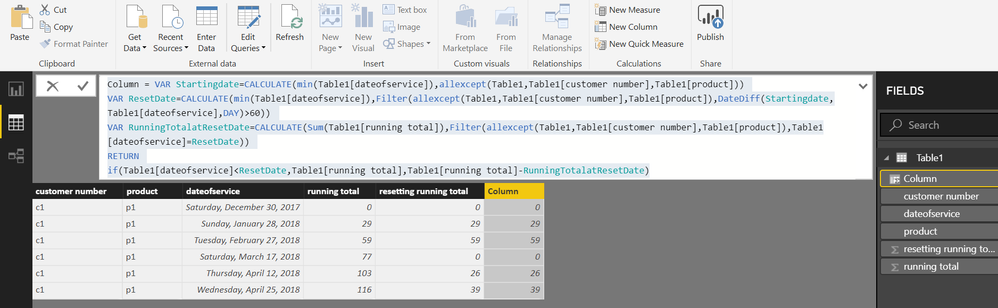
Try this calculated Column


Resetting Running Total =
VAR Startingdate =
    CALCULATE (
        MIN ( Table1[dateofservice] ),
        ALLEXCEPT ( Table1, Table1[customer number], Table1[product] )
    )
VAR ResetDate =
    CALCULATE (
        MIN ( Table1[dateofservice] ),
        FILTER (
            ALLEXCEPT ( Table1, Table1[customer number], Table1[product] ),
            DATEDIFF ( Startingdate, Table1[dateofservice], DAY ) > 60
        )
    )
VAR RunningTotalatResetDate =
    CALCULATE (
        SUM ( Table1[running total] ),
        FILTER (
            ALLEXCEPT ( Table1, Table1[customer number], Table1[product] ),
            Table1[dateofservice] = ResetDate
        )
    )
RETURN
    IF (
        Table1[dateofservice] < ResetDate,
        Table1[running total],
        Table1[running total] - RunningTotalatResetDate
    )

View solution in original post

24 REPLIES 24

Hi @Zubair_Muhammad


In the illustration I attempted to note why the reset was taking place.  Hopefully this makes the reason for resetting more clear.  Thank you for your help.


customer numberproductdateofservicerunning totalresetting running total   
c1p112/30/201700start  
c1p11/28/20182929   
c1p12/27/20185959   
c1p13/17/2018770reset: due to days between 3/17/2018 & 12/30/2018 is > 60
c1p14/12/201810326   
c1p14/25/201811639   
c1p15/23/20181440reset: due to days between 5/23/2018 & 3/17/2018 is > 60
c1p17/7/201818945   
c1p18/6/20182190reset: due to days between 8/6/2017 & 5/23/2018 is > 60

Great... this is going to be funn.... I will try my attempt... feels like this can be achieved

Works perfectly!  Thanks so much!

Helpful resources

Announcements
November Power BI Update Carousel

Power BI Monthly Update - November 2025

Check out the November 2025 Power BI update to learn about new features.

Fabric Data Days Carousel

Fabric Data Days

Advance your Data & AI career with 50 days of live learning, contests, hands-on challenges, study groups & certifications and more!

FabCon Atlanta 2026 carousel

FabCon Atlanta 2026

Join us at FabCon Atlanta, March 16-20, for the ultimate Fabric, Power BI, AI and SQL community-led event. Save $200 with code FABCOMM.

Top Solution Authors
Top Kudoed Authors