Join us in Barcelona for FabCon and SQLCon, September 28 - October 1, 2026.
This is best Fabric, Power BI, SQL and AI community event. How do we know? The last event sold out! Save €200 with code FABCMTY200.
Register now- Power BI forums
- Get Help with Power BI
- Desktop
- Service
- Report Server
- Power Query
- Mobile Apps
- Developer
- DAX Commands and Tips
- Custom Visuals Development Discussion
- Health and Life Sciences
- Power BI Spanish forums
- Translated Spanish Desktop
- Training and Consulting
- Instructor Led Training
- Dashboard in a Day for Women, by Women
- Galleries
- Data Stories Gallery
- Themes Gallery
- Contests Gallery
- QuickViz Gallery
- Quick Measures Gallery
- Visual Calculations Gallery
- Notebook Gallery
- Translytical Task Flow Gallery
- TMDL Gallery
- R Script Showcase
- Webinars and Video Gallery
- Ideas
- Custom Visuals Ideas (read-only)
- Issues
- Issues
- Events
- Upcoming Events
A new Data Days event is coming soon! This time we’re going bigger than ever. Fabric, Power BI, SQL, AI and more. Don't miss out.
- Power BI forums
- Forums
- Get Help with Power BI
- Desktop
- Re: Running total limit
- Subscribe to RSS Feed
- Mark Topic as New
- Mark Topic as Read
- Float this Topic for Current User
- Bookmark
- Subscribe
- Printer Friendly Page

- Mark as New
- Bookmark
- Subscribe
- Mute
- Subscribe to RSS Feed
- Permalink
- Report Inappropriate Content
Running total limit
Hello, I have a live running total for the month from our accounting system which i am having trouble with.
Here is the current formula:
Running total =
IF(
	MIN('Date'[Date]) <= CALCULATE(MAX(DR_INVLINES[TRANSDATE]), ALL(DR_INVLINES)),
CALCULATE(
	SUM('DR_INVLINES'[Total (NZD)]),
	FILTER(
		ALLSELECTED('Date'[Date]),
		ISONORAFTER('Date'[Date], MAX('Date'[Date]), DESC) &&
			MONTH('Date'[Date]) = MONTH(TODAY()) &&
			YEAR('Date'[Date]) = YEAR(TODAY())

	)
)
)
And the result:
My problem is that invoices are often done in advance so that (as you can see in the picture) there is values past today's date. This is due to MAX('date'date). Can someone help to modify the formula so it only displays values less than or equal to today's date?
Everything I have tried results in a flat running total line or the line continuing on to those dates but just showing no increase.
Thanks!!!!
Solved! Go to Solution.


- Mark as New
- Bookmark
- Subscribe
- Mute
- Subscribe to RSS Feed
- Permalink
- Report Inappropriate Content
Hi @moseshewetson,
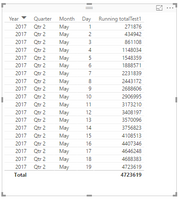
From your file, you have created the cline chart, which displays the data and running total before today. Based on your description :"Can someone help to modify the formula so it only displays values less than or equal to today's date?", I think you have got your target. While for "I need a way to filter out all transactions that are ahead of today's date so the running total line does not show dates ahead of time.", you does not show datea before today? It's confusing.
You also can create your measure using the following formula.
Running totalTest1 =
IF(FIRSTNONBLANK('Date'[Date],1)<TODAY(),CALCULATE(
 SUM(Sales[Amount]),
 FILTER(

  ALL('Date'), 'Date'[Date]<=MAX('Date'[Date])
)))
Please see the following formula, it only shows data and running total before today.
Thanks,
Angelia


- Mark as New
- Bookmark
- Subscribe
- Mute
- Subscribe to RSS Feed
- Permalink
- Report Inappropriate Content
		ISONORAFTER('Date'[Date], MAX('Date'[Date]), DESC) &&
			MONTH('Date'[Date]) = MONTH(TODAY()) &&
			YEAR('Date'[Date]) = YEAR(TODAY()) &&
                        DAY('Date'[Date]) <= DAY(TODAY())
?
Follow on LinkedIn
@ me in replies or I'll lose your thread!!!
Instead of a Kudo, please vote for this idea
Become an expert!: Enterprise DNA
External Tools: MSHGQM
YouTube Channel!: Microsoft Hates Greg
Latest book!: DAX For Humans
DAX is easy, CALCULATE makes DAX hard...
- Mark as New
- Bookmark
- Subscribe
- Mute
- Subscribe to RSS Feed
- Permalink
- Report Inappropriate Content
@smoupre wrote:ISONORAFTER('Date'[Date], MAX('Date'[Date]), DESC) && MONTH('Date'[Date]) = MONTH(TODAY()) && YEAR('Date'[Date]) = YEAR(TODAY()) &&
DAY('Date'[Date]) <= DAY(TODAY())
?
Nope Tried that...
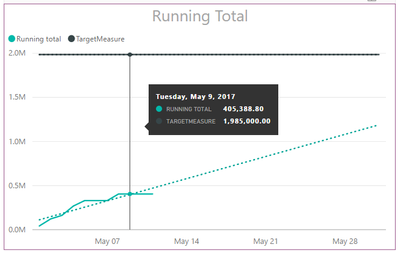
It still includes the dates but just shows no values...
- Mark as New
- Bookmark
- Subscribe
- Mute
- Subscribe to RSS Feed
- Permalink
- Report Inappropriate Content
Hi @moseshewetson,
In the screenshot, what's the means of the dotted line, hows the date? And could you please share more details for further analysis?
Thanks,
Angelia
- Mark as New
- Bookmark
- Subscribe
- Mute
- Subscribe to RSS Feed
- Permalink
- Report Inappropriate Content
Hello @v-huizhn-msft
The dotted line is just a trend line.
'Date' is a date table linked to a transaction table ('DR_INVLINES') that contains all of the sales transactions for the company.
I need a way to filter out all transactions that are ahead of today's date so the running total line does not show dates ahead of time.
Thanks.
- Mark as New
- Bookmark
- Subscribe
- Mute
- Subscribe to RSS Feed
- Permalink
- Report Inappropriate Content
Hi @moseshewetson,
Got it. Do you mind share some sample data, or .pbix file for further analysis. So we can post solution which is close to your requirement.
Thanks,
Angelia
- Mark as New
- Bookmark
- Subscribe
- Mute
- Subscribe to RSS Feed
- Permalink
- Report Inappropriate Content
Hello, here is a sample 🙂
Thanks,
- Mark as New
- Bookmark
- Subscribe
- Mute
- Subscribe to RSS Feed
- Permalink
- Report Inappropriate Content
Hi @moseshewetson,
From your file, you have created the cline chart, which displays the data and running total before today. Based on your description :"Can someone help to modify the formula so it only displays values less than or equal to today's date?", I think you have got your target. While for "I need a way to filter out all transactions that are ahead of today's date so the running total line does not show dates ahead of time.", you does not show datea before today? It's confusing.
You also can create your measure using the following formula.
Running totalTest1 =
IF(FIRSTNONBLANK('Date'[Date],1)<TODAY(),CALCULATE(
 SUM(Sales[Amount]),
 FILTER(

  ALL('Date'), 'Date'[Date]<=MAX('Date'[Date])
)))
Please see the following formula, it only shows data and running total before today.
Thanks,
Angelia

Helpful resources

Power BI Monthly Update - May 2026
Check out the May 2026 Power BI update to learn about new features.

Data Days 2026 coming soon!
Sign up to receive a private message when registration opens and key events begin.

New to Fabric Survey
If you have recently started exploring Fabric, we'd love to hear how it's going. Your feedback can help with product improvements.

Power BI DataViz World Championships - June 2026
A new Power BI DataViz World Championship is coming this June! Don't miss out on submitting your entry.

| User | Count |
|---|---|
| 32 | |
| 26 | |
| 25 | |
| 24 | |
| 15 |


| User | Count |
|---|---|
| 62 | |
| 48 | |
| 27 | |
| 21 | |
| 20 |


