Get Fabric or SQL Certified for Free.
Get certified for free when you join Fabric Data Days 2026 and dive into Fabric, Power BI, SQL, AI, and other essential data skills.
Join now- Power BI forums
- Get Help with Power BI
- Desktop
- Service
- Report Server
- Power Query
- Mobile Apps
- Developer
- DAX Commands and Tips
- Custom Visuals Development Discussion
- Health and Life Sciences
- Power BI Spanish forums
- Translated Spanish Desktop
- Training and Consulting
- Instructor Led Training
- Dashboard in a Day for Women, by Women
- Galleries
- Data Stories Gallery
- Themes Gallery
- Contests Gallery
- QuickViz Gallery
- Quick Measures Gallery
- Visual Calculations Gallery
- Notebook Gallery
- Translytical Task Flow Gallery
- TMDL Gallery
- R Script Showcase
- Webinars and Video Gallery
- Ideas
- Custom Visuals Ideas (read-only)
- Issues
- Issues
- Events
- Upcoming Events
July 7 - July 17 | Round 2 of the Power BI Dataviz World Championships. Don't miss your chance! Learn more
- Power BI forums
- Forums
- Get Help with Power BI
- Desktop
- Re: Running Total?
- Subscribe to RSS Feed
- Mark Topic as New
- Mark Topic as Read
- Float this Topic for Current User
- Bookmark
- Subscribe
- Printer Friendly Page

- Mark as New
- Bookmark
- Subscribe
- Mute
- Subscribe to RSS Feed
- Permalink
- Report Inappropriate Content
Running Total?
Hello,
I think I need help with calculating a running total, though I'm not sure. Apologies if this has been answered elsewhere.
I took some time to create an example file.
In the example file, I have two excel tables loaded into Power Query as connection only, and loaded to data model. I have not created any relationships or measures.
The first table shows employees and their FTE per position.
The second table is a list of dates incremented by 1 day.
I created a dummy end goal sheet (3rd tab). I'd like the user to be able to filter by employee and see a line chart of the running total(?) of FTE. Yes I'm using Excel... I hope it's clear what I'm trying to do!
I'm more of a power query guy than a DAX guy, and I think I need a DAX measure to achieve what I want...
Any help would be appreciated !!
- Kurt
Solved! Go to Solution.

- Mark as New
- Bookmark
- Subscribe
- Mute
- Subscribe to RSS Feed
- Permalink
- Report Inappropriate Content
Hi @kbarber ,
I create a measure using SUMX function. You could reference it to have a try.
Measure =
SUMX (
    FILTER (
        FTE,
        FTE[Pos Start] <= MAX ( 'Calendar'[Date] )
            && (
                FTE[Pos End] >= MAX ( 'Calendar'[Date] )
                    || ISBLANK ( FTE[Pos End] )
            )
    ),
    FTE[FTE]
)
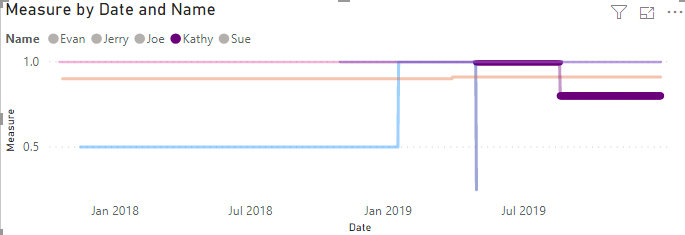
Best Regards,
Xue Ding
If this post helps, then please consider Accept it as the solution to help the other members find it more quickly.
Xue Ding
If this post helps, then please consider Accept it as the solution to help the other members find it more quickly.
- Mark as New
- Bookmark
- Subscribe
- Mute
- Subscribe to RSS Feed
- Permalink
- Report Inappropriate Content
Hi @kbarber ,
I create a measure using SUMX function. You could reference it to have a try.
Measure =
SUMX (
    FILTER (
        FTE,
        FTE[Pos Start] <= MAX ( 'Calendar'[Date] )
            && (
                FTE[Pos End] >= MAX ( 'Calendar'[Date] )
                    || ISBLANK ( FTE[Pos End] )
            )
    ),
    FTE[FTE]
)
Best Regards,
Xue Ding
If this post helps, then please consider Accept it as the solution to help the other members find it more quickly.
Xue Ding
If this post helps, then please consider Accept it as the solution to help the other members find it more quickly.
- Mark as New
- Bookmark
- Subscribe
- Mute
- Subscribe to RSS Feed
- Permalink
- Report Inappropriate Content
We are having a peculiar situation where we need to calculating cumulative running totals in fly reducing a certain percentage value(.98). The new row should take the previous calculated value to cumulation.
Below is the sample data set. Here you see 5th row is cumulation till 4th row multiplied by .98, where 6th row should take the result of previous calculation that is 9.8 for cumulation and not 10.
Please let me know your thoughts on this which is our last resort 😊
Rep Month/Year Measure Cumulative result Calculation
Rep1 2017001 0 0
Rep1 2017002 0 0
Rep1 2017003 0 0
Rep1 2017004 10 9.8 (0+10)*.98 = 9.8
Rep1 2017005 10 19.404 (9.8 + 10)* .98
Rep1 2017006 0 19.01 (19.04+0)*.98
Rep1 2017007 10 28.43 (19.01 + 10)*.98
Rep1 2017008 20 47.46 (28.43+20) * .98
Rep1 2017009 6 52.39 (47.46+6)*.98
Rep1 2017010 30
Rep1 2017011 0
Rep1 2017012 0
- Mark as New
- Bookmark
- Subscribe
- Mute
- Subscribe to RSS Feed
- Permalink
- Report Inappropriate Content
hello @Anonymous - since your use case is different, i'd recommend posting as a new question. Also, i find if i create a dummy file and link to the post it's more likely to get a response...
- Kurt
- Mark as New
- Bookmark
- Subscribe
- Mute
- Subscribe to RSS Feed
- Permalink
- Report Inappropriate Content
- Mark as New
- Bookmark
- Subscribe
- Mute
- Subscribe to RSS Feed
- Permalink
- Report Inappropriate Content
@v-xuding-msft - that worked!!!
thank you so much for taking the time to respond; made my day!
In my limited understanding of DAX/Modeling, I thought I'd first have to create table relationships between the tables. I'm a bit surprised that no relationships are necessary...
thanks again,
- Kurt


- Mark as New
- Bookmark
- Subscribe
- Mute
- Subscribe to RSS Feed
- Permalink
- Report Inappropriate Content
I would start with the Running Total Quick Measure built into Power BI Desktop. Even if you are using Excel, you can fire up Power BI Desktop and check out the DAX code. Failing that, see if my Time Intelligence the Hard Way provides a different way of accomplishing what you are going for.
https://community.powerbi.com/t5/Quick-Measures-Gallery/Time-Intelligence-quot-The-Hard-Way-quot-TIT...
Follow on LinkedIn
@ me in replies or I'll lose your thread!!!
Instead of a Kudo, please vote for this idea
Become an expert!: Enterprise DNA
External Tools: MSHGQM
YouTube Channel!: Microsoft Hates Greg
Latest book!: DAX For Humans
DAX is easy, CALCULATE makes DAX hard...

Helpful resources

FabCon & SQLCon – Barcelona 2026
Join us in Barcelona for FabCon and SQLCon, the Fabric, Power BI, SQL, and AI community event. Save €200 with code FABCMTY200.

Data Days 2026
Join Fabric Data Days 2026: 60 days of free live/on-demand sessions, challenges, study groups, and certification opportunities.

Power BI DataViz World Championships - June 2026
A new Power BI DataViz World Championship is coming this June! Don't miss out on submitting your entry.

| User | Count |
|---|---|
| 22 | |
| 22 | |
| 18 | |
| 16 | |
| 13 |


| User | Count |
|---|---|
| 63 | |
| 41 | |
| 40 | |
| 39 | |
| 38 |


