cancel
Showing results for 
Search instead for 
Did you mean: 

We've captured the moments from FabCon & SQLCon that everyone is talking about, and we are bringing them to the community, live and on-demand. Starts on April 14th. Register now

Reply
STS_Joshua
Helper II
Helper II

Running Total

Hi All,


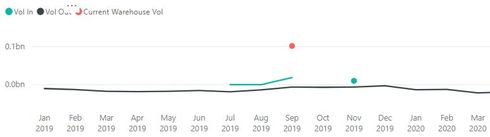
I have an issue I could use some help with. I need to create a running total measure instead of the below.

example.JPG


Where that has +'s and -'s for each month, this data isn't really totaled up so that it makes sense looking in the future.

Where I have this:


Current Month:

Current Inventory: 10

Ins: 5

Outs: 6

Final Inventory : 9


Next Month:

Current Inventory: 0 

Ins: 0

Outs: 7

Final Inventory : -7


I'd like this:


Current Month:

Current Inventory: 10

Ins: 5

Outs: 6

Final Inventory : 9


Next Month:

Current Inventory: 9 

Ins: 0

Outs: 7

Final Inventory : 2


Thanks!


1 ACCEPTED SOLUTION
amitchandak
Super User
Super User

Try Like this . Adding Inventory from day one.  I have used the same table. Use appropriate tables 


Inventory till date = 
Var _min_date_for_inventory = CALCULATE(maxx(all('Date'[Date Filer]),'Date'[Date Filer]))
Var _Todays_date=CALCULATE(maxx(ALLSELECTED('Date'[Date Filer]),'Date'[Date Filer]))

Var _inventory= CALCULATE(sum(Sales[Sales Amount]),Sales[Sales Date]<=_min_date_for_inventory)
Var   Sale_till_tody =CALCULATE(sum(Sales[Sales Amount]),filter(sales,Sales[Sales Date]<=maxx(Sales,Sales[Sales Date].[Date])))
Var   purchase_till_tody =CALCULATE(sum(Sales[Sales Amount]),filter(sales,Sales[Sales Date]<=maxx(Sales,Sales[Sales Date].[Date])))

return
_inventory+Sale_till_tody-purchase_till_tody


Share with Power BI Enthusiasts: Full Power BI Video (20 Hours) YouTube
Microsoft Fabric Series 60+ Videos YouTube
Microsoft Fabric Hindi End to End YouTube

View solution in original post

2 REPLIES 2
amitchandak
Super User
Super User

Try Like this . Adding Inventory from day one.  I have used the same table. Use appropriate tables 


Inventory till date = 
Var _min_date_for_inventory = CALCULATE(maxx(all('Date'[Date Filer]),'Date'[Date Filer]))
Var _Todays_date=CALCULATE(maxx(ALLSELECTED('Date'[Date Filer]),'Date'[Date Filer]))

Var _inventory= CALCULATE(sum(Sales[Sales Amount]),Sales[Sales Date]<=_min_date_for_inventory)
Var   Sale_till_tody =CALCULATE(sum(Sales[Sales Amount]),filter(sales,Sales[Sales Date]<=maxx(Sales,Sales[Sales Date].[Date])))
Var   purchase_till_tody =CALCULATE(sum(Sales[Sales Amount]),filter(sales,Sales[Sales Date]<=maxx(Sales,Sales[Sales Date].[Date])))

return
_inventory+Sale_till_tody-purchase_till_tody


Share with Power BI Enthusiasts: Full Power BI Video (20 Hours) YouTube
Microsoft Fabric Series 60+ Videos YouTube
Microsoft Fabric Hindi End to End YouTube
Ashish_Mathur
Super User
Super User

Hi,

Share the link from where i can download your PBI file.


Regards,
Ashish Mathur
http://www.ashishmathur.com
https://www.linkedin.com/in/excelenthusiasts/

Helpful resources

Announcements
New to Fabric survey Carousel

New to Fabric Survey

If you have recently started exploring Fabric, we'd love to hear how it's going. Your feedback can help with product improvements.

Power BI DataViz World Championships carousel

Power BI DataViz World Championships - June 2026

A new Power BI DataViz World Championship is coming this June! Don't miss out on submitting your entry.

Join our Fabric User Panel

Join our Fabric User Panel

Share feedback directly with Fabric product managers, participate in targeted research studies and influence the Fabric roadmap.

March Power BI Update Carousel

Power BI Community Update - March 2026

Check out the March 2026 Power BI update to learn about new features.