Join us at FabCon Atlanta from March 16 - 20, 2026, for the ultimate Fabric, Power BI, AI and SQL community-led event. Save $200 with code FABCOMM.
Register now!The Power BI Data Visualization World Championships is back! It's time to submit your entry. Live now!
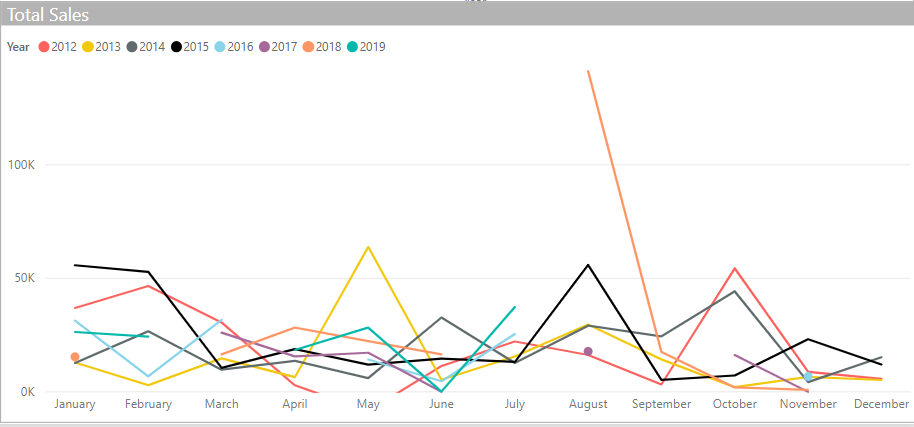
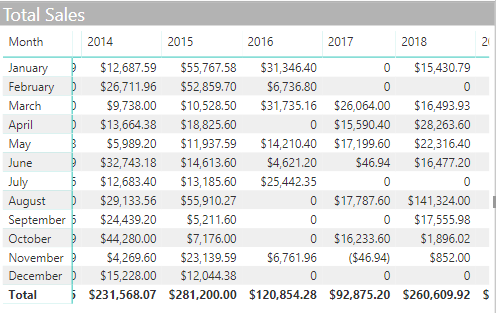
I have a table with sales by month and year and wtih some months zero, I am trying to create a line chart that shows running total throughout the year, but the blank values are getting me and I can't see how to overcome this.
I use this formula for the table and it works well, but can't see after reading all the posts on this topic how to close the gap on my problem
@Anonymous
You may check if the following post helps.
https://community.powerbi.com/t5/Desktop/Dax-Measure-Fill-Down-Value/m-p/594415#M282232
Hi,
What result are you expecting?
I am looking for a total that adds up the prior months, but then also just repeats previous month until a value comes in.
So that the line is continious
I would use some of the time intelligent functions that DAX has, i.e. TOTALYTD. This should make your lines continuous.
Sales YTD = TOTALYTD( [Sales]; Date[Date]) // Returns the running total for the year
I cannot recreate the issue in my own workbook. But I have two suggestions which might work:
As you can see in the picture below then when there are no observations in a given month then the line just stays horizontally in my workbook (which I believe is the functionality you are looking for?)
The Power BI Data Visualization World Championships is back! It's time to submit your entry.
Check out the January 2026 Power BI update to learn about new features.
| User | Count |
|---|---|
| 56 | |
| 42 | |
| 40 | |
| 21 | |
| 21 |
| User | Count |
|---|---|
| 149 | |
| 105 | |
| 63 | |
| 36 | |
| 36 |