Don't miss your chance to take the Fabric Data Engineer (DP-700) exam on us!
Learn moreWe've captured the moments from FabCon & SQLCon that everyone is talking about, and we are bringing them to the community, live and on-demand. Starts on April 14th. Register now
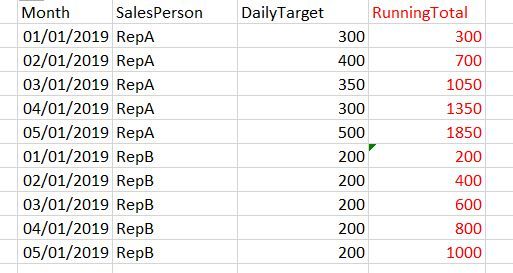
Want to get a running total for each date by SalesReps, ordering by date (ie. Month column) ascending. I have highlighted in red what I am trying to achieve.
Solved! Go to Solution.
RunningTote = VAR _SPerson = TableX[sPerson]
VAR _Day = TableX[day]
RETURN
CALCULATE(SUM([dTarget]),
FILTER(TableX,
TableX[day] <= _Day &&
TableX[sPerson] = _SPerson))Create a calculated column, swap in your table and column names.
Quick Tip : For better help, post sample data rather than a picture of the data
hi, @OLoughanD
You could use Time-intelligence functions: TOTALYTD, TOTALMTD
measre=CALCULATE([DailyTarget],DATESYTD('Date'[Date]))
or filter over the date column using FILTER called as below:
Measure= CALCULATE( SUM(DailyTarget), FILTER (ALLSELECTED ( 'Date'[Date] ), AND ( 'Date'[Date] <= MAX ( 'Date'[Date] ), YEAR ( 'Date'[Date] ) = YEAR ( MAX ( 'Date'[Date] ) ) ) ) )
or
Measure= CALCULATE( SUM([DailyTarget]), FILTER (ALLSELECTED ( 'Date'[Date] ), AND ( 'Date'[Date] <= MAX ( 'Date'[Date] ), AND ( YEAR ( 'Date'[Date] ) = YEAR ( MAX ( 'Date'[Date] ) ), MONTH ( 'Date'[Date] ) = MONTH ( MAX ( 'Date'[Date] ) ) ) ) ) )
Best Regards,
Lin
Hi,
Try this:
Target = SUM(Data[DailyTarget])
RunningTotal = CALCULATE([Target],DATESYTD(Calendar[Date],"31/12"))
Hope this helps.
RunningTote = VAR _SPerson = TableX[sPerson]
VAR _Day = TableX[day]
RETURN
CALCULATE(SUM([dTarget]),
FILTER(TableX,
TableX[day] <= _Day &&
TableX[sPerson] = _SPerson))Create a calculated column, swap in your table and column names.
Quick Tip : For better help, post sample data rather than a picture of the data
@HotChilliThank you very much. This worked perfectly. I added a column to my table and based on your proposed solution my final code was:
If you have recently started exploring Fabric, we'd love to hear how it's going. Your feedback can help with product improvements.
A new Power BI DataViz World Championship is coming this June! Don't miss out on submitting your entry.
Share feedback directly with Fabric product managers, participate in targeted research studies and influence the Fabric roadmap.
| User | Count |
|---|---|
| 55 | |
| 40 | |
| 35 | |
| 19 | |
| 18 |
| User | Count |
|---|---|
| 71 | |
| 70 | |
| 38 | |
| 35 | |
| 23 |