Share feedback directly with Fabric product managers, participate in targeted research studies and influence the Fabric roadmap.
Sign up nowGet Fabric certified for FREE! Don't miss your chance! Learn more
Hi guys,
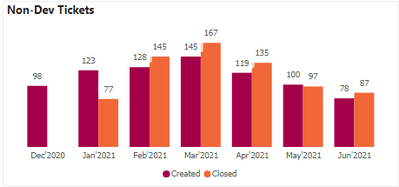
I have the below graph and I want to show the running total in it.
Please let me know the best approach for this.
i mean the open ticket for Dec should be 98, for Jan it should be (123-77) + 98 = 144, for Feb (128-145) + 144= 127 and so on. In the end for june i should get 83 as open.
is there any DAX calculation for this or should I consider creating a quick measure?
Regards,
Himanshu
Hi @Anonymous,
Can you please share some dummy data with a similar data structure and expected results? It should help us clarify your scenario and test to coding formula.
How to Get Your Question Answered Quickly
Regards,
Xiaoxin Sheng
@Anonymous
You will need to have measure something like:
Running Total Closed =
CALCULATE (
[OpenTicketsMeasure],
FILTER (
ALL(dates),
dates[date] < = max(dates[date])
)
)
⭕ Subscribe and learn Power BI from these videos
⚪ Website ⚪ LinkedIn ⚪ PBI User Group
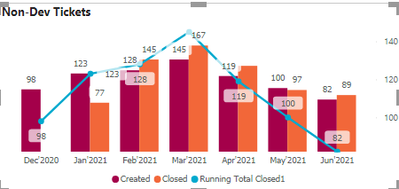
I created the below measure but its not giving correct value.
Try:
Running Total Closed1 =
CALCULATE (
[Non-Dev Tags],
FILTER (
ALL('DAX Date Table'),
'DAX Date Table'[Date] <= max('DAX Date Table'[Date])
)
)
⭕ Subscribe and learn Power BI from these videos
⚪ Website ⚪ LinkedIn ⚪ PBI User Group
No This is giving extremely wrong numbers.
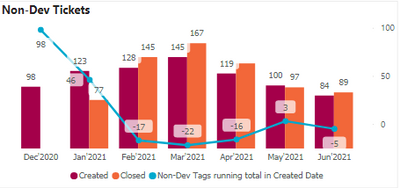
I tried using the measure:
Share feedback directly with Fabric product managers, participate in targeted research studies and influence the Fabric roadmap.
| User | Count |
|---|---|
| 62 | |
| 62 | |
| 42 | |
| 21 | |
| 18 |
| User | Count |
|---|---|
| 120 | |
| 113 | |
| 38 | |
| 29 | |
| 28 |