cancel
Showing results for 
Search instead for 
Did you mean: 

Try your skills in the Power BI Dataviz World Championship! Round one ends June 26. Join now

Reply
ziyabikram96
Helper V
Helper V

Running Total

Hi,

I need to calculate running totals over hierarchical period i.e quarters,months,weeks. I have tried using STARTOFYEAR() and FIRSTDATE() but couldn't get the solution. I need to put it into the line chart where the axis is hierarchical. I guess, period context is affecting STARTOFYEAR and FIRSTDATE.

Thank you!

4 REPLIES 4
v-alq-msft
Community Support
Community Support

Hi, @ziyabikram96 


Running total calculation depends on the period used to display the result. I created data to reproduce your scenario to calculate the running total 3 month. The pbix file is attached in the end.

Table:

d1.png


Calendar(a calculated table):

Calendar = CALENDARAUTO()


There is a relationship between two tables. You may create a measure as below.

Running total 3 month = 
IF(
    NOT(ISBLANK(SELECTEDVALUE('Table'[Date]))),
    CALCULATE(
        SUM('Table'[Value]),
        DATESINPERIOD(
            'Calendar'[Date],
            LASTDATE('Calendar'[Date]),
            -3,MONTH
        )
    )
)


Result:
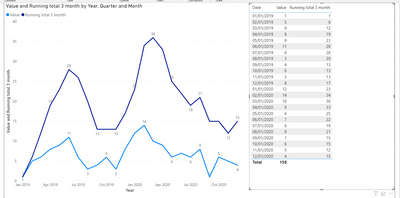
d2.png


Best Regards

Allan


If this post helps, then please consider Accept it as the solution to help the other members find it more quickly.

But, it has to be dynamic. Like, I don't have to specifically mention "-3" using DATESINPERIOD function. It should take just first and last date and then calculate running total between that period.

amitchandak
Super User
Super User

@ziyabikram96 , these are various way to have running totals with ate table

MTD Sales = CALCULATE(SUM(Sales[Sales Amount]),DATESMTD('Date'[Date])) //monthly

QTD Sales = CALCULATE(SUM(Sales[Sales Amount]),DATESQTD(('Date'[Date]))) //qrtly

YTD Sales = CALCULATE(SUM(Sales[Sales Amount]),DATESYTD('Date'[Date],"12/31")) //yearly

Cumm Sales = CALCULATE(SUM(Sales[Sales Amount]),filter(date,date[date] <=maxx(date,date[date]))) //overall
Cumm Sales = CALCULATE(SUM(Sales[Sales Amount]),filter(date,date[date] <=max(Sales[Sales Date])))


Can you share sample data and sample output in table format?


To get the best of the time intelligence function. Make sure you have a date calendar and it has been marked as the date in model view. Also, join it with the date column of your fact/s. Refer :
https://radacad.com/creating-calendar-table-in-power-bi-using-dax-functions
https://www.archerpoint.com/blog/Posts/creating-date-table-power-bi
https://www.sqlbi.com/articles/creating-a-simple-date-table-in-dax/

See if my webinar on Time Intelligence can help: https://community.powerbi.com/t5/Webinars-and-Video-Gallery/PowerBI-Time-Intelligence-Calendar-WTD-Y...


Appreciate your Kudos.

Share with Power BI Enthusiasts: Full Power BI Video (20 Hours) YouTube
Microsoft Fabric Series 60+ Videos YouTube
Microsoft Fabric Hindi End to End YouTube

I have a Sales Table & a Calendar Table where Sales table has many-to-1 relation with Calendar table. Here is my measure:

Sales from first day =
VAR firstdatee = CALCULATE(FIRSTDATE(SALES[Date]),ALL('CALENDAR'[Quarter Description]),ALL('CALENDAR'[Month Short]),ALL('CALENDAR'[Week in Year]))
VAR lastdatee = LASTDATE(SALES[Date])
RETURN
CALCULATE(SUM(SALES[Sales]),DATESBETWEEN(SALES[Date],firstdatee,lastdatee))

Helpful resources

Announcements
Fabric Data Days is here Carousel

Fabric Data Days 2026

Don't miss out on Data Days, June 15 through August 7. Learn Fabric, Power BI, SQL, AI and more.

Power BI DataViz World Championships carousel

Power BI DataViz World Championships - June 2026

A new Power BI DataViz World Championship is coming this June! Don't miss out on submitting your entry.