FabCon is coming to Atlanta
Join us at FabCon Atlanta from March 16 - 20, 2026, for the ultimate Fabric, Power BI, AI and SQL community-led event. Save $200 with code FABCOMM.
Register now!- Power BI forums
- Get Help with Power BI
- Desktop
- Service
- Report Server
- Power Query
- Mobile Apps
- Developer
- DAX Commands and Tips
- Custom Visuals Development Discussion
- Health and Life Sciences
- Power BI Spanish forums
- Translated Spanish Desktop
- Training and Consulting
- Instructor Led Training
- Dashboard in a Day for Women, by Women
- Galleries
- Data Stories Gallery
- Themes Gallery
- Contests Gallery
- QuickViz Gallery
- Quick Measures Gallery
- Visual Calculations Gallery
- Notebook Gallery
- Translytical Task Flow Gallery
- TMDL Gallery
- R Script Showcase
- Webinars and Video Gallery
- Ideas
- Custom Visuals Ideas (read-only)
- Issues
- Issues
- Events
- Upcoming Events
The Power BI Data Visualization World Championships is back! Get ahead of the game and start preparing now! Learn more
- Power BI forums
- Forums
- Get Help with Power BI
- Desktop
- Running Total restart each year
- Subscribe to RSS Feed
- Mark Topic as New
- Mark Topic as Read
- Float this Topic for Current User
- Bookmark
- Subscribe
- Printer Friendly Page

- Mark as New
- Bookmark
- Subscribe
- Mute
- Subscribe to RSS Feed
- Permalink
- Report Inappropriate Content
Running Total restart each year
Hi I'm calculating a running total for each quarter each year and I would want it to stop and restart at the end of each year.
This is for TRACKED_LOANS. My current calculation is:
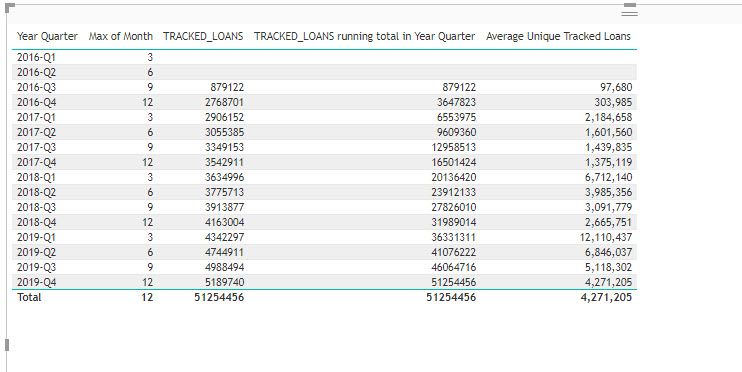
Solved! Go to Solution.


- Mark as New
- Bookmark
- Subscribe
- Mute
- Subscribe to RSS Feed
- Permalink
- Report Inappropriate Content
To use this Time Intelligence function you need a proper Date table and reference the column that has marked as the date column (not possible with a column like you showed in your picture).
If you're not prepared to work with such a table, you'd have to add a year-filter into your original measure like so:
TRACKED_LOANS running total in Year Quarter =
CALCULATE(
    SUM('FACT_Unique Tracked Loans'[TRACKED_LOANS]),
    FILTER(
        ALLSELECTED('DIM_Date'[Year Quarter]),
        ISONORAFTER('DIM_Date'[Year Quarter], MAX('DIM_Date'[Year Quarter]), DESC)
    ),
    FILTER(
        ALL('DIM_Date'[Year]),
        'DIM_Date'[Year] = MAX('DIM_Date'[Year])
    )
)
Imke Feldmann (The BIccountant)
If you liked my solution, please give it a thumbs up. And if I did answer your question, please mark this post as a solution. Thanks!
How to integrate M-code into your solution -- How to get your questions answered quickly -- How to provide sample data -- Check out more PBI- learning resources here -- Performance Tipps for M-queries
- Mark as New
- Bookmark
- Subscribe
- Mute
- Subscribe to RSS Feed
- Permalink
- Report Inappropriate Content
hey There
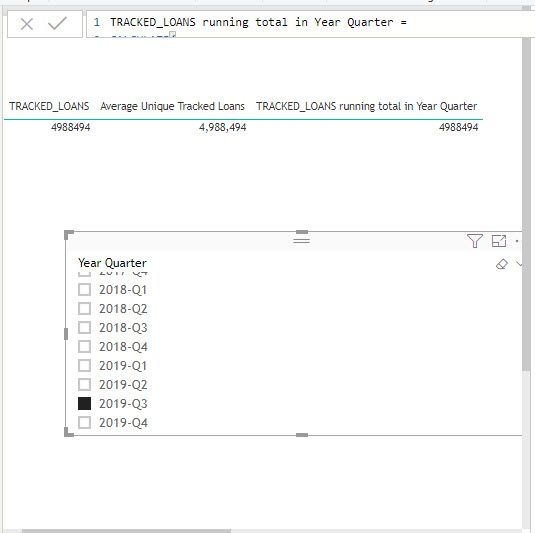
When I adda slicer of the quarter year this breaks the calculation and this gives me the tracked loans again
- Mark as New
- Bookmark
- Subscribe
- Mute
- Subscribe to RSS Feed
- Permalink
- Report Inappropriate Content
That's due to the ALLSELECTED you've used. I strongly recommend to work with a proper date table, then you can use standard solutions for your problems.
Now you can try sth like this:
TRACKED_LOANS running total in Year Quarter =
CALCULATE(
    SUM('FACT_Unique Tracked Loans'[TRACKED_LOANS]),
    FILTER(
        ALL('DIM_Date'[Year Quarter]),
        'DIM_Date'[Year Quarter] <= MAX('DIM_Date'[Year Quarter])
    ),
    FILTER(
        ALL('DIM_Date'[Year]),
        'DIM_Date'[Year] = MAX('DIM_Date'[Year])
    )
)
Imke Feldmann (The BIccountant)
If you liked my solution, please give it a thumbs up. And if I did answer your question, please mark this post as a solution. Thanks!
How to integrate M-code into your solution -- How to get your questions answered quickly -- How to provide sample data -- Check out more PBI- learning resources here -- Performance Tipps for M-queries
- Mark as New
- Bookmark
- Subscribe
- Mute
- Subscribe to RSS Feed
- Permalink
- Report Inappropriate Content
Hello,
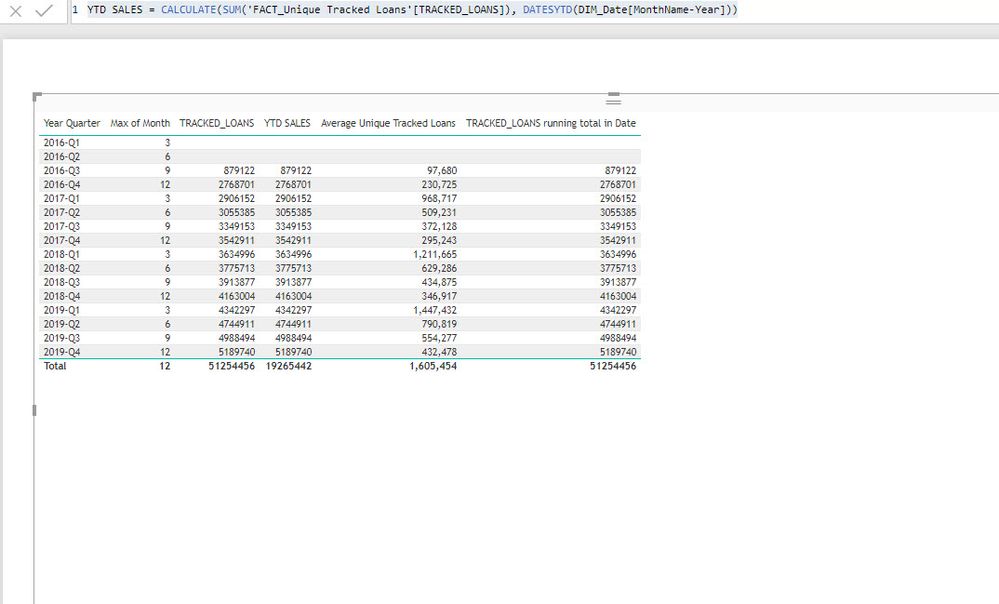
I just switched it to a date field in DIM_DATE and I'm still getting the same:

- Mark as New
- Bookmark
- Subscribe
- Mute
- Subscribe to RSS Feed
- Permalink
- Report Inappropriate Content
To use this Time Intelligence function you need a proper Date table and reference the column that has marked as the date column (not possible with a column like you showed in your picture).
If you're not prepared to work with such a table, you'd have to add a year-filter into your original measure like so:
TRACKED_LOANS running total in Year Quarter =
CALCULATE(
    SUM('FACT_Unique Tracked Loans'[TRACKED_LOANS]),
    FILTER(
        ALLSELECTED('DIM_Date'[Year Quarter]),
        ISONORAFTER('DIM_Date'[Year Quarter], MAX('DIM_Date'[Year Quarter]), DESC)
    ),
    FILTER(
        ALL('DIM_Date'[Year]),
        'DIM_Date'[Year] = MAX('DIM_Date'[Year])
    )
)
Imke Feldmann (The BIccountant)
If you liked my solution, please give it a thumbs up. And if I did answer your question, please mark this post as a solution. Thanks!
How to integrate M-code into your solution -- How to get your questions answered quickly -- How to provide sample data -- Check out more PBI- learning resources here -- Performance Tipps for M-queries
- Mark as New
- Bookmark
- Subscribe
- Mute
- Subscribe to RSS Feed
- Permalink
- Report Inappropriate Content
Thank you so much this worked like a charm !
- Mark as New
- Bookmark
- Subscribe
- Mute
- Subscribe to RSS Feed
- Permalink
- Report Inappropriate Content
I tried this solution and I'm getting just the TRACKED_LOANS

- Mark as New
- Bookmark
- Subscribe
- Mute
- Subscribe to RSS Feed
- Permalink
- Report Inappropriate Content
The DATESYTD-function has to reference the DIM_Date and not the Fact-table.
Imke Feldmann (The BIccountant)
If you liked my solution, please give it a thumbs up. And if I did answer your question, please mark this post as a solution. Thanks!
How to integrate M-code into your solution -- How to get your questions answered quickly -- How to provide sample data -- Check out more PBI- learning resources here -- Performance Tipps for M-queries


- Mark as New
- Bookmark
- Subscribe
- Mute
- Subscribe to RSS Feed
- Permalink
- Report Inappropriate Content
You can use datesytd and totalytd, It will restart after year
YTD Sales = CALCULATE(SUM('FACT_Unique Tracked Loans'[TRACKED_LOANS])),DATESYTD(('DIM_Date'[Date])))
Appreciate your Kudos. In case, this is the solution you are looking for, mark it as the Solution. In case it does not help, please provide additional information and mark me with @
Thanks. My Recent Blog -
Winner-Topper-on-Map-How-to-Color-States-on-a-Map-with-Winners , HR-Analytics-Active-Employee-Hire-and-Termination-trend
Power-BI-Working-with-Non-Standard-Time-Periods And Comparing-Data-Across-Date-Ranges
Connect on Linkedin
- Mark as New
- Bookmark
- Subscribe
- Mute
- Subscribe to RSS Feed
- Permalink
- Report Inappropriate Content
Hi @Anonymous
you could consider a more generich approach like so:
TRACKED_LOANS running total in Year Quarter =
CALCULATE(
    SUM('FACT_Unique Tracked Loans'[TRACKED_LOANS]),
    DATESYTD('DIM_Date'[Date]),
    )
)
You might have to replace the "Date" by the name of the date-column in your DIM_Date.
Imke Feldmann (The BIccountant)
If you liked my solution, please give it a thumbs up. And if I did answer your question, please mark this post as a solution. Thanks!
How to integrate M-code into your solution -- How to get your questions answered quickly -- How to provide sample data -- Check out more PBI- learning resources here -- Performance Tipps for M-queries
Helpful resources

Power BI Dataviz World Championships
The Power BI Data Visualization World Championships is back! Get ahead of the game and start preparing now!

Power BI Monthly Update - December 2025
Check out the December 2025 Power BI Holiday Recap!

FabCon Atlanta 2026
Join us at FabCon Atlanta, March 16-20, for the ultimate Fabric, Power BI, AI and SQL community-led event. Save $200 with code FABCOMM.

| User | Count |
|---|---|
| 38 | |
| 36 | |
| 33 | |
| 30 | |
| 28 |


| User | Count |
|---|---|
| 126 | |
| 88 | |
| 78 | |
| 66 | |
| 65 |


