cancel
Showing results for 
Search instead for 
Did you mean: 

Get Fabric Certified for FREE during Fabric Data Days. Don't miss your chance! Request now

Reply
nironixon
Frequent Visitor

Running Total on the given dataset?

Hi there,
Can anyone help me or point me in the right direction how to calculate the running total column on the following
example dataset in powerbi;


ACCOUNTS Table:
ID | CREATEDDATE | DELETEDDATE |
1   | 2018-01-01       | NULL   |
2   | 2018-01-01       | NULL |
3   | 2018-01-02       | NULL |
4   | 2018-01-03       | 2018-01-04 |
5   | 2018-01-04       | NULL |


Explanation to the table;
For reach row that models an "account" we store when it was created (createddate) and when the account
is deleted (DELETEDDATE).


The accounts table is connected to a date table in my model.

What is the best approach here, create a calculated table that counts the number of created resp. deltete accounts for each date;


DATE           | CREATED | DELETED | RUNNING TOTAL
2018-01-01  | 2               | 0              | 2
2018-01-02  | 1               | 0              | 3
2018-01-03  | 1               | 1              | 3
2018-01-04  | 1               | 0              | 4


Best Regards
Niclas

4 REPLIES 4
PattemManohar
Community Champion
Community Champion

@nironixon Please try this in "Power Query"


let
    Source = Table.FromRows(Json.Document(Binary.Decompress(Binary.FromText("i45WMlTSUTIw1AUiIwNDCyBHKVYnWskIq6gxSNQIXdQEJGqMJGpgAueA5E1RhUC6YgE=", BinaryEncoding.Base64), Compression.Deflate)), let _t = ((type text) meta [Serialized.Text = true]) in type table [ID = _t, CreatedDate = _t, DeletedDate = _t]),
    #"Changed Type" = Table.TransformColumnTypes(Source,{{"ID", Int64.Type}, {"CreatedDate", type date}, {"DeletedDate", type date}}),
    #"Added Conditional Column" = Table.AddColumn(#"Changed Type", "Created", each if [CreatedDate] <> null then 1 else 0),
    #"Added Conditional Column1" = Table.AddColumn(#"Added Conditional Column", "Deleted", each if [DeletedDate] <> null then 1 else 0),
    #"Grouped Rows" = Table.Group(#"Added Conditional Column1", {"CreatedDate"}, {{"Created", each List.Sum([Created]), type number}, {"Deleted", each List.Sum([Deleted]), type number}}),
    #"Added Custom" = Table.AddColumn(#"Grouped Rows", "Total", each [Created]-[Deleted]),
    #"Added Index" = Table.AddIndexColumn(#"Added Custom", "Index", 0, 1),
    #"Added Running Total" = Table.AddColumn(#"Added Index", "RunningTotal", each List.Sum(List.FirstN(#"Added Index"[Total],[Index]+1))),
    #"Removed Columns" = Table.RemoveColumns(#"Added Running Total",{"Total", "Index"})
    
in
    #"Removed Columns"

Here is the expected output !!
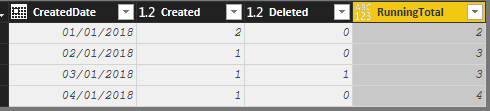
 

image.png


Did I answer your question? Mark my post as a solution!

Proud to be a PBI Community Champion


Hi there and thanks for your efforts and it def. works on a small dataset!


The dataset im working on have approx 1.300.000 rows and the query times out. 

I think it is the #"Added Running Total" statement that sums up rows up to the current index that performs badly;


#"Added Running Total" = Table.AddColumn(#"Added Index", "RunningTotal", each List.Sum(List.FirstN(#"Added Index"[Total],[Index]+1))),


Any idea how we can fix this, im totaly blank!

Niclas

Hi,


This can be done with a DAX formula.  In the visual, you would drag Account to the row labels and then write a mesure.  Would you be interested in that solution?


Regards,
Ashish Mathur
http://www.ashishmathur.com
https://www.linkedin.com/in/excelenthusiasts/
Anonymous
Not applicable

Hi @nironixon,


I'd like to suggest you do running total on data view side with dax calculate column, it has better performance than direct invoke all list of data to sum up.

Running Total=
CALCULATE (
    SUM ( Table[Created] ),
    FILTER ( ALL ( Table ), [Date] <= EARLIER ( Table[Date] ) )
)


Regards,

Xiaoxin Sheng

Helpful resources

Announcements
November Power BI Update Carousel

Power BI Monthly Update - November 2025

Check out the November 2025 Power BI update to learn about new features.

Fabric Data Days Carousel

Fabric Data Days

Advance your Data & AI career with 50 days of live learning, contests, hands-on challenges, study groups & certifications and more!

FabCon Atlanta 2026 carousel

FabCon Atlanta 2026

Join us at FabCon Atlanta, March 16-20, for the ultimate Fabric, Power BI, AI and SQL community-led event. Save $200 with code FABCOMM.

Top Solution Authors
Top Kudoed Authors