- Power BI forums
- Updates
- News & Announcements
- Get Help with Power BI
- Desktop
- Service
- Report Server
- Power Query
- Mobile Apps
- Developer
- DAX Commands and Tips
- Custom Visuals Development Discussion
- Health and Life Sciences
- Power BI Spanish forums
- Translated Spanish Desktop
- Power Platform Integration - Better Together!
- Power Platform Integrations (Read-only)
- Power Platform and Dynamics 365 Integrations (Read-only)
- Training and Consulting
- Instructor Led Training
- Dashboard in a Day for Women, by Women
- Galleries
- Community Connections & How-To Videos
- COVID-19 Data Stories Gallery
- Themes Gallery
- Data Stories Gallery
- R Script Showcase
- Webinars and Video Gallery
- Quick Measures Gallery
- 2021 MSBizAppsSummit Gallery
- 2020 MSBizAppsSummit Gallery
- 2019 MSBizAppsSummit Gallery
- Events
- Ideas
- Custom Visuals Ideas
- Issues
- Issues
- Events
- Upcoming Events
- Community Blog
- Power BI Community Blog
- Custom Visuals Community Blog
- Community Support
- Community Accounts & Registration
- Using the Community
- Community Feedback
Register now to learn Fabric in free live sessions led by the best Microsoft experts. From Apr 16 to May 9, in English and Spanish.
- Power BI forums
- Forums
- Get Help with Power BI
- Desktop
- Re: Running Total on a non-date column
- Subscribe to RSS Feed
- Mark Topic as New
- Mark Topic as Read
- Float this Topic for Current User
- Bookmark
- Subscribe
- Printer Friendly Page


- Mark as New
- Bookmark
- Subscribe
- Mute
- Subscribe to RSS Feed
- Permalink
- Report Inappropriate Content
Running Total on a non-date column
Hi guys,
I am having some real problems with calculating a running-total in Power BI.
Main problem here is that my running total should be based on a calculated measure.
Here is the problem:
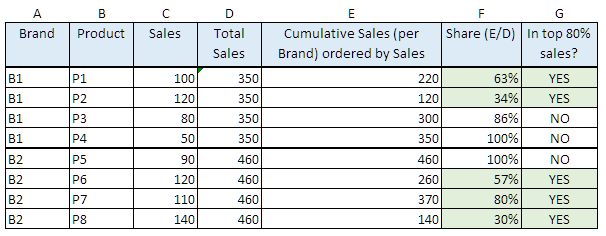
Calculate a column, that will show, if your product is in the product group, that makes 80% of sales per Brand.
Someting like this (the problem is - how to calculate column E):
I have tried several tutorials and forums but still no answer.
Looks like the support bot running functions is very limited in Power BI.
Thanks
Solved! Go to Solution.


- Mark as New
- Bookmark
- Subscribe
- Mute
- Subscribe to RSS Feed
- Permalink
- Report Inappropriate Content
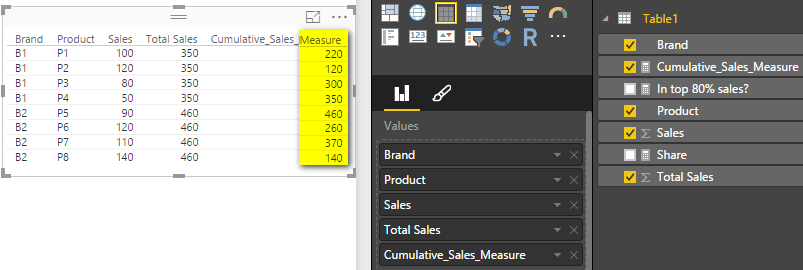
Please try with following Calculated Measure for the cumulative sales. It should be able to reduce the calculation.
Cumulative_Sales_Measure =
CALCULATE (
    SUM ( Table1[Sales] ),
    FILTER ( ALL(Table1), Table1[Sales] >= MAX ( Table1[Sales] ) ),
    VALUES ( Table1[Brand] )
)
Regards,

- Mark as New
- Bookmark
- Subscribe
- Mute
- Subscribe to RSS Feed
- Permalink
- Report Inappropriate Content
I have same query no body going to resolve this problem even there is no toturial for this concern.
| Name | Retailer | Channel | Val | Contri | Flag Town Level |
| Achampet | R2 | C1 | 42 | 36% | Top 80% |
| Achampet | R1 | C2 | 30 | 26% | Top 80% |
| Achampet | R3 | C1 | 26 | 22% | Top 80% |
| Achampet | R4 | C2 | 19 | 16% | Rest |
| ADDANKI | R7 | C1 | 45 | 38% | Top 80% |
| ADDANKI | R8 | C2 | 26 | 22% | Top 80% |
| ADDANKI | R5 | C1 | 21 | 18% | Top 80% |
| ADDANKI | R9 | C2 | 13 | 11% | Rest |
| ADDANKI | R6 | C1 | 12 | 10% | Rest |
| ADILABAD | R11 | C2 | 75 | 35% | Top 80% |
| ADILABAD | R10 | C1 | 44 | 21% | Top 80% |
| ADILABAD | R13 | C2 | 33 | 15% | Top 80% |
| ADILABAD | R14 | C1 | 31 | 15% | Top 80% |
| ADILABAD | R12 | C2 | 30 | 14% | Rest |
- Mark as New
- Bookmark
- Subscribe
- Mute
- Subscribe to RSS Feed
- Permalink
- Report Inappropriate Content
Hi Guys this does not seem to work .
Product NameProduct Sales
| Product 63 | 25145 |
| Product 64 | 25413 |
| Product 65 | 25681 |
| Product 66 | 25949 |
| Product 67 | 26217 |
| Product 68 | 26485 |
| Product 69 | 26753 |
| Product 70 | 27021 |
| Product 71 | 27289 |
| Product 72 | 27557 |
| Product 73 | 27825 |
| Product 74 | 28093 |
| Product 75 | 28361 |
| Product 76 | 28629 |
| Product 77 | 28897 |
| Product 78 | 29165 |
| Product 79 | 29433 |
Cumulative_Sales_Measure =
CALCULATE (
SUM ( Product[Total Sales] ),
FILTER ( ALL(Product), Product[Total Sales] >= MAX ( Product[Total Sales] ) ),
VALUES ( Product[Product Name )
)
- Mark as New
- Bookmark
- Subscribe
- Mute
- Subscribe to RSS Feed
- Permalink
- Report Inappropriate Content
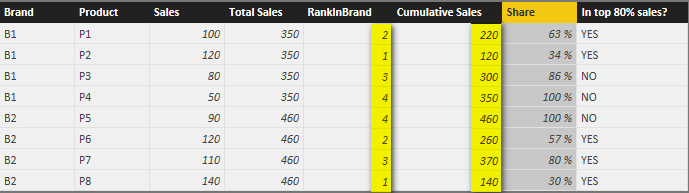
In this scenario, you can rank the sales for each brand first, and then get the cumulative sales according to the rank. Please create two calculated columns with following formulas.
RankInBrand =
RANKX (
    FILTER ( Table1, EARLIER ( Table1[Brand] ) = Table1[Brand] ),
    Table1[Sales]
)
Cumulative Sales =
SUMX (
    FILTER (
        Table1,
        Table1[RankInBrand] <= EARLIER ( Table1[RankInBrand] )
            && Table1[Brand] = EARLIER ( Table1[Brand] )
    ),
    Table1[Sales]
)
Regards,


- Mark as New
- Bookmark
- Subscribe
- Mute
- Subscribe to RSS Feed
- Permalink
- Report Inappropriate Content
Thanks a lot for the solution, I was struggling to get the cumulative total
- Mark as New
- Bookmark
- Subscribe
- Mute
- Subscribe to RSS Feed
- Permalink
- Report Inappropriate Content
Thanks for the reply..
I got stuck on
RANKX (
    FILTER ( Table1, EARLIER ( Table1[Brand] ) = Table1[Brand] ),
    Table1[Sales]
)
EARLIER/EARLIEST refers to an earlier row context which doesn't exist.
Looking for a workaround...
- Mark as New
- Bookmark
- Subscribe
- Mute
- Subscribe to RSS Feed
- Permalink
- Report Inappropriate Content
Please make sure you’re creating a Calculated Column instead of a Measure with above formulas.
Regards,

- Mark as New
- Bookmark
- Subscribe
- Mute
- Subscribe to RSS Feed
- Permalink
- Report Inappropriate Content
| S.no | Job Name | Fail_count | Running_fail_count_Sum |
| 1 | sapbw | 110 | 110 |
| 2 | Sslog | 90 | 200 |
| 3 | tdnxt | 63 | 263 |
| 4 | rtxls | 22 | 285 |
How do i get the S.No generated based on Fail_count ? and running_count as shown in the sample. .. Job_name and Fail_count is available.
- Mark as New
- Bookmark
- Subscribe
- Mute
- Subscribe to RSS Feed
- Permalink
- Report Inappropriate Content
Thanks Simon,
This solution might work in theory, but the calculation eats all of my RAM (13 GB) and drops due to lack of space.
Perhaps Power BI just can't handle those calculations. I would probably have to push that to a Calculated Measure and this may be impossible.
Such a simple task, yet so hard to implement.
Thanks for the help.

- Mark as New
- Bookmark
- Subscribe
- Mute
- Subscribe to RSS Feed
- Permalink
- Report Inappropriate Content
Hi!
Did you found a solution to the memory problem? I have the same problem, we are trying to do the same exercise you put on the table.
Regards
JCarlos
- Mark as New
- Bookmark
- Subscribe
- Mute
- Subscribe to RSS Feed
- Permalink
- Report Inappropriate Content
Please try with following Calculated Measure for the cumulative sales. It should be able to reduce the calculation.
Cumulative_Sales_Measure =
CALCULATE (
    SUM ( Table1[Sales] ),
    FILTER ( ALL(Table1), Table1[Sales] >= MAX ( Table1[Sales] ) ),
    VALUES ( Table1[Brand] )
)
Regards,
Helpful resources

Microsoft Fabric Learn Together
Covering the world! 9:00-10:30 AM Sydney, 4:00-5:30 PM CET (Paris/Berlin), 7:00-8:30 PM Mexico City

Power BI Monthly Update - April 2024
Check out the April 2024 Power BI update to learn about new features.

Fabric Community Update - April 2024
Find out what's new and trending in the Fabric Community.

| User | Count |
|---|---|
| 114 | |
| 105 | |
| 79 | |
| 68 | |
| 63 |


| User | Count |
|---|---|
| 148 | |
| 107 | |
| 106 | |
| 82 | |
| 70 |


