Join us at FabCon Atlanta from March 16 - 20, 2026, for the ultimate Fabric, Power BI, AI and SQL community-led event. Save $200 with code FABCOMM.
Register now!The Power BI Data Visualization World Championships is back! Get ahead of the game and start preparing now! Learn more
Hi,
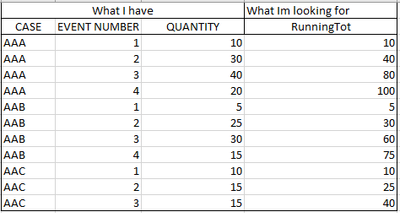
Can you help me make the running total like the example in the excel below but as a DAX calculation?
Thank you. 🙂
Solved! Go to Solution.
Running Total =
var currentEvent = SELECTEDVALUE('Table'[Event number])
return CALCULATE( SUM('Table'[Quantity]),
ALLEXCEPT('Table'[Case]),
'Table'[Event number] <= currentEvent
)
Running Total =
var currentEvent = SELECTEDVALUE('Table'[Event number])
return CALCULATE( SUM('Table'[Quantity]),
ALLEXCEPT('Table'[Case]),
'Table'[Event number] <= currentEvent
)
The Power BI Data Visualization World Championships is back! Get ahead of the game and start preparing now!
| User | Count |
|---|---|
| 39 | |
| 38 | |
| 38 | |
| 28 | |
| 27 |
| User | Count |
|---|---|
| 124 | |
| 88 | |
| 73 | |
| 66 | |
| 65 |