cancel
Showing results for 
Search instead for 
Did you mean: 

Learn from the best! Meet the four finalists headed to the FINALS of the Power BI Dataviz World Championships! Register now

Reply
eengle11
New Member

Running Total On Graph

Power BI Help.PNG

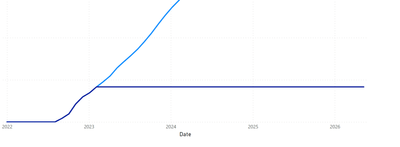
Sorry for the basic picture, I am trying to display a running total graphically, the darker blue represents Actual amounts, and the light Blue represents Projections. They should always follow each other as the projection changes based upon the actual amount. I would like for the Actual Line to stop when it no longer is following the Projection. I have found a work around by using a variable date, however different reporting schedules has caused this to become a less then ideal fix. Please let me know if there is a simple way to get the darker blue line to stop, based on when it deviates from the light blue. 

1 REPLY 1
vsorensen
Frequent Visitor

Try using an if statement

IF(SELECTEDVALUE([date_column]) > [date_to_stop_graph], CALCULATE())

Replace the 'CALCULATE()' statement with your running total calculation. 

Helpful resources

Announcements
Join our Fabric User Panel

Join our Fabric User Panel

Share feedback directly with Fabric product managers, participate in targeted research studies and influence the Fabric roadmap.

March Power BI Update Carousel

Power BI Community Update - March 2026

Check out the March 2026 Power BI update to learn about new features.