Join us at FabCon Atlanta from March 16 - 20, 2026, for the ultimate Fabric, Power BI, AI and SQL community-led event. Save $200 with code FABCOMM.
Register now!The Power BI Data Visualization World Championships is back! Get ahead of the game and start preparing now! Learn more
Hi Folks,
I'm trying to get the running total for my tables with date and group filters.
Following is the DAX syntax I'm using but it is not giving the correct anwer,
For Column,
Could you please help me in this.
| ReturnDate | Group | FundReturn | P1Log_Ret | Running_TotalC |
| 1/31/2013 0:00 | A | -0.00195227 | -0.001954178 | -0.001954178 |
| 2/1/2013 0:00 | A | 0.000267338 | 0.000267302 | 0.000267302 |
| 2/2/2013 0:00 | A | 0.000186013 | 0.000185996 | 0.000185996 |
| 2/3/2013 0:00 | A | 0.000186661 | 0.000186644 | 0.000186644 |
| 2/4/2013 0:00 | A | -0.001295777 | -0.001296618 | -0.001296618 |
| 2/5/2013 0:00 | A | -0.000439921 | -0.000440018 | -0.000440018 |
| 2/6/2013 0:00 | A | 0.00016158 | 0.000161566 | 0.000161566 |
| 2/7/2013 0:00 | A | -0.000492769 | -0.00049289 | -0.00049289 |
| 2/8/2013 0:00 | A | 0.000590821 | 0.000590646 | 0.000590646 |
| 2/9/2013 0:00 | A | 0.000188243 | 0.000188225 | 0.000188225 |
| 2/10/2013 0:00 | A | 0.000188208 | 0.000188191 | 0.000188191 |
| 2/11/2013 0:00 | A | -0.000108518 | -0.000108524 | -0.000108524 |
| 2/12/2013 0:00 | A | 3.2959E-06 | 3.29589E-06 | 3.29589E-06 |
| 2/1/2013 0:00 | B | -0.001927674 | -0.001929534 | -0.001929534 |
| 2/2/2013 0:00 | B | 0.000179452 | 0.000179436 | 0.000179436 |
| 2/3/2013 0:00 | B | 0.000180487 | 0.000180471 | 0.000180471 |
| 2/4/2013 0:00 | B | 0.001884993 | 0.001883219 | 0.001883219 |
| 2/5/2013 0:00 | B | -0.002777571 | -0.002781436 | -0.002781436 |
| 2/6/2013 0:00 | B | 0.003122746 | 0.00311788 | 0.00311788 |
| 2/7/2013 0:00 | B | 0.000423851 | 0.000423761 | 0.000423761 |
| 2/8/2013 0:00 | B | -0.000412682 | -0.000412767 | -0.000412767 |
Solved! Go to Solution.
Hi @Anonymous ,
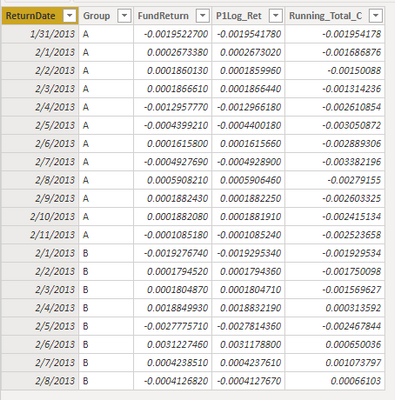
If i understand you correctly, please modify "ALLEXCEPT(Data_2, Data_2[Group] ,Data_2[ReturnDate])" to "ALLEXCEPT(Data_2, Data_2[Group])".
For Column:
Running_Total_C =
CALCULATE (
SUM ( Data_2[P1Log_Ret] ),
FILTER (
ALLEXCEPT ( Data_2, Data_2[Group] ),
Data_2[ReturnDate] <= EARLIER ( Data_2[ReturnDate] )
)
)For Measure:
Running_Total_M =
CALCULATE (
SUM ( Data_2[P1Log_Ret] ),
FILTER (
ALLEXCEPT ( Data_2, Data_2[Group] ),
Data_2[ReturnDate] <= SELECTEDVALUE ( Data_2[ReturnDate] )
)
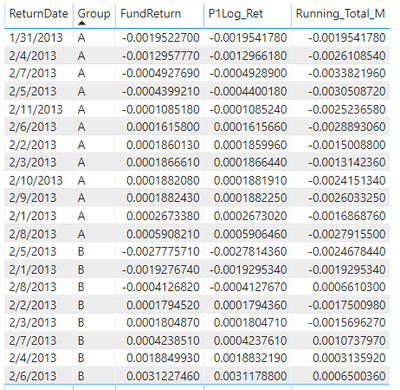
)Result would be shown as below:
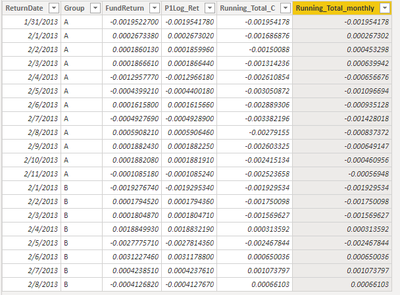
BTW, if you want to calculate Running Total per month, please refer to the formula below.
Running_Total_monthly =
CALCULATE (
SUM ( Data_2[P1Log_Ret] ),
FILTER (
ALLEXCEPT ( Data_2, Data_2[Group] ),
Data_2[ReturnDate] <= EARLIER ( Data_2[ReturnDate] )
&& FORMAT ( Data_2[ReturnDate], "YYYYMM" )
= FORMAT ( EARLIER ( Data_2[ReturnDate] ), "YYYYMM" )
)
)
Best Regards,
Jay
Community Support Team _ Jay Wang
If this post helps, then please consider Accept it as the solution to help the other members find it more quickly.
Hi @Anonymous ,
If i understand you correctly, please modify "ALLEXCEPT(Data_2, Data_2[Group] ,Data_2[ReturnDate])" to "ALLEXCEPT(Data_2, Data_2[Group])".
For Column:
Running_Total_C =
CALCULATE (
SUM ( Data_2[P1Log_Ret] ),
FILTER (
ALLEXCEPT ( Data_2, Data_2[Group] ),
Data_2[ReturnDate] <= EARLIER ( Data_2[ReturnDate] )
)
)For Measure:
Running_Total_M =
CALCULATE (
SUM ( Data_2[P1Log_Ret] ),
FILTER (
ALLEXCEPT ( Data_2, Data_2[Group] ),
Data_2[ReturnDate] <= SELECTEDVALUE ( Data_2[ReturnDate] )
)
)Result would be shown as below:
BTW, if you want to calculate Running Total per month, please refer to the formula below.
Running_Total_monthly =
CALCULATE (
SUM ( Data_2[P1Log_Ret] ),
FILTER (
ALLEXCEPT ( Data_2, Data_2[Group] ),
Data_2[ReturnDate] <= EARLIER ( Data_2[ReturnDate] )
&& FORMAT ( Data_2[ReturnDate], "YYYYMM" )
= FORMAT ( EARLIER ( Data_2[ReturnDate] ), "YYYYMM" )
)
)
Best Regards,
Jay
Community Support Team _ Jay Wang
If this post helps, then please consider Accept it as the solution to help the other members find it more quickly.
Hi @Anonymous ,
did you solve your problem?
If I answered your question, please mark my post as solution, this will also help others.
Please give Kudos for support.
Marcus Wegener works as Full Stack Power BI Engineer at BI or DIE.
His mission is clear: "Get the most out of data, with Power BI."
twitter - LinkedIn - YouTube - website - podcast - Power BI Tutorials
Hi @Anonymous
You may download my PBIX file from here.
Hope this helps.
If I answered your question, please mark my post as solution, this will also help others.
Please give Kudos for support.
Marcus Wegener works as Full Stack Power BI Engineer at BI or DIE.
His mission is clear: "Get the most out of data, with Power BI."
twitter - LinkedIn - YouTube - website - podcast - Power BI Tutorials
The Power BI Data Visualization World Championships is back! Get ahead of the game and start preparing now!
| User | Count |
|---|---|
| 39 | |
| 37 | |
| 33 | |
| 33 | |
| 29 |
| User | Count |
|---|---|
| 132 | |
| 90 | |
| 78 | |
| 66 | |
| 65 |