Don't miss your chance to take the Fabric Data Engineer (DP-700) exam on us!
Learn moreNext up in the FabCon + SQLCon recap series: The roadmap for Microsoft SQL and Maximizing Developer experiences in Fabric. All sessions are available on-demand after the live show. Register now
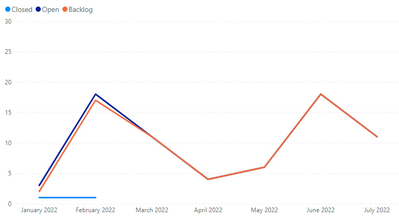
I have a table shown Below:
I need to have a 4th line that takes a cumulative total over the months. So February shows the total for Jan and Feb, March Shows Jane Feb & March etc. I have tried the Running Total Function but it doesnt seem to do what i want.
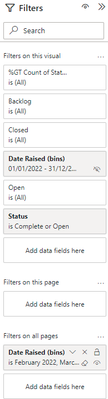
This is the Filters i Have also:
It is taking a sharepoint list and filtering to 2022 only. The Choice field on the list is for Closed and Open NCR's. i then have a difference line between the two to show backlog.
Solved! Go to Solution.
Hi @Anonymous ,
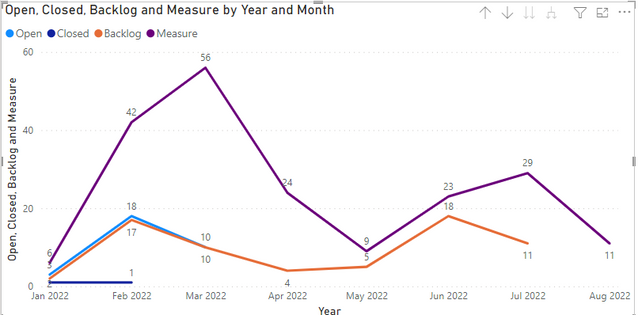
Please try the measure.
Measure =
CALCULATE (
SUM ( 'Table'[Backlog] ) + SUM ( 'Table'[Closed] )
+ SUM ( 'Table'[Open] ),
DATESINPERIOD ( 'Calendar'[Date], MAX ( 'Calendar'[Date] ), -2, MONTH )
)
If the problem is still not resolved, please provide detailed error information or the expected result you expect. Let me know immediately, looking forward to your reply.
Best Regards,
Winniz
If this post helps, then please consider Accept it as the solution to help the other members find it more quickly.
Hi @Anonymous ,
Please try the measure.
Measure =
CALCULATE (
SUM ( 'Table'[Backlog] ) + SUM ( 'Table'[Closed] )
+ SUM ( 'Table'[Open] ),
DATESINPERIOD ( 'Calendar'[Date], MAX ( 'Calendar'[Date] ), -2, MONTH )
)
If the problem is still not resolved, please provide detailed error information or the expected result you expect. Let me know immediately, looking forward to your reply.
Best Regards,
Winniz
If this post helps, then please consider Accept it as the solution to help the other members find it more quickly.
@Anonymous , usally we have this kind of measure for running total
Cumm = CALCULATE(SUM(Sales[Sales Amount]),filter(allselected('Date'),'Date'[date] <=max('Date'[date])))
Cumm = CALCULATE(SUMX(Values('Date'[Month]), [Measure]) ,filter(allselected('Date'),'Date'[date] <=max('Date'[date])))
If you have recently started exploring Fabric, we'd love to hear how it's going. Your feedback can help with product improvements.
A new Power BI DataViz World Championship is coming this June! Don't miss out on submitting your entry.
Share feedback directly with Fabric product managers, participate in targeted research studies and influence the Fabric roadmap.
| User | Count |
|---|---|
| 50 | |
| 44 | |
| 41 | |
| 18 | |
| 18 |
| User | Count |
|---|---|
| 69 | |
| 68 | |
| 32 | |
| 32 | |
| 32 |