Don't miss your chance to take the Fabric Data Engineer (DP-700) exam on us!
Learn moreWe've captured the moments from FabCon & SQLCon that everyone is talking about, and we are bringing them to the community, live and on-demand. Starts on April 14th. Register now
Hello,
I'm a new DAX user and am having trouble getting a formula to transfer from Excel to PBI. I have tried two different methods based on responses from other forum posts. See bottom for what I'm envising as a final result.
My goal: create a running total column based on a Qty Received.
The excel formula I'm trying to recreate: =SUMIFS($C$2:C3,$A$2:A3,A3,$B$2:B3,B3) where Column A = Order ID, Column B = PO Line Number, Column C = Qty Received
I think my issue is that in excel it is performing a SUM operation up until the row, where PBI is performing the SUM on the entire column?
Below are the two formulas that I have tried:
1. Running Receipt Total =
CALCULATE(
SUM('Monthly Ariba Dataset'[Adj QTY Received]),
FILTER(
ALLSELECTED('Monthly Ariba Dataset'),
'Monthly Ariba Dataset'[[RCT]] Order Id]<=MAX('Monthly Ariba Dataset'[[RCT]] Order Id]) &&
'Monthly Ariba Dataset'[[PO]] PO Line Number] <= MAX('Monthly Ariba Dataset'[[PO]] PO Line Number])))
2. Running Receipt Total = CALCULATE(
SUM('Monthly Ariba Dataset'[Adj QTY Received]),
ALL('Monthly Ariba Dataset'[[RCT]] Order Id]),
ALL('Monthly Ariba Dataset'[[PO]] PO Line Number]))
Below is an example of how I need to end result to be formatted.
Order ID | PO Line Number | Qty Received | Running Total
PO123 | 1 | -1 | -1
PO123 | 1 | -1 | -2
PO123 | 1 | -1 | -3
PO123 | 1 | 1 | -2
PO123 | 1 | 1 | -1
Solved! Go to Solution.
Hi @bjsrm8,
Based on my test, you could refer to below steps:
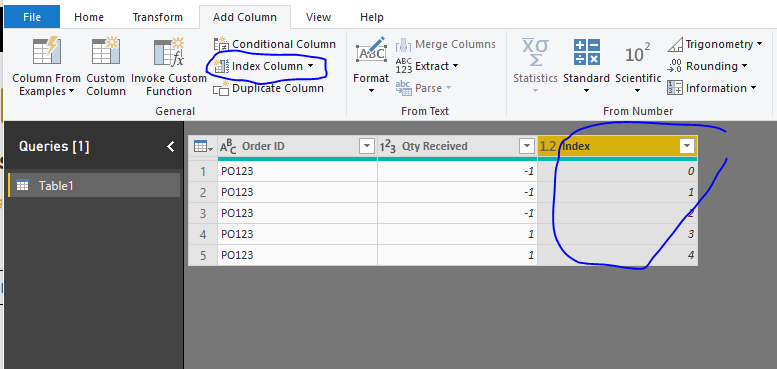
1.Add index for your data in query editor:
2.Apply it and create below calculated column:
Running total = CALCULATE(SUM(Table1[Qty Received]),FILTER('Table1','Table1'[Index]<=EARLIER(Table1[Index])))
Result:
You could also download the pbix file to have a view.
Regards,
Daniel He
Hi @bjsrm8,
Based on my test, you could refer to below steps:
1.Add index for your data in query editor:
2.Apply it and create below calculated column:
Running total = CALCULATE(SUM(Table1[Qty Received]),FILTER('Table1','Table1'[Index]<=EARLIER(Table1[Index])))
Result:
You could also download the pbix file to have a view.
Regards,
Daniel He
Yeah, you may want to add an Index column in your Power Query and that would allow you to use EARLIER to filter your table to just rows up until the current row. See my article on Mean Time Before Failure (MTBF) which uses EARLIER: http://community.powerbi.com/t5/Community-Blog/Mean-Time-Between-Failure-MTBF-and-Power-BI/ba-p/3395...
Is there something in the data set that would let you identify in what order the lines should be added into the running total. Something like processed date/time or po line occurrence?
If you have recently started exploring Fabric, we'd love to hear how it's going. Your feedback can help with product improvements.
A new Power BI DataViz World Championship is coming this June! Don't miss out on submitting your entry.
Share feedback directly with Fabric product managers, participate in targeted research studies and influence the Fabric roadmap.
| User | Count |
|---|---|
| 55 | |
| 40 | |
| 36 | |
| 20 | |
| 18 |
| User | Count |
|---|---|
| 74 | |
| 72 | |
| 38 | |
| 35 | |
| 26 |