cancel
Showing results for 
Search instead for 
Did you mean: 

Did you hear? There's a new SQL AI Developer certification (DP-800). Start preparing now and be one of the first to get certified. Register now

Reply
Federico92
New Member

Running Count for Selected Values

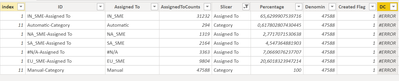
Hi everyone, I'm new to power by and I want to obtain this results from my data

Federico92_1-1626453568370.png


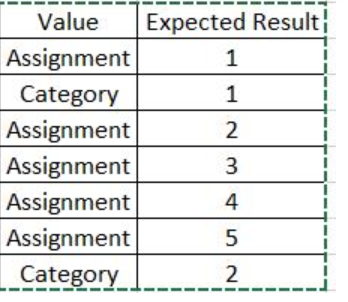
What I want to do is a running count based on the value in fields "Assigned To" that is numerically sorted like in the image below

Federico92_2-1626453601366.png

Any suggestions? Thanks


1 ACCEPTED SOLUTION
mwegener
Most Valuable Professional

Hi @Federico92 ,

this seems to work.

Running Count.png

Count =
VAR OrderID = 'Sample Data'[Order]
RETURN
    CALCULATE (
        COUNTROWS ( 'Sample Data' ),
        FILTER (
            ALLEXCEPT ( 'Sample Data', 'Sample Data'[Group] ),
            'Sample Data'[Order] <= OrderID
        )
    )


Did I answer your question?
Please mark my post as solution, this will also help others.
Please give Kudos for support.

Marcus Wegener works as Full Stack Power BI Engineer at BI or DIE.
His mission is clear: "Get the most out of data, with Power BI."
twitter - LinkedIn - YouTube - website - podcast - Power BI Tutorials


View solution in original post

3 REPLIES 3
mwegener
Most Valuable Professional

Hi @Federico92 ,

can you provide sample data and describe which column is used for sorting?
In the image with the expected result, I don't see any reference to the "Assigned To" column.


Did I answer your question?
Please mark my post as solution, this will also help others.
Please give Kudos for support.

Marcus Wegener works as Full Stack Power BI Engineer at BI or DIE.
His mission is clear: "Get the most out of data, with Power BI."
twitter - LinkedIn - YouTube - website - podcast - Power BI Tutorials


https://drive.google.com/file/d/1pTdvJHx7GQokfhmI4AiOxQIkWtCxR5WC/view?usp=sharing

I simplified the problem to make it easier to understand. In the linked PBIX I would like to get the results in the "Expected Results" column. What I want it to do is calculate a distinct running count for each value of the "Group" column.
mwegener
Most Valuable Professional

Hi @Federico92 ,

this seems to work.

Running Count.png

Count =
VAR OrderID = 'Sample Data'[Order]
RETURN
    CALCULATE (
        COUNTROWS ( 'Sample Data' ),
        FILTER (
            ALLEXCEPT ( 'Sample Data', 'Sample Data'[Group] ),
            'Sample Data'[Order] <= OrderID
        )
    )


Did I answer your question?
Please mark my post as solution, this will also help others.
Please give Kudos for support.

Marcus Wegener works as Full Stack Power BI Engineer at BI or DIE.
His mission is clear: "Get the most out of data, with Power BI."
twitter - LinkedIn - YouTube - website - podcast - Power BI Tutorials


Helpful resources

Announcements
April Power BI Update Carousel

Power BI Monthly Update - April 2026

Check out the April 2026 Power BI update to learn about new features.

Fabric SQL PBI Data Days

Data Days 2026 coming soon!

Sign up to receive a private message when registration opens and key events begin.

New to Fabric survey Carousel

New to Fabric Survey

If you have recently started exploring Fabric, we'd love to hear how it's going. Your feedback can help with product improvements.

Power BI DataViz World Championships carousel

Power BI DataViz World Championships - June 2026

A new Power BI DataViz World Championship is coming this June! Don't miss out on submitting your entry.