Join us at FabCon Atlanta from March 16 - 20, 2026, for the ultimate Fabric, Power BI, AI and SQL community-led event. Save $200 with code FABCOMM.
Register now!The Power BI Data Visualization World Championships is back! Get ahead of the game and start preparing now! Learn more
Hello Dax Experts!
My dataset lists scores by user over time. Each user can take the test each week hopefully improving their score. I'd like to show the rolling current score average by week (only showing the users latest current score )
| UserId | WeekStarting | Score |
| 1 | 1/7/2019 | 75 |
| 1 | 1/14/2019 | 90 |
| 2 | 1/7/2019 | 60 |
| 2 | 1/14/2019 | 70 |
| 2 | 1/28/2019 | 80 |
| 3 | 1/14/2019 | 83 |
| 3 | 1/21/2019 | 85 |
| 3 | 1/28/2019 | 90 |
Expected result:
| WeekStarting | DistinctUserCount | SumLatestScoreOfEachUser | AverageScore |
| 1/7/2019 | 2 | 135 | 67.5 |
| 1/14/2019 | 3 | 243 | 81 |
| 1/21/2019 | 3 | 245 | 81.66666667 |
| 1/28/2019 | 3 | 260 | 86.66666667 |
In order to get the average I need the sum of the latest score by each user by the given week and divide it by the distinct count of users at that time.
This has had me stumped for way too long. Thank you for any and all help!
Solved! Go to Solution.
Hi @Anonymous,
A bit hard work way. Please refer to the steps as below.
1. Create two calculate tables.
date = VALUES('Table1'[WeekStarting])
id = VALUES('Table1'[UserId])
2. Create a rank column in table date.
Column = RANKX(ALL('date'),'date'[WeekStarting1])
3. Cross join the two tables as a new one. And create two calculated column in the new table.
newjoin = CROSSJOIN('date','id')
result = LOOKUPVALUE(Table1[Score],Table1[WeekStarting],newjoin[WeekStarting1],Table1[UserId],newjoin[UserId])
newScore = var new = newjoin[rank]+1 var new1= newjoin[rank]+2 var re = CALCULATE(SUM(newjoin[result]),FILTER(ALLEXCEPT(newjoin,newjoin[UserId]),newjoin[rank]=new)) var re1 = CALCULATE(SUM(newjoin[result]),FILTER(ALLEXCEPT(newjoin,newjoin[UserId]),newjoin[rank]=new1)) var sc = IF(ISBLANK(newjoin[result]),re,newjoin[result]) return IF(ISBLANK(sc),re1,sc)
4. To create the measures as below to get the result as you need.
DistinctUserCount = CALCULATE(DISTINCTCOUNT(newjoin[UserId]),FILTER(newjoin,newjoin[newScore]<>BLANK()))
AverageScore1 = CALCULATE(SUM(newjoin[newScore]))/[DistinctUserCount]
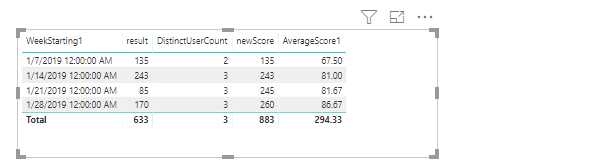
Please find the pbix as attached.
Regards,
Frank
Hi @Anonymous,
A bit hard work way. Please refer to the steps as below.
1. Create two calculate tables.
date = VALUES('Table1'[WeekStarting])
id = VALUES('Table1'[UserId])
2. Create a rank column in table date.
Column = RANKX(ALL('date'),'date'[WeekStarting1])
3. Cross join the two tables as a new one. And create two calculated column in the new table.
newjoin = CROSSJOIN('date','id')
result = LOOKUPVALUE(Table1[Score],Table1[WeekStarting],newjoin[WeekStarting1],Table1[UserId],newjoin[UserId])
newScore = var new = newjoin[rank]+1 var new1= newjoin[rank]+2 var re = CALCULATE(SUM(newjoin[result]),FILTER(ALLEXCEPT(newjoin,newjoin[UserId]),newjoin[rank]=new)) var re1 = CALCULATE(SUM(newjoin[result]),FILTER(ALLEXCEPT(newjoin,newjoin[UserId]),newjoin[rank]=new1)) var sc = IF(ISBLANK(newjoin[result]),re,newjoin[result]) return IF(ISBLANK(sc),re1,sc)
4. To create the measures as below to get the result as you need.
DistinctUserCount = CALCULATE(DISTINCTCOUNT(newjoin[UserId]),FILTER(newjoin,newjoin[newScore]<>BLANK()))
AverageScore1 = CALCULATE(SUM(newjoin[newScore]))/[DistinctUserCount]
Please find the pbix as attached.
Regards,
Frank
Frank, I'm giving you a standing ovation right now! That was driving me crazy that I couldn't get the solution. I'm a SQL brain learning the DAX way of thinking.
Thank you, thank you, thank you! Much appreciation
Ben
Try this:
AverageScore =
VAR LastScoresByDate =
ADDCOLUMNS (
VALUES ( Table[UserId] ),
"Score", CALCULATE (
SUM ( Table[Score] )
)
)
RETURN
AVERAGEX (
LastScoresByDate,
[Score]
)
Hi Chris, thank you for your reply! That is very close to what I'm after. However, I think the missing piece is finding the user's latest score by week and repeating that score if unavailable.
For an example with UserId = 2... they do not have a score for the week of 1/21/19... I want to repeat their last score available prior to that week ... (in UserId=2 case it would be the score of 70 that was taken on 1/14/19).
I'm showing this on an area chart and would like it to look similar to the following:
I appreciate your help!
Thanks, Ben
The Power BI Data Visualization World Championships is back! Get ahead of the game and start preparing now!
| User | Count |
|---|---|
| 41 | |
| 38 | |
| 36 | |
| 30 | |
| 28 |
| User | Count |
|---|---|
| 128 | |
| 88 | |
| 79 | |
| 67 | |
| 62 |