FabCon is coming to Atlanta
Join us at FabCon Atlanta from March 16 - 20, 2026, for the ultimate Fabric, Power BI, AI and SQL community-led event. Save $200 with code FABCOMM.
Register now!- Power BI forums
- Get Help with Power BI
- Desktop
- Service
- Report Server
- Power Query
- Mobile Apps
- Developer
- DAX Commands and Tips
- Custom Visuals Development Discussion
- Health and Life Sciences
- Power BI Spanish forums
- Translated Spanish Desktop
- Training and Consulting
- Instructor Led Training
- Dashboard in a Day for Women, by Women
- Galleries
- Data Stories Gallery
- Themes Gallery
- Contests Gallery
- QuickViz Gallery
- Quick Measures Gallery
- Visual Calculations Gallery
- Notebook Gallery
- Translytical Task Flow Gallery
- TMDL Gallery
- R Script Showcase
- Webinars and Video Gallery
- Ideas
- Custom Visuals Ideas (read-only)
- Issues
- Issues
- Events
- Upcoming Events
The Power BI Data Visualization World Championships is back! Get ahead of the game and start preparing now! Learn more
- Power BI forums
- Forums
- Get Help with Power BI
- Desktop
- Re: Runnig Division
- Subscribe to RSS Feed
- Mark Topic as New
- Mark Topic as Read
- Float this Topic for Current User
- Bookmark
- Subscribe
- Printer Friendly Page

- Mark as New
- Bookmark
- Subscribe
- Mute
- Subscribe to RSS Feed
- Permalink
- Report Inappropriate Content
Runnig Division
Hello Experts,
I was trying to create measure in DAX on the following data:
Table Name: Sample
Product_id date My_price sales other_price Indexed other price
12345 20200701 100 75 120
12345 20200704 100 22 130
12345 20200705 100 56 140
12345 20200706 100 52 140
12345 20200731 100 99 140
12345 20200801 100 24 150
12345 20200809 100 58 120
12345 20200907 100 24 200
12345 20200908 100 39 120
12345 20200908 100 56 100
12345 20200908 100 64 125
Formula for Indexed other price=other_price/first_other_price_in_the_month * 100
Below is expected output:
Product_id date My_price sales other_price Indexed other price
12345 20200701 100 75 120 100
12345 20200704 100 22 130 108.3333333
12345 20200705 100 56 140 116.6666667
12345 20200706 100 52 140 116.6666667
12345 20200731 100 99 140 116.6666667
12345 20200801 100 24 150 100
12345 20200809 100 58 120 80
12345 20200907 100 24 200 100
12345 20200908 100 39 120 60
12345 20200908 100 56 100 50
12345 20200908 100 64 125 62.5
In above example For:
July Month first_other_price_in_the_month=120 (to be used in formula for july month data)
August Month first_other_price_in_the_month=150 (to be used in formula for Augmonth data)
September Month first_other_price_in_the_month=200 (to be used in formula for Sept month data)
Note: I have 100 different Product_ID, in above example have considered only one product_id.
Any help or suggestion on DAX code for populating indexed other price would be highly appreciated.
Thanks
Solved! Go to Solution.


- Mark as New
- Bookmark
- Subscribe
- Mute
- Subscribe to RSS Feed
- Permalink
- Report Inappropriate Content
You need a date table to do this properly @Anonymous which I've included in the PBIX file I'm sharing below. This measure will I think return what you want.
Measure =
VAR varCurrentDate =
    MAXX(
        'Table',
        RELATED('Date'[Date])
    )
VAR varCurrentMonthYear =
    YEAR( varCurrentDate )
        * 100
            + MONTH( varCurrentDate )
VAR varCurrentMonth =
    MAXX(
        'Table',
        RELATED( 'Date'[Month Year Sort] )
    )
VAR varFirstDateOfMonth =
    CALCULATE(
        MIN( 'Table'[date] ),
        REMOVEFILTERS( 'Table'[date] ),
        FILTER(
            'Date',
            'Date'[Month Year Sort] = varCurrentMonthYear
        )
    )
VAR varFirstOtherPrice =
    CALCULATE(
        MAX( 'Table'[other_price] ),
        'Table'[date] = varFirstDateOfMonth,
        REMOVEFILTERS( 'Table'[date] )
    )
VAR varOtherPrice =
    MAX( 'Table'[other_price] )
VAR Result =
    DIVIDE(
        varOtherPrice,
        varFirstOtherPrice,
        0
    ) * 100
RETURN
    Result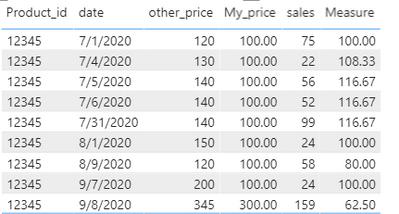
Did I answer your question? Mark my post as a solution!
Did my answers help arrive at a solution? Give it a kudos by clicking the Thumbs Up!
DAX is for Analysis. Power Query is for Data Modeling
Proud to be a Super User!
MCSA: BI Reporting- Mark as New
- Bookmark
- Subscribe
- Mute
- Subscribe to RSS Feed
- Permalink
- Report Inappropriate Content
Hi @Antara ,
You can try to create a measure as below:
avg_measure =
VAR _sumofSales =
    SUMX (
        FILTER (
            ALL ( 'Table'[date], 'Table'[Product_id] ),
            'Table'[date] = MAX ( 'Table'[date] )
        ),
        [Measure]
    )
VAR _countofP =
    CALCULATE (
        DISTINCTCOUNT ( 'Table'[Product_id] ),
        FILTER ( 'Table', 'Table'[date] = MAX ( 'Table'[date] ) )
    )
RETURN
    DIVIDE ( _sumofSales, _countofP, 0 )
Best Regards
Rena
- Mark as New
- Bookmark
- Subscribe
- Mute
- Subscribe to RSS Feed
- Permalink
- Report Inappropriate Content
You need a date table to do this properly @Anonymous which I've included in the PBIX file I'm sharing below. This measure will I think return what you want.
Measure =
VAR varCurrentDate =
    MAXX(
        'Table',
        RELATED('Date'[Date])
    )
VAR varCurrentMonthYear =
    YEAR( varCurrentDate )
        * 100
            + MONTH( varCurrentDate )
VAR varCurrentMonth =
    MAXX(
        'Table',
        RELATED( 'Date'[Month Year Sort] )
    )
VAR varFirstDateOfMonth =
    CALCULATE(
        MIN( 'Table'[date] ),
        REMOVEFILTERS( 'Table'[date] ),
        FILTER(
            'Date',
            'Date'[Month Year Sort] = varCurrentMonthYear
        )
    )
VAR varFirstOtherPrice =
    CALCULATE(
        MAX( 'Table'[other_price] ),
        'Table'[date] = varFirstDateOfMonth,
        REMOVEFILTERS( 'Table'[date] )
    )
VAR varOtherPrice =
    MAX( 'Table'[other_price] )
VAR Result =
    DIVIDE(
        varOtherPrice,
        varFirstOtherPrice,
        0
    ) * 100
RETURN
    Result
Did I answer your question? Mark my post as a solution!
Did my answers help arrive at a solution? Give it a kudos by clicking the Thumbs Up!
DAX is for Analysis. Power Query is for Data Modeling
Proud to be a Super User!
MCSA: BI Reporting

- Mark as New
- Bookmark
- Subscribe
- Mute
- Subscribe to RSS Feed
- Permalink
- Report Inappropriate Content
Thanks @edhans for the quick response. I really appreciate. If in case I want perform average on top of measure across date (irrespective of Product_id). Can we create average measure on top of this measure?
In short,
To show date, avg_of_Measure_created_below in a table visual. If we have date as 20200701 for 2 Product_ID(say 12345 and 56789) and Measure(created using formula mention by @edhans ) as value 100 and 200 then table visual should show:
Output:
date avg_measure
20200701 150
Any help or suggestion would be helpful
Thanks
- Mark as New
- Bookmark
- Subscribe
- Mute
- Subscribe to RSS Feed
- Permalink
- Report Inappropriate Content
Hi @Antara ,
You can try to create a measure as below:
avg_measure =
VAR _sumofSales =
    SUMX (
        FILTER (
            ALL ( 'Table'[date], 'Table'[Product_id] ),
            'Table'[date] = MAX ( 'Table'[date] )
        ),
        [Measure]
    )
VAR _countofP =
    CALCULATE (
        DISTINCTCOUNT ( 'Table'[Product_id] ),
        FILTER ( 'Table', 'Table'[date] = MAX ( 'Table'[date] ) )
    )
RETURN
    DIVIDE ( _sumofSales, _countofP, 0 )
Best Regards
Rena
Helpful resources

Power BI Dataviz World Championships
The Power BI Data Visualization World Championships is back! Get ahead of the game and start preparing now!

Power BI Monthly Update - December 2025
Check out the December 2025 Power BI Holiday Recap!

FabCon Atlanta 2026
Join us at FabCon Atlanta, March 16-20, for the ultimate Fabric, Power BI, AI and SQL community-led event. Save $200 with code FABCOMM.

| User | Count |
|---|---|
| 40 | |
| 35 | |
| 34 | |
| 31 | |
| 28 |


| User | Count |
|---|---|
| 136 | |
| 102 | |
| 68 | |
| 66 | |
| 58 |


