Don't miss your chance to take exam DP-600 or DP-700 on us!
Request nowLearn from the best! Meet the four finalists headed to the FINALS of the Power BI Dataviz World Championships! Register now
@Anonymous
You have to add a column "Group" to identify the group.
Refer the below example.
Sample Table.
| RuleName | Total Records | Total Record Passed | Group |
| A | 100 | 50 | 1 |
| B | 200 | 150 | 1 |
| C | 230 | 75 | 2 |
| D | 50 | 230 | 2 |
| E | 150 | 50 | 3 |
| F | 75 | 150 | 3 |
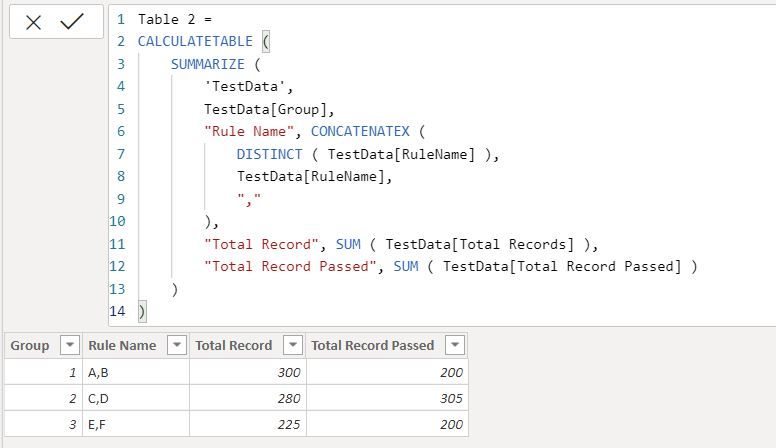
Calculated Table
Table 2 =
CALCULATETABLE (
SUMMARIZE (
'TestData',
TestData[Group],
"Rule Name", CONCATENATEX (
DISTINCT ( TestData[RuleName] ),
TestData[RuleName],
","
),
"Total Record", SUM ( TestData[Total Records] ),
"Total Record Passed", SUM ( TestData[Total Record Passed] )
)
)
Did I answer your question? Mark my post as a solution!
Appreciate with a kudos 🙂
any suggestion as an SQL query
Hi @Anonymous ,
For SQL Query, you can try to write it like this:
select case when RuleName in ('A','B') then 'AB' when RuleName in ('C','D','E') then 'CDE' when RuleName in ('F','G') then 'FG' end as RuleName,
sum([Total Records])"Total Records", sum([Total Records Passed]) "Total Records Passed",sum([Total Records Failed]) "Total Records Failed",
cast(cast(100 *(sum([Total Records Passed])/sum([Total Records]) )as decimal(18,1) ) as varchar(50))+'%' "Pass%",
cast(cast(100 *(sum([Total Records Failed])/sum([Total Records]) )as decimal(18,1) ) as varchar(50))+'%' "Fail%"
from Rules
group by
case when RuleName in ('A','B') then 'AB' when RuleName in ('C','D','E') then 'CDE' when RuleName in ('F','G') then 'FG' endBest Regards
Rena
thanks. let me try the solution
Share feedback directly with Fabric product managers, participate in targeted research studies and influence the Fabric roadmap.
Check out the February 2026 Power BI update to learn about new features.
| User | Count |
|---|---|
| 54 | |
| 47 | |
| 39 | |
| 16 | |
| 15 |
| User | Count |
|---|---|
| 83 | |
| 70 | |
| 38 | |
| 28 | |
| 26 |