Join us at FabCon Atlanta from March 16 - 20, 2026, for the ultimate Fabric, Power BI, AI and SQL community-led event. Save $200 with code FABCOMM.
Register now!Get Fabric Certified for FREE during Fabric Data Days. Don't miss your chance! Request now
Hello there,
I am new to Power BI. It would be really helpful if someone could help me out with this.
In my raw Excel file, I have rows of data such as below. This is an example of one of the mnemonic as BIT_CONF.
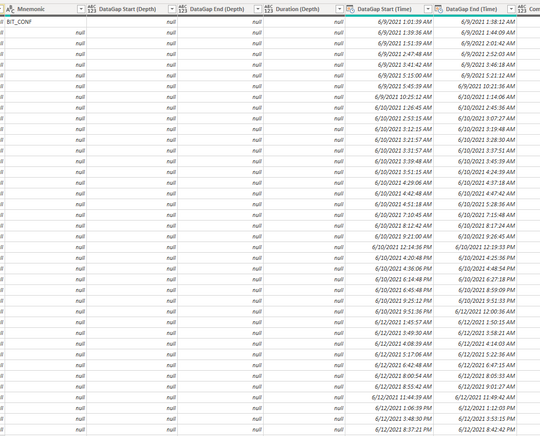
However, after uploading to Power BI Query Editor, the data shows as below. The values below BIT_CONF is written as null. Actually those rows are linked to BIT_CONF.
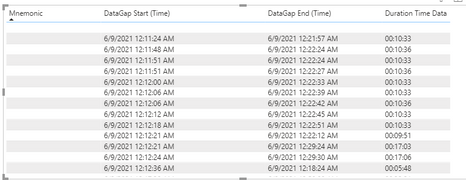
When I display it on Power BI, I get result such as this :-
The mnemonic part of it goes missing (proabably cause the value is null in the query editor).
Hence, my question is, how can i have the BIT_CONF (for example) to be merged and linked to all its respective rows.
I am unable to edit it in the raw Excel file as the file template is automated.
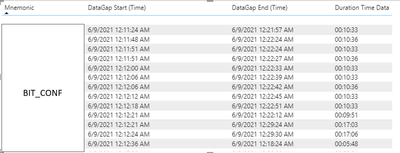
I want it to look like below. :-
Any help will be greatly appreciated 🙂
That is great! it did work for me. Thankyou so much. However, now the layout is as below.
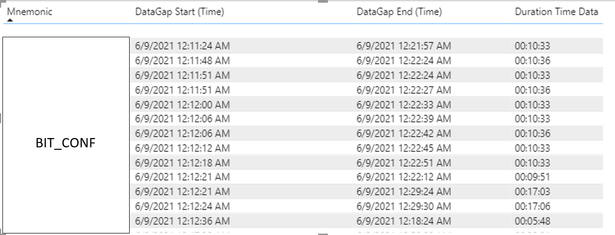
Is there a way i can make it to as below instead :-
Hi, @PKS_09
Sorry that this layout cannot be implemented in table visual.
For your requirement , you can submit it as an idea on Power BI Ideas forum and add your comments there to make this feature coming sooner.
Best Regards,
Community Support Team _ Eason
Check out the November 2025 Power BI update to learn about new features.
Advance your Data & AI career with 50 days of live learning, contests, hands-on challenges, study groups & certifications and more!