cancel
Showing results for 
Search instead for 
Did you mean: 

The Power BI Data Visualization World Championships is back! Get ahead of the game and start preparing now! Learn more

Reply
Anonymous
Not applicable

Row wise Calculation

Hi,

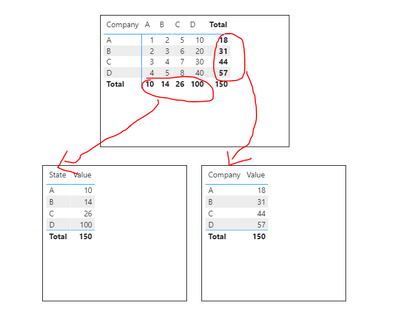
I fail to do the row-wise calculation in DAX measure.

I attached screenshots for your reference.

 Company   

State

ABCD
A12510
B23620
C34730
D45840
Total101426100


Now, the values coming in 'Total', want to use in the new table. I want to use the sum of 'Company A' in a new table in a single row.

Ex: 

CompanyTotal No. of Sales
A10
B14
C26
D100

Now, how can I get this total value in this new table?

Please help me we this concern. Thank you in advance

1 ACCEPTED SOLUTION
v-lionel-msft
Community Support
Community Support

Hi @Anonymous ,


This is what you want.

v-lionel-msft_1-1606723278665.png

But your table columns are actually aggregated like this.


v-lionel-msft_0-1606723130333.png

So is it a mistake in your expression?


Best regards,
Lionel Chen

If this post helps, then please consider Accept it as the solution to help the other members find it more quickly.


View solution in original post

3 REPLIES 3
v-lionel-msft
Community Support
Community Support

Hi @Anonymous ,


This is what you want.

v-lionel-msft_1-1606723278665.png

But your table columns are actually aggregated like this.


v-lionel-msft_0-1606723130333.png

So is it a mistake in your expression?


Best regards,
Lionel Chen

If this post helps, then please consider Accept it as the solution to help the other members find it more quickly.


amitchandak
Super User
Super User

@Anonymous , is first one a visual table and actual table. If it is a visual table, You can take the company and Sum of Sales, That should give you.

else you need to unpivot first :  https://radacad.com/pivot-and-unpivot-with-power-bi

Share with Power BI Enthusiasts: Full Power BI Video (20 Hours) YouTube
Microsoft Fabric Series 60+ Videos YouTube
Microsoft Fabric Hindi End to End YouTube
Anonymous
Not applicable

@amitchandak Yes, the first table is the visual table made using Matrix visulaization.

Helpful resources

Announcements
Power BI DataViz World Championships

Power BI Dataviz World Championships

The Power BI Data Visualization World Championships is back! Get ahead of the game and start preparing now!

December 2025 Power BI Update Carousel

Power BI Monthly Update - December 2025

Check out the December 2025 Power BI Holiday Recap!

FabCon Atlanta 2026 carousel

FabCon Atlanta 2026

Join us at FabCon Atlanta, March 16-20, for the ultimate Fabric, Power BI, AI and SQL community-led event. Save $200 with code FABCOMM.