Get certified for free when you join Fabric Data Days 2026 and dive into Fabric, Power BI, SQL, AI, and other essential data skills.
Join nowTry your skills in the Power BI Dataviz World Championship! Round one ends June 26. Join now
Hi,
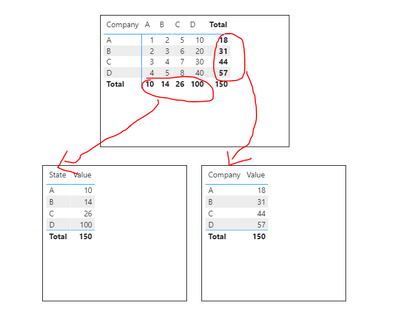
I fail to do the row-wise calculation in DAX measure.
I attached screenshots for your reference.
| Company | ||||
State | A | B | C | D |
| A | 1 | 2 | 5 | 10 |
| B | 2 | 3 | 6 | 20 |
| C | 3 | 4 | 7 | 30 |
| D | 4 | 5 | 8 | 40 |
| Total | 10 | 14 | 26 | 100 |
Now, the values coming in 'Total', want to use in the new table. I want to use the sum of 'Company A' in a new table in a single row.
Ex:
| Company | Total No. of Sales |
| A | 10 |
| B | 14 |
| C | 26 |
| D | 100 |
Now, how can I get this total value in this new table?
Please help me we this concern. Thank you in advance
Solved! Go to Solution.
Hi @Anonymous ,
This is what you want.
But your table columns are actually aggregated like this.
So is it a mistake in your expression?
Best regards,
Lionel Chen
If this post helps, then please consider Accept it as the solution to help the other members find it more quickly.
Hi @Anonymous ,
This is what you want.
But your table columns are actually aggregated like this.
So is it a mistake in your expression?
Best regards,
Lionel Chen
If this post helps, then please consider Accept it as the solution to help the other members find it more quickly.
@Anonymous , is first one a visual table and actual table. If it is a visual table, You can take the company and Sum of Sales, That should give you.
else you need to unpivot first : https://radacad.com/pivot-and-unpivot-with-power-bi
@amitchandak Yes, the first table is the visual table made using Matrix visulaization.
Don't miss out on Data Days, June 15 through August 7. Learn Fabric, Power BI, SQL, AI and more.
Check out the May 2026 Power BI update to learn about new features.
| User | Count |
|---|---|
| 24 | |
| 22 | |
| 22 | |
| 20 | |
| 12 |
| User | Count |
|---|---|
| 69 | |
| 57 | |
| 42 | |
| 40 | |
| 30 |