cancel
Showing results for 
Search instead for 
Did you mean: 

The Power BI Data Visualization World Championships is back! Get ahead of the game and start preparing now! Learn more

Reply
sakshi3456
Regular Visitor

Row header not appearing in a Matrix with a single value

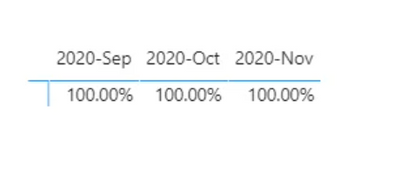
 I have a simple matrix with dates for columns and a single value. It looks like this:


sakshi3456_1-1695118620036.png

You can see there is no row header for the single value. However, as soon as I add another value, I get row headers for both values.


Is this a Power BI limitation or is there a solution for this?

2 REPLIES 2
Idrissshatila
Super User
Super User

Hello @sakshi3456 ,


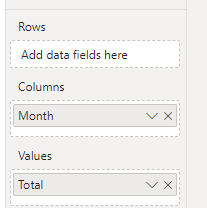
Are you sure it is in the row section not in the column because it is showing that it is in the column section.


Idrissshatila_0-1695119137177.png


If I answered your question, please mark my post as solution, Appreciate your Kudos 👍

Follow me on Linkedin
Vote for my Community Mobile App Idea 💡


Did I answer your question? Mark my post as a solution! Appreciate your Kudos
Follow me on LinkedIn linkedIn
Vote for my Community Mobile App Idea

Proud to be a Super User!


@Idrissshatila 


The  columns used are under column and value only like you showed but I have enabled switch to rows option from the format pane. 

The problem is with using only a single column.

With multiple columns I dont have any issues.

Helpful resources

Announcements
Power BI DataViz World Championships

Power BI Dataviz World Championships

The Power BI Data Visualization World Championships is back! Get ahead of the game and start preparing now!

December 2025 Power BI Update Carousel

Power BI Monthly Update - December 2025

Check out the December 2025 Power BI Holiday Recap!

FabCon Atlanta 2026 carousel

FabCon Atlanta 2026

Join us at FabCon Atlanta, March 16-20, for the ultimate Fabric, Power BI, AI and SQL community-led event. Save $200 with code FABCOMM.