cancel
Showing results for 
Search instead for 
Did you mean: 

The Power BI Data Visualization World Championships is back! Get ahead of the game and start preparing now! Learn more

Reply
Arial12
Frequent Visitor

Row filter at person level

Hi,


my data looks like this:


vendor id         Product color

12345               Red

12345               White

12345              Yellow

23456               Red

23456              Green

34567               Red

34567                Silver

45678                Ross gold

 and the list goes on.


basically what I want is if any vendor whose has order a product in red,blue (in a real data they are over 50 colors to filter) then finter out those vendors and keeping a display:


45678     Ross gold 


i did try a page level filter but then it only takes a vendor record out with color Red and keeps the rest and I want to filter all all the records associated with that vendor, if a vendor has ever order a color I want to filter out.


Thanks for any suggestions and help!


4 REPLIES 4
Anonymous
Not applicable

Hi @Arial12,


You can refer to below steps to filter visual by previous filter result.


Steps:

1. Use color column to create new table as selector.

Color = VALUES('sample'[Product color]) 

2. Write measure to compare current item with select item, return flag based on check result.

Flag =
VAR current_id =
    LASTNONBLANK ( 'sample'[vendor id], [vendor id] )
VAR filtered =
    CALCULATETABLE (
        VALUES ( 'sample'[vendor id] ),
        'sample'[Product color] IN ALLSELECTED ( Color[Product color] )
    )
RETURN
    IF ( NOT ( current_id IN filtered ), "Y", "N" )

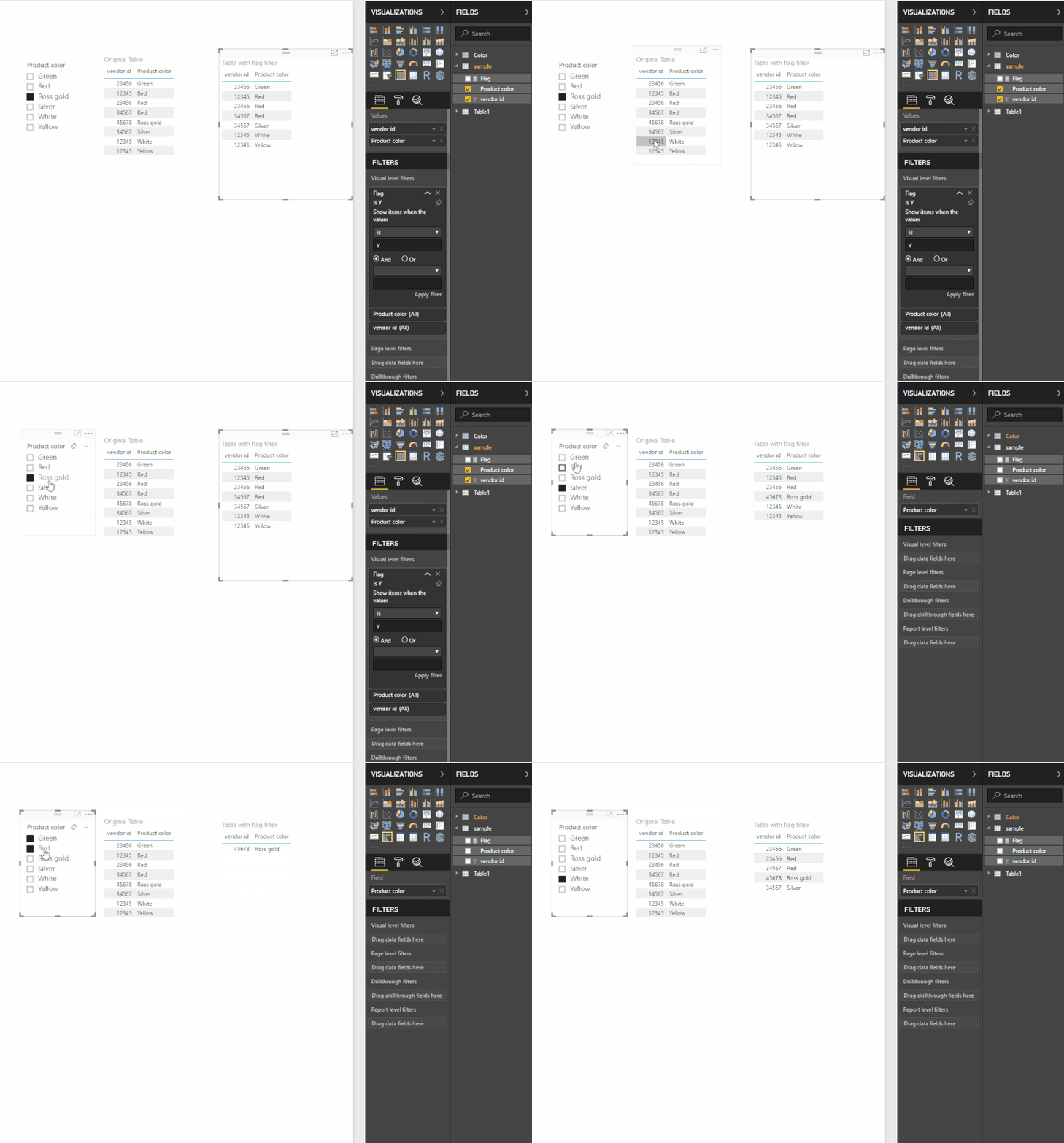
3. Create table visual(original table) and slicer(color selector table).

4. Drag measure to table visual visual level filter, switch mode to 'is', filter flag 'Y'.


Result:

1.gif


Regards,

Xiaoxin Sheng

Thank you so much Xiaoxin Sheng but I am connectin in DirectQuery Mode.


so, Lastnonblank doesn't work there. any other idea?


Thanks,

Anonymous
Not applicable

Hi @Arial12,


Current I also not have any effective methods to achieve this on 'direct query' mode, perhaps you can submit an idea for this requirement.


Regards,

Xiaoxin Sheng

I was able to accomplish this without lookup function. i will post my solution shortly.

Helpful resources

Announcements
Power BI DataViz World Championships

Power BI Dataviz World Championships

The Power BI Data Visualization World Championships is back! Get ahead of the game and start preparing now!

December 2025 Power BI Update Carousel

Power BI Monthly Update - December 2025

Check out the December 2025 Power BI Holiday Recap!

FabCon Atlanta 2026 carousel

FabCon Atlanta 2026

Join us at FabCon Atlanta, March 16-20, for the ultimate Fabric, Power BI, AI and SQL community-led event. Save $200 with code FABCOMM.